Is your Amana washer acting up when you least expect it? Whether it’s not spinning, making strange noises, or refusing to drain, these problems can quickly disrupt your daily routine.
But before you panic or call for expensive repairs, there’s good news—you can often fix these issues yourself with the right guidance. You’ll find clear, step-by-step troubleshooting tips designed to help you diagnose and solve common Amana washer problems. Stick with us, and you’ll save time, money, and the frustration of waiting for service calls.
Ready to get your washer back in top shape? Let’s dive into the solutions that work.

Common Amana Washer Problems
Drainage problems in your Amana washer can stop your laundry routine fast. Water that won’t drain leaves clothes wet and your machine stuck. Fixing drainage issues often involves simple checks and cleaning. These quick steps can save time and avoid costly repairs.
Checking The Drain Hose
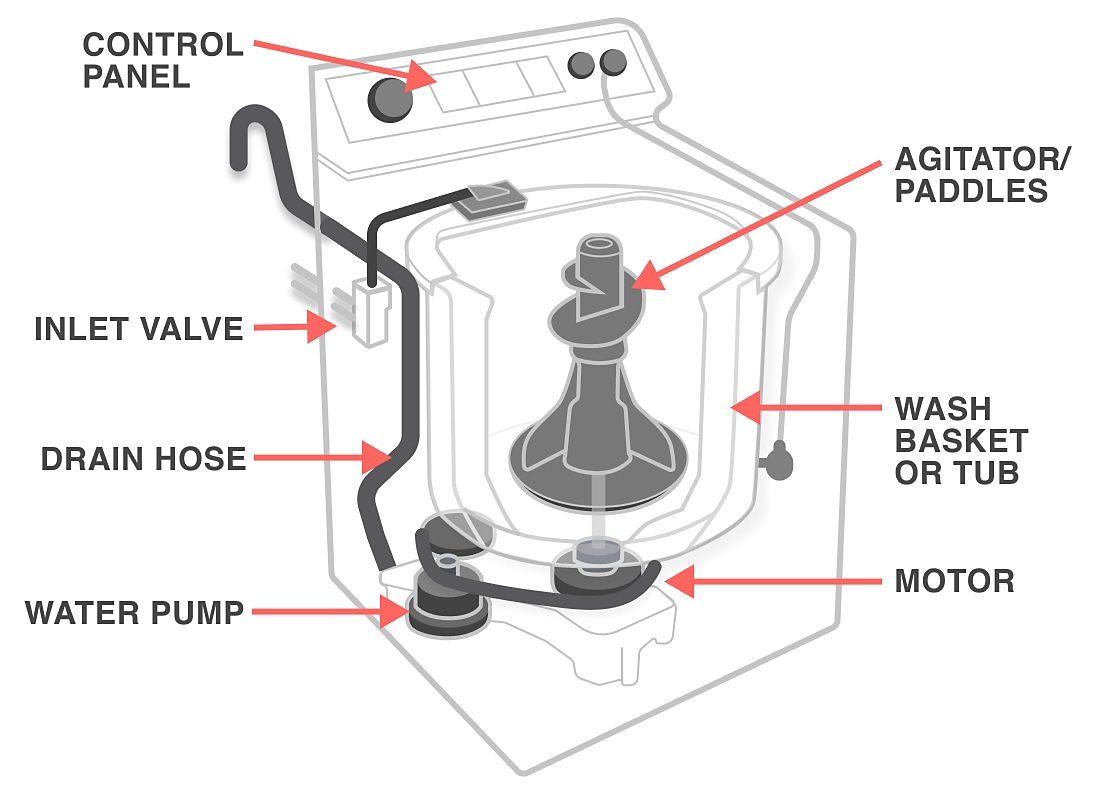
Start by examining the drain hose for kinks or bends. A bent hose blocks water flow and stops proper drainage. Make sure the hose is connected tightly to both the washer and the drain pipe. Look for cracks or holes that could leak water. Replace the hose if damaged to ensure smooth drainage.
Inspecting The Drain Pump
The drain pump moves water out of your washer. If it fails, water stays inside the drum. Unplug the washer before inspecting the pump. Remove the access panel to reach the pump. Check for any objects stuck in or around the pump impeller. If the pump makes strange noises or does not spin, it may need replacement.
Clearing Blockages
Blockages in the drain system stop water from flowing out. Remove the drain hose and look inside for clogs. Use a flexible brush or a long wire to clear any debris. Check the filter if your model has one. Clean it regularly to avoid buildup. Clear pipes and pump to keep water draining freely.
Diagnosing Error Codes
Water flow problems in your Amana washer can stop it from working well. These issues might cause the washer to fill slowly or not fill at all. Checking water flow quickly helps avoid bigger troubles. Follow clear steps to fix common water flow problems. This guide covers key points to keep water moving smoothly.
Inspecting Water Inlet Valves
The water inlet valve controls water entry into the washer. Dirt or damage can block the valve. Turn off the water supply first. Remove the valve and check for clogs or wear. Use a multimeter to test if the valve works. Replace the valve if it does not open or close properly.
Ensuring Proper Water Supply
Check the water faucets connected to the washer. Make sure they are fully open. Low water pressure can cause slow filling. Inspect hoses for kinks or leaks. Replace any damaged hoses. Confirm hot and cold water supply lines are connected correctly. Proper water pressure ensures the washer fills on time.
Cleaning Filters And Screens
Filters and screens stop debris from entering the washer. These can get clogged over time. Locate the screens near the water inlet valves. Remove the screens carefully and rinse them with water. Use a soft brush to clean stubborn dirt. Clean filters and screens regularly to maintain water flow.
Fixes For Drainage Problems
Performing a hard reset on your Amana washer can clear many common issues. This simple process helps restart the machine’s control board. It often fixes unresponsive buttons, error codes, or cycle problems. A hard reset does not erase your settings but refreshes the washer’s system.
Knowing how and when to perform a hard reset can save time and avoid costly repairs. Follow the steps carefully to ensure the reset completes successfully. This guide explains the reset process and the best situations to use it.
Step-by-step Reset Procedures
First, unplug your Amana washer from the power outlet. Leave it disconnected for at least one minute. This pause allows the control board to fully power down.
Next, plug the washer back in. Press and hold the “Start/Pause” button for five seconds. Release the button and wait for the machine to beep or the display to reset.
Finally, select a new wash cycle and start the machine. The washer should now operate normally. If problems persist, repeat the steps or try other troubleshooting methods.
When To Use A Hard Reset
Use a hard reset if the washer’s display is frozen or unresponsive. It helps clear error codes that do not automatically disappear. A reset can also fix issues with the washer not starting or stopping mid-cycle.
Try a hard reset before calling for service or replacing parts. It solves many minor electronic glitches quickly. Avoid using a reset for mechanical problems like leaks or strange noises.

Resolving Spin And Agitation Issues
Keeping your Amana washer in top shape helps prevent common problems. Simple maintenance steps improve its performance. These tips lower repair needs and extend the washer’s life. Follow easy actions to keep your machine running smoothly.
Regular Cleaning
Clean your washer regularly to avoid buildup. Wipe the door seal and detergent dispenser. Run a cleaning cycle with washer cleaner or white vinegar. This removes soap scum and dirt that cause odors. Clean the lint filter to keep water flowing well. Regular cleaning prevents mold and keeps clothes fresh.
Proper Load Sizes
Do not overload the washer. Large loads strain the motor and drum. Overloading causes poor washing and spinning. Follow the manual’s load size guidelines. Balance clothes evenly inside the drum. Proper loads reduce wear and stop shaking or noise problems.
Using The Right Detergents
Use detergents made for high-efficiency washers if your model requires them. Too much detergent creates excess suds. Suds can block drains and damage parts. Measure detergent carefully for each load size. Using the right detergent protects your washer and cleans better.
Frequently Asked Questions
What Is The Most Common Problem With Amana Washers?
The most common problem with Amana washers is failure to drain properly. This often results from clogged drains or faulty water inlet valves.
How Do I Hard Reset My Amana Washing Machine?
To hard reset your Amana washing machine, unplug it for one minute. Then, plug it back in and press the Start/Pause button to restart the cycle.
What Is The Most Common Problem With A Washing Machine Top Loader?
The most common problem with a top-loading washing machine is failure to spin or agitate. This often results from a worn belt, motor issues, or lid switch failure.
How To Force Reset A Washing Machine?
Unplug the washing machine for one minute. Plug it back in and press the start or reset button. This forces a reset.
What Causes My Amana Washer To Not Spin Properly?
A common cause is an unbalanced load inside the drum. Check if clothes are evenly spread and try restarting the cycle.
Conclusion
Troubleshooting your Amana washer can save time and money. Start with simple checks like power supply and water connections. Listen for unusual sounds and watch for error codes. Small fixes often resolve common issues quickly. Keep the user manual handy for guidance.
Regular maintenance helps prevent future problems. Act promptly to avoid bigger repairs. Understanding basic troubleshooting steps makes washing easier. Your Amana washer can work well with proper care and attention.