Having trouble with your Blendjet? You’re not alone.
When your portable blender doesn’t work as expected, it can be frustrating—especially when you need a quick smoothie or shake. But don’t worry, this guide is here to help you fix common Blendjet problems fast. By the time you finish reading, you’ll know exactly how to get your Blendjet running smoothly again.
Keep reading to save time, avoid hassle, and enjoy your favorite blends without interruption.
Common Blendjet Issues
Blendjet blenders are popular for their convenience and portability. Yet, like any device, they sometimes face issues. Knowing common problems helps users fix them quickly. This saves time and avoids frustration. Here are frequent Blendjet troubles and simple tips to handle each.
Blender Not Turning On
Sometimes, the Blendjet does not start. This may happen if the battery is empty. Check if the blender is charged fully. Another cause is the safety lock. Ensure the lid is closed tightly. Also, press the power button firmly. If none of these work, reset the blender by pressing the button for 10 seconds.
Weak Blending Power
The blender may blend slowly or unevenly. Overfilling the jar can cause this. Use less content for better blending. Check if the blades are clean and sharp. Thick ingredients can slow the motor. Add some liquid to help blend faster. Clean the blade base if food sticks there.
Unusual Noises
Strange sounds can mean a problem. Foreign objects like hard seeds may touch the blades. Remove the jar and inspect inside carefully. Worn or loose blades also cause noise. Tighten or replace them if needed. Avoid running the blender empty to protect the motor.
Leaking Or Spilling
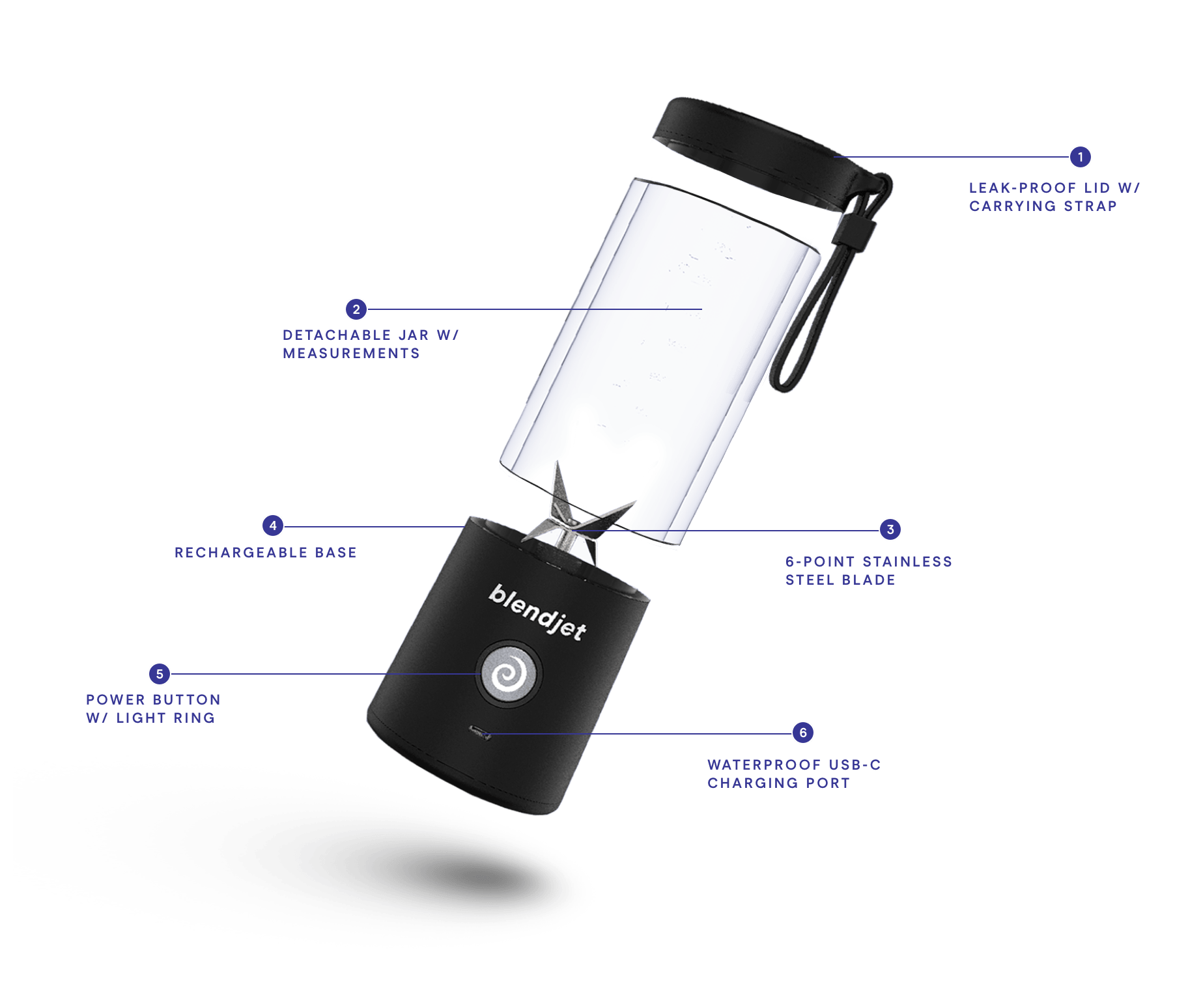
Leaks happen if the jar is not sealed well. Check the rubber gasket for damage or dirt. Clean or replace the gasket to stop leaks. Do not overfill the jar. Pour liquids slowly to avoid spills. Make sure the lid is locked properly before blending.
Charging Problems
The Blendjet may not charge correctly. Use the original charger and cable. Clean the charging port gently with a dry cloth. Avoid charging in very hot or cold places. If charging still fails, try a different power source. Battery issues may require professional help.

Power And Battery Tips
Power and battery issues can stop your Blendjet from working well. Knowing how to check and care for the battery helps keep your blender ready. Small steps can fix many common problems fast. Save time and avoid frustration by following these simple tips.
Checking Battery Level
Look at the light indicator on your Blendjet to see the battery level. A green light means the battery is full or nearly full. A red or blinking light shows the battery is low and needs charging. Check the battery before each use to avoid sudden stops while blending.
Proper Charging Methods
Use the original charger or a charger with the same power output. Plug the charger fully into the blender and the power source. Charge the Blendjet on a flat surface at room temperature. Avoid charging in very hot or cold places to protect the battery. Do not overcharge; unplug once the light shows full charge.
Resetting The Blender
Sometimes the Blendjet may stop working due to a small error. To reset, press and hold the power button for 10 seconds. Release the button and wait a few seconds. Press the power button again to turn it on. This simple reset can solve many power and battery issues.
Blade And Motor Care
Taking care of the blades and motor is important for keeping your Blendjet working well. Clean blades blend better and last longer. The motor needs proper care to avoid damage and keep it running smoothly. This section shows easy ways to care for these parts.
Cleaning The Blades
Always clean the blades after each use. Fill the Blendjet with warm water and a drop of soap. Turn it on for a few seconds to clean the blades safely. Rinse with clean water and dry the jar well. Avoid touching the blades with your fingers to prevent cuts.
Removing Stuck Ingredients
Sometimes ingredients get stuck around the blades. Use a soft brush or a toothpick to remove them gently. Do not use sharp tools that can damage the blades. Running water can help loosen stuck pieces. Regular cleaning stops build-up and keeps the Blendjet fresh.
Preventing Motor Overheating
Do not run the Blendjet for more than 30 seconds at a time. Give it time to cool down between blends. Avoid blending hard or frozen ingredients without adding liquid first. Overloading the Blendjet strains the motor and causes overheating. Following these tips keeps your motor safe and working well.
Blending Techniques
Blending techniques can improve your Blendjet’s performance. Proper methods help ingredients mix smoothly. This prevents jams and uneven blends. Small changes in how you blend make a big difference. Below are key tips for better blending results.
Ideal Ingredient Sizes
Cut ingredients into small pieces. About one-inch chunks work best. Large pieces strain the motor and slow blending. Smaller sizes blend quickly and evenly. Hard items like carrots or ice need to be smaller. This protects your Blendjet from damage.
Adding Liquids Correctly
Always add liquids first. This creates a smooth base for blending. Liquids help move solid ingredients around. Without enough liquid, the blades can get stuck. Use water, juice, or milk depending on the recipe. Pour enough to cover the blades slightly.
Pulse Vs Continuous Blending
Pulse blending uses short bursts of power. It breaks down tough chunks gently. Good for chunky salsas or thick smoothies. Continuous blending runs the motor non-stop. It creates a smooth, even texture. Use this for liquids or soft fruits. Choose the mode based on your ingredients.
Maintenance And Storage
Proper maintenance and storage keep your Blendjet working well. They help avoid common issues and extend the device’s life. Simple habits make a big difference in performance and safety.
Regular Cleaning Routines
Clean your Blendjet after every use. Rinse the jar with warm water and mild soap. Use a soft sponge to avoid scratches. Wipe the base gently with a damp cloth. Never immerse the base in water. Clean blades carefully to avoid cuts. Dry all parts completely before reassembling.
Safe Storage Practices
Store your Blendjet in a dry, cool place. Keep it away from direct sunlight or heat. Ensure the jar is dry before storing. Leave the lid off or loose to prevent odors. Avoid placing heavy items on top of your Blendjet. Store it upright to protect the motor and blades. Proper storage stops damage and keeps it ready to use.
Replacing Parts When Needed
Check your Blendjet parts regularly for wear. Replace cracked or damaged jars promptly. Change the lid if it no longer seals tightly. Swap blades if they become dull or bent. Use only original parts for safety. Regular replacement avoids breakdowns and keeps blending smooth.

When To Contact Support
Knowing when to contact Blendjet support can save time and frustration. Some problems need expert help beyond basic fixes. Recognizing these signs ensures your Blendjet stays in good condition.
If your Blendjet stops working suddenly or won’t charge, contact support. Strange noises or leaking also require professional assistance. Avoid opening or fixing it yourself to prevent damage.
Warranty Information
Blendjet offers a limited warranty on most products. This covers defects in materials and workmanship. Check your purchase date to see if your Blendjet is still under warranty. Keep your receipt or proof of purchase ready when contacting support. Warranty usually does not cover damage from misuse or accidents.
Authorized Repair Services
Only use authorized repair centers for Blendjet problems. Unauthorized repairs can void your warranty. Authorized centers have trained technicians and original parts. They follow Blendjet’s safety and repair standards. Contact support to find the nearest authorized service center.
Customer Service Tips
Have your model number and purchase details ready. Describe the problem clearly and mention any troubleshooting steps taken. Be patient and polite when speaking with customer service. They aim to help and resolve issues quickly. Keep notes of your communication for future reference.
Frequently Asked Questions
Why Is My Blendjet Not Turning On?
Check if the battery is charged. Make sure the power button is pressed firmly. Clean the charging port if dirty.
How Do I Fix A Blendjet That Won’t Blend?
Ensure the jar is properly locked onto the base. Avoid overfilling the jar. Cut ingredients into smaller pieces for easier blending.
What To Do If Blendjet Leaks During Use?
Inspect the silicone ring for damage or dirt. Tighten the jar lid securely before blending. Avoid filling above the max line.
How Can I Clean My Blendjet Safely?
Use warm water and mild soap to clean the jar. Avoid submerging the base in water. Wipe the motor base with a damp cloth.
Why Is My Blendjet Making Loud Noises?
Loud noises may mean hard items or too many ingredients inside. Remove and cut ingredients into smaller pieces. Check for loose parts before blending again.
Conclusion
Troubleshooting your Blendjet can save time and avoid frustration. Start with simple checks like power and charging issues. Clean the blades and container regularly for better performance. Remember to follow the manual’s safety tips. Small fixes often solve common problems fast.
Keep your Blendjet working smoothly by caring for it well. Enjoy your smoothies without worry. Troubleshooting helps you get the most from your blender every day. Easy steps make blending simple again.