Is your Calix router acting up? Are you struggling with slow internet or complete connection loss?
You’re not alone, and the good news is, you can often fix these issues yourself. This guide is designed to get your Calix router back online fast. We’ll skip the confusing jargon and get straight to the solutions that work.
Imagine getting back to seamless streaming, lag-free gaming, and smooth video calls without waiting for a technician. Ready to take control of your home network? Let’s dive in.
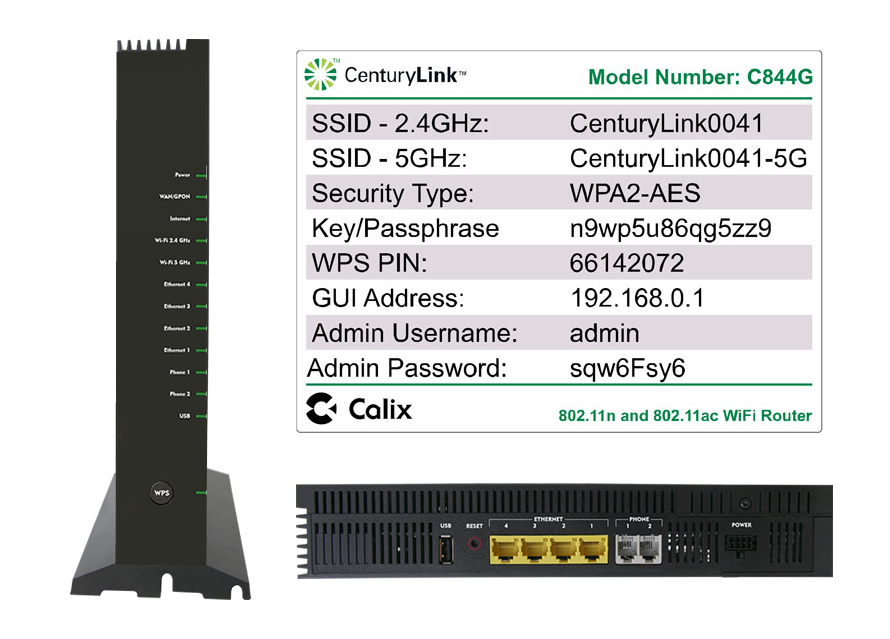
Power Cycle Basics
Rebooting your Calix router can fix many issues. This simple step refreshes its connection. Unplug it, wait briefly, then plug it back in.
A power cycle is a simple fix. It often solves many router problems. This process restarts your Calix router. It clears temporary glitches. Think of it as a quick refresh. It’s the first step for troubleshooting.
Check Power And Cables
Ensure the router has power. Is it plugged in correctly? Check the power cord. Make sure it’s secure. Look at the wall outlet. Is it working? Try another outlet. Check all connected cables. Are they firmly attached? This includes the internet cable. The cable should fit snugly.
The Reboot Sequence
Unplug the router’s power. Wait for about 30 seconds. Plug the power cord back in. Wait for the router to start. Lights will blink. Then they should become steady. This can take a few minutes. Your internet should reconnect. This simple step fixes many issues.

Decoding Indicator Lights
Indicator lights signal your Calix router’s status. A green or blue light means it’s working well. A red light often shows an internet problem or a damaged cable.
Your Calix router has lights. These lights tell you what is happening. Understanding them helps fix problems. It is like a secret code. Let’s learn this code.
Green Or Blue: All Good
A green or blue light is good. It means your router is working. The internet connection is fine. Everything is operating normally. You can enjoy your internet.
The Red Light Mystery
A red light is not good. It shows a problem. Your internet may be down. There could be a line issue. This light needs attention.
Other Light Patterns
Some routers show other colors. They might blink or flash. These patterns mean different things. Check your router’s manual. It explains each light code. Your internet provider can help too.
Factory Reset Procedure
A factory reset returns your Calix router to its original settings. This process can fix many connection problems. It erases custom configurations.
The factory reset procedure is a powerful tool. It returns your Calix router to its original settings. This can fix many persistent problems. Use this option as a last resort.
When To Reset
Your router acts strangely. Internet connection drops often. Wi-Fi speeds are very slow. You forget your router password. These are signs to consider a reset.
Physical Reset Guide
Locate the reset button. It is usually a small, recessed hole. You might need a paperclip. Push and hold the button. Do this for about 10 seconds. The router lights will blink. Release the button. The router restarts. This process erases all settings. You will need to set it up again.
Advanced Settings And App Use
Explore advanced settings for better Wi-Fi. Use your provider’s app for easy setup. This helps fix smart device connection problems.
Advanced Settings and App Use You can manage your Calix router with advanced settings. An app makes this easy. It helps you control your home network. This section covers key app features.
Commandiq App Features
The CommandIQ app gives you control. You can see connected devices. You can also check internet speeds. The app helps manage network security. It offers parental controls. You can set internet time limits.
Wi-fi Name And Password Changes
Changing your Wi-Fi name is simple. You can also change your password. Use the CommandIQ app for this. Go to the Wi-Fi settings. Enter your new network name. Then, choose a strong password. Save your changes. Your devices will reconnect.
Smart Device Connectivity
Smart devices need good connections. Troubleshooting your Calix router helps keep them online. Check cables and lights first.
Your smart home devices rely on a stable Wi-Fi connection. A strong signal keeps them online. This section helps fix those connection problems. It makes your gadgets work again.
Dfs Channel Conflicts
Some Wi-Fi channels cause trouble. These are Dynamic Frequency Selection (DFS) channels. Smart devices may not like these channels. They can disconnect from your network. Your router might use these channels. This causes smart devices to drop.
Troubleshooting Smart Gadgets
Check your router’s settings. Look for DFS channel options. Turn off DFS channel usage. This might fix device drops. Some providers manage this for you. Contact your internet provider. They can adjust settings remotely. This helps your smart gadgets connect.
When To Call Your Provider
Troubleshooting your Calix router? Try power cycling first. Check all cable connections too. If problems persist, contact your provider. They can help with deeper issues.
Here’s a section for your blog post about Calix router troubleshooting: When to Call Your Provider You’ve tried the basics. Your Calix router still acts up. Some problems need expert help. Your internet provider can fix these. They manage some of your equipment.
Isp Managed Hardware
Your internet provider owns some hardware. This includes your Calix router. They control its settings. They provision the device. You cannot change these settings. Contact them for hardware issues.
Persistent Connection Problems
Your internet keeps dropping. Lights blink red or orange. You rebooted the router. You checked all cables. The problem continues. This means a deeper issue exists. It could be your service line. It might be network congestion. Your provider can diagnose this. They have tools for this. They can see network status. They can check your signal. Contact your provider. They are the best resource. They can restore your connection.
Signs Of A Failing Router
Slow internet speeds are a common problem. Your device might also lose its connection often. These issues can signal a failing router.
Your Calix router is vital for your internet. It helps you connect online. A failing router causes many problems. Watch for these warning signs. Your internet experience suffers. Your router might be failing. Look for clear clues. These point to a bad router.
Sudden Performance Drops
Your internet suddenly slows down. Web pages load slowly. Videos buffer constantly. Downloads take much longer. This is a big problem. Your router is struggling.
Frequent Reboots
Your router restarts itself. It happens often. You lose your connection. Then it comes back. This shows instability. The router cannot stay on.
Frequently Asked Questions
Why Is My Calix Router Not Working?
Check power and cables first. Cycle the power on your Calix router. Examine the indicator lights for issues. Update router firmware if possible. Resetting to factory defaults may help. Contact your internet provider for further assistance.
How To Reboot Calix Router?
Unplug your Calix router from power. Wait 30 seconds. Plug it back in. The router will restart. This process is called power cycling. It often fixes connection problems.
What Are Signs That Your Router Is Going Bad?
Your router shows slow speeds. It frequently disconnects. Wi-Fi signals drop unexpectedly. Lights blink unusually on the device. Your internet becomes unreliable.
My Calix Wifi Router Has A Red Light. What Does This Mean?
A red light indicates an internet outage. It can also mean a line fault. Check your cables are secure. Contact your internet provider for help. They can diagnose the issue further.
Calix Router Not Connecting? Try This First.
Ensure your Calix router is plugged in. Check that all cables are secure. Try restarting the router by unplugging it for 30 seconds.
Conclusion
Troubleshooting your Calix router can be simple. Try checking cables first. Power cycling often fixes issues. Look at the router lights. A red light needs attention. Smart device problems? Adjust settings. Contact your provider for help. They manage your Calix device.
Don’t worry. You can get online again.