Having trouble with your Denon AVR S760H? You’re not alone, and the good news is that many common issues can be fixed quickly and easily.
Whether your receiver won’t power on, the sound isn’t clear, or your remote isn’t responding, this guide will help you find solutions step-by-step. Keep reading to get your Denon AVR S760H working perfectly again without frustration or wasted time.
Power Issues
Power issues with the Denon AVR S760H can stop your home theater experience. These problems often cause frustration and confusion. Understanding common power problems helps fix them quickly. The two main concerns are when the unit does not power on or when it shuts down unexpectedly.
No Power Or Unit Won’t Turn On
Check the power cord connection first. Make sure it is plugged into a working outlet. Try another outlet if needed. Confirm the power switch on the back is in the ON position. Look for a blown fuse in the power plug or inside the unit. Replace any faulty fuses carefully. If the remote control does not turn on the unit, try using the power button on the receiver itself. Sometimes the remote batteries need replacement. Also, check if there is any visible damage to the power cable or ports. Contact a technician if the receiver still does not turn on after these steps.
Unexpected Shutdowns
Unexpected shutdowns may happen due to overheating. Ensure the receiver has enough space for air circulation. Remove any objects blocking the vents. Clean dust from vents and fans regularly. Overloaded power outlets can cause shutdowns. Avoid plugging too many devices into one outlet. Power surges may also trigger shutdowns. Use a surge protector to protect your receiver. Firmware bugs sometimes cause shutdowns. Check for software updates on the Denon website. Install the latest firmware to fix bugs. Persistent shutdowns need professional inspection to prevent damage.
Audio Problems
Audio problems can disrupt your experience with the Denon AVR S760H. These issues may affect sound quality or cause no sound at all. Understanding common audio problems helps fix them quickly. Here are some common problems and easy fixes.
No Sound From Speakers
Check if the speakers are connected properly to the receiver. Loose or wrong connections often cause no sound. Make sure the speaker wires are secure and in the right ports.
Verify the input source on the AVR matches the device playing sound. Sometimes the wrong input can cause silence. Also, check if the volume is turned up and not muted.
Distorted Or Low Volume
Distorted sound can come from poor speaker connections or damaged cables. Inspect all wires and replace any that look worn or broken. Using the wrong speaker impedance may cause distortion too.
Low volume may happen if the receiver’s sound settings are incorrect. Adjust the bass, treble, and balance to improve sound quality. Avoid setting volume levels too high to prevent distortion.
Audio Sync Issues
Audio sync problems mean sound and picture do not match. This can happen if the receiver or TV delays sound processing. Use the AVR’s audio delay feature to fix sync problems.
Try resetting the receiver to factory settings if the issue continues. Also, check if your HDMI cables support audio and video properly.
Video Concerns
Video issues with the Denon AVR S760H can disrupt your home theater experience. These problems often relate to how the receiver sends video signals to your TV or projector. Fixing them quickly helps you enjoy clear and smooth visuals again.
No Video Output
Check if the receiver is powered on and connected properly. Make sure the input source matches the device you want to watch. Try switching HDMI ports on the receiver and your TV. Restart both the receiver and the TV to reset the connection. Use a different HDMI cable to rule out cable faults.
Poor Picture Quality
Low resolution or blurry images can spoil your viewing. Set the receiver’s video output to match your TV’s highest resolution. Clean the HDMI ports to remove dust or dirt. Avoid using very long or damaged HDMI cables. Adjust the picture settings on your TV and receiver for better clarity.
Hdmi Connection Problems
Loose or faulty HDMI cables cause signal drops and flickering. Firmly connect cables on both ends, the receiver and the TV. Use high-speed HDMI cables certified for 4K or HDR content. Disable HDMI-CEC in the receiver settings if strange behaviors occur. Update the receiver’s firmware to fix known HDMI bugs.
Remote Control Troubles
Remote control problems with the Denon AVR S760H can cause frustration. The remote is key to easy operation. Without it working well, managing your audio and video settings becomes tough. Common issues include the remote not responding and trouble pairing with the receiver.
Unresponsive Remote
Sometimes the remote stops working completely. Check the batteries first. Replace old batteries with new ones. Make sure they are inserted correctly. Clean the battery contacts if needed. Dirt or corrosion can block power flow. Point the remote directly at the receiver’s sensor. Avoid any objects blocking the signal path. Try pressing different buttons to see if any work. If not, the remote or receiver sensor may be faulty.
Remote Pairing Issues
Pairing problems often cause the remote to fail. The remote and receiver must connect properly. Start by turning both devices off. Turn them back on and try pairing again. Follow the exact pairing steps from the manual. Keep the remote close to the receiver during pairing. Avoid interference from other devices nearby. If pairing fails, reset the receiver to default settings. Then attempt the pairing process once more.
Network And Streaming Errors
Network and streaming errors can disrupt your experience with the Denon AVR S760H. These issues often prevent smooth playback or connection to online services. Understanding common problems helps fix them faster and enjoy uninterrupted sound.
Wi-fi Connectivity Problems
Wi-Fi issues often cause the Denon AVR S760H to lose connection. Weak signals or interference can block the device from connecting to the network. Restart your router and the receiver to refresh the connection. Check if the receiver is within range of your Wi-Fi signal. Avoid physical obstacles like walls or large furniture. Update the receiver’s firmware to improve network stability. Use a wired Ethernet connection for a more stable link if Wi-Fi fails repeatedly.
Streaming Service Failures
Streaming apps on the Denon AVR S760H may stop working due to service errors. Outdated app versions can cause playback issues. Regularly update apps through the receiver’s settings menu. Clear the app cache to resolve loading problems. Confirm that your streaming service subscription is active. Network interruptions also affect streaming performance. Restart the streaming app or the receiver to restore service. Check for service outages from the streaming provider’s website or social media.

Setup And Configuration
Setting up your Denon AVR S760H correctly ensures the best sound and performance. Proper configuration helps avoid common issues and improves your listening experience. This section covers key setup steps and common troubleshooting tips.
Speaker Calibration Errors
Speaker calibration adjusts sound levels for each speaker in your room. Errors occur if the microphone is moved during calibration. Check that the mic is at ear level and away from noise.
Incorrect distances or speaker sizes can cause poor calibration. Verify each speaker’s position and size in the settings menu. Run the calibration again after any changes to your room or speakers.
Input Source Recognition
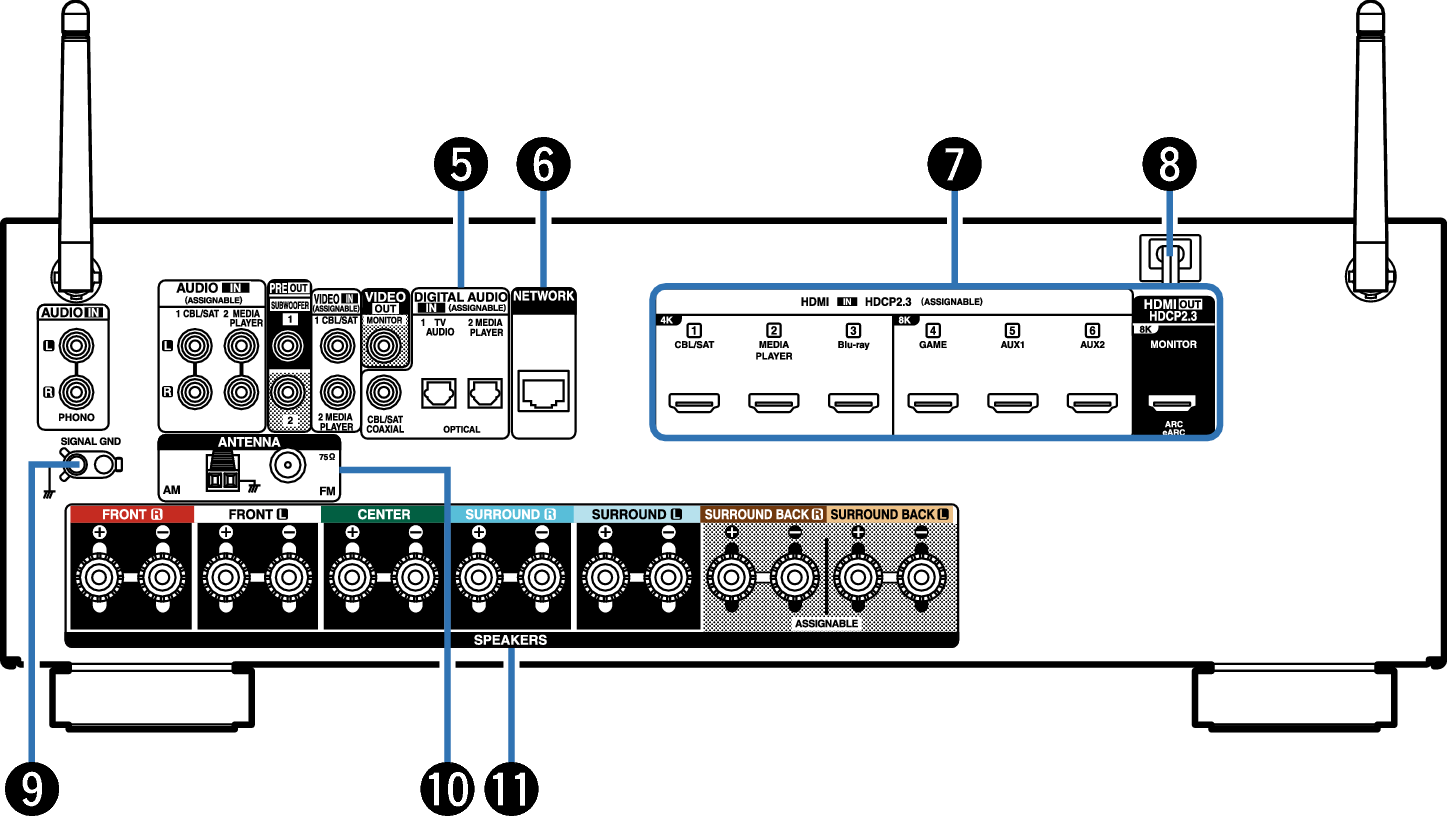
The AVR must detect input sources like Blu-ray players or game consoles. If the device does not appear, check cable connections. Use the correct HDMI or audio cables for each device.
Update the AVR firmware to improve compatibility with new devices. Restart both the AVR and the source device if inputs fail to show. Confirm the source device is powered on and set to output the correct signal.
Firmware And Software
The firmware and software of the Denon AVR S760H play a key role in its performance. Firmware controls the device’s core functions. Software manages the user interface and features. Keeping both updated ensures smooth operation and fixes bugs. Sometimes, resetting the device helps clear issues that updates cannot fix.
Updating Firmware
Updating the firmware improves your receiver’s stability and performance. Visit the official Denon website to download the latest version. Follow the instructions carefully for a safe update. Usually, updates fix bugs and add new features. Always update using a stable internet connection. Avoid turning off the receiver during the process. Check the current firmware version in the settings menu before updating. This step confirms if an update is necessary.
Resetting To Factory Settings
Resetting to factory settings clears all custom changes. This step can solve persistent software problems. To reset, navigate to the setup menu on your receiver. Select the factory reset option and confirm your choice. The device will restart and return to original settings. Remember to back up important settings if possible. After reset, you may need to reconfigure your preferences. This method often resolves glitches caused by corrupted settings.

Advanced Troubleshooting Tips
Advanced troubleshooting helps solve tough problems with the Denon AVR S760H. It goes beyond basic fixes and looks deeper. This approach saves time and improves performance.
Follow clear steps to check hardware and software issues. This way, you can find the exact cause of the problem.
Checking Cables And Connections
Start by inspecting all cables. Loose or damaged cables cause many problems. Make sure each cable fits tightly into the correct port.
Look for frayed or bent wires. Replace any cables that seem worn out. Check HDMI, speaker, and power cables carefully.
Verify that the speakers connect to the right terminals. Wrong connections may lead to poor sound or no sound at all.
Using Diagnostic Tools
Use built-in diagnostic tools to test the receiver. The Denon AVR S760H has menus for checking speaker setup and signal input.
Run speaker tests to hear if each speaker works well. The test tones help find faulty speakers or wiring.
Use the receiver’s display to check error messages. These codes give clues on what needs fixing.
Consider firmware updates as part of diagnostics. Updated software can fix bugs and improve device stability.
Frequently Asked Questions
How Do I Fix No Sound From Denon Avr S760h?
Check all speaker wires are connected tightly. Ensure input source and volume settings are correct. Restart the receiver to reset its system.
Why Does My Denon Avr S760h Lose Wi-fi Connection?
Router distance or signal interference can cause Wi-Fi drops. Restart both router and receiver for a fresh connection. Update the receiver’s firmware for better network stability.
What To Do If Hdmi Ports On Denon Avr S760h Don’t Work?
Try unplugging and reconnecting HDMI cables firmly. Test with different HDMI cables or devices to isolate the issue. Reset the receiver settings to default if problem continues.
How Can I Solve Remote Control Not Working On Denon Avr S760h?
Replace the remote batteries with fresh ones. Point the remote directly at the receiver’s sensor without obstacles. Reset the remote or receiver if it still doesn’t respond.
Why Is My Denon Avr S760h Overheating And Shutting Down?
Ensure the receiver has enough ventilation space around it. Clean dust from vents and keep it away from heat sources. Avoid blocking the fan or air vents during use.
Conclusion
Troubleshooting your Denon AVR S760H can be simple and quick. Start by checking all connections and power sources. Reset settings if problems persist. Use the user manual for clear guidance. Small fixes often solve common issues. Stay patient and test each step carefully.
This approach helps keep your sound system working well. Enjoy better audio without stress or confusion.