Electric gates offer convenience, security, and a modern look to homes and businesses. But like all machines, they can develop problems. If your electric gate is not working, it can be frustrating and even leave your property vulnerable. Fortunately, many issues can be solved without calling a professional.
In this guide, you’ll learn how to troubleshoot electric gate problems, understand the possible causes, and know when you need expert help. Whether you have a sliding gate, swinging gate, or another type, this article will give you clear, practical steps to solve common issues and keep your gate running smoothly.
How Electric Gates Work
To troubleshoot an electric gate, you first need to know the basics of how it works. Electric gates use a combination of motors, sensors, and control units to open and close automatically. Most gates fall into two main types: sliding and swing gates.
A typical electric gate system includes:
- Gate leaves or panels (the moving parts)
- Electric motor or actuator
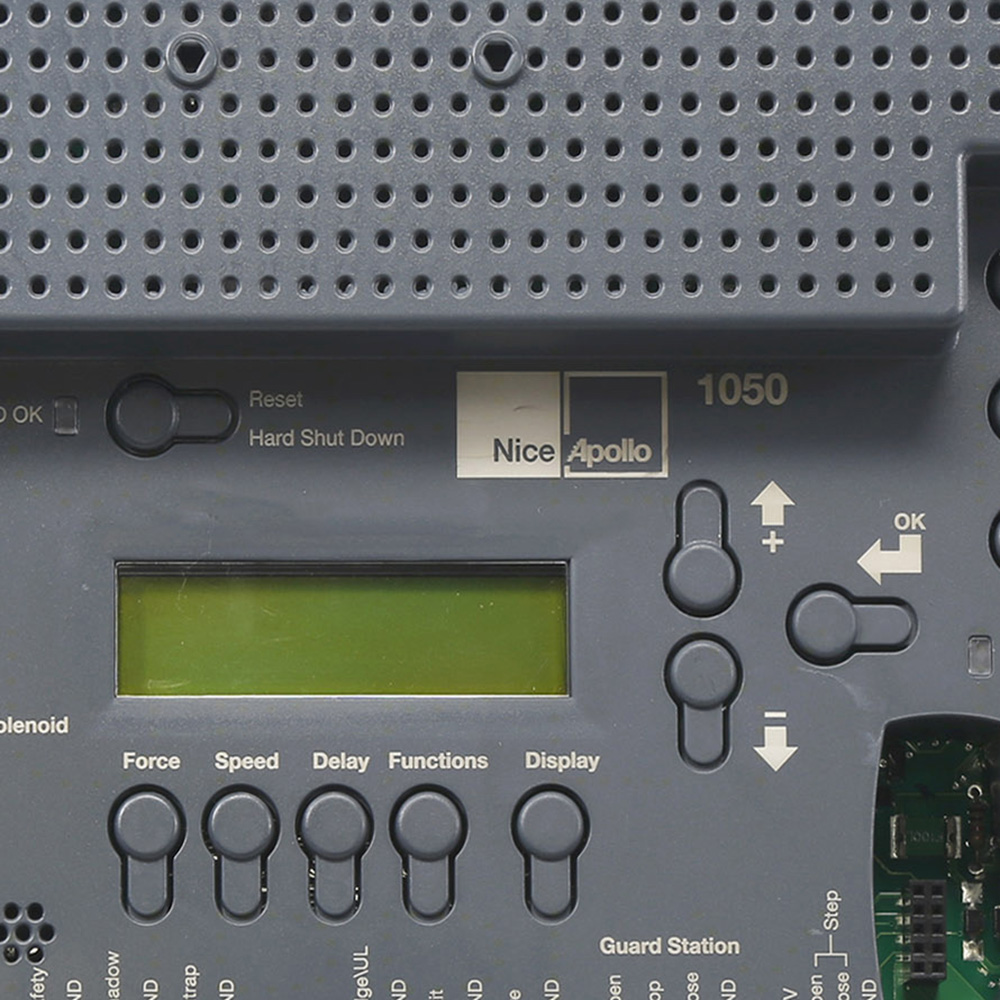
- Control board (the “brain”)
- Remote controls or keypads
- Safety devices such as photocells and loop detectors
- Limit switches to sense open/closed positions
- Power supply (mains electricity or battery)
When you press a remote or enter a code, the control board sends power to the motor. The motor moves the gate, and sensors ensure it stops safely. Safety devices prevent the gate from closing on people, cars, or pets.
Understanding these parts helps you find where a problem might start.
Common Electric Gate Problems
Some issues with electric gates are more common than others. Here are problems most people encounter, from basic to more technical:
- Gate won’t open or close
- Gate opens or closes halfway
- Remote control doesn’t work
- Gate moves slowly or makes noise
- Gate reverses direction
- Manual release not working
- Intermittent operation
- Flashing lights or error messages
- Unusual sounds (grinding, clicking)
- Gate not responding to safety devices
Each of these has possible causes and solutions. Let’s look at how to troubleshoot each problem.
Step-by-step Troubleshooting Guide
1. Gate Won’t Open Or Close
This is the most common problem. If your gate is not moving at all, check these points:
Power supply: Make sure the gate is receiving power. Check if other electrical items nearby work. Look for a tripped circuit breaker or blown fuse.
Remote batteries: If you use a remote, try new batteries. Remotes often fail due to weak batteries.
Manual override: Use the manual release key to test if the gate moves freely. If it’s stiff, the problem could be mechanical rather than electrical.
Control panel indicator lights: Most control panels have LEDs that show the system status. Look for lights that are off, blinking, or a different color. Check your gate’s manual for what each light means.
Common beginner mistake: Many people overlook the manual override switch. If it’s left in “manual” mode, the motor won’t work.
2. Gate Opens Or Closes Only Partway
If the gate stops halfway, or reverses before closing, possible reasons include:
- Obstructions: Something may be blocking the path. Even small items or overgrown plants can trigger safety sensors.
- Dirty or misaligned sensors: Clean photocells and ensure they are facing each other directly.
- Limit switch issues: Limit switches tell the gate when to stop. If they’re faulty or knocked out of position, the gate may stop early.
- Mechanical resistance: Rust, lack of lubrication, or debris in the track (for sliding gates) can cause the motor to stop.
Practical tip: Use a flashlight to check the full path of the gate, especially in low light.
3. Remote Control Doesn’t Work
If your remote is not working:
- Check batteries first.
- Reprogram the remote if needed (follow the manual).
- Check receiver antenna: Make sure it’s not broken or disconnected.
- Try a backup remote: If you have a second one, see if it works.
If none work, the problem may be with the receiver unit in the control box.
4. Gate Moves Slowly Or Makes Noise
A gate that’s slow or noisy may have:
- Low voltage: Weak power supply can slow down the motor.
- Motor problems: Worn brushes or gears can make grinding or whining sounds.
- Mechanical resistance: Lack of lubrication, bent tracks, or worn hinges.
- Debris: Stones or leaves stuck in sliding gate tracks.
Non-obvious insight: Noise can also come from loose mounting bolts. Check all fixings on the gate and motor.
5. Gate Reverses Direction
If the gate starts to close then opens again, or vice versa:
- Safety sensors may be dirty or misaligned.
- Obstructions in the path (even a spider web can fool some sensors).
- Incorrect force settings: The control board lets you adjust how much force the motor uses. If set too low, the gate may think there’s an obstacle.
6. Manual Release Not Working
If you can’t open the gate with the manual release:
- Wrong key or stuck lock: Try lubricating the lock or using the correct release key.
- Jammed mechanism: Sometimes, the motor or gear can stick. Rock the gate gently to free it.
- Bent or broken parts: Inspect the release lever and linkage for damage.
Beginner mistake: Forcing the manual release without understanding the mechanism can cause more damage.
7. Intermittent Operation
A gate that works sometimes, but not always, may have:
- Loose wiring: Check all electrical connections for tightness.
- Moisture in control box: Water inside the box can cause random problems. Look for condensation or water marks.
- Weak power supply: If power dips at certain times, the motor may not work reliably.
8. Flashing Lights Or Error Messages
Many modern gates have diagnostic lights. If you see flashing LEDs or error codes:
- Check the manual for code meanings.
- Count flashes: Often, the number of flashes tells you the fault.
- Reset the system: Turn off power for 30 seconds, then turn back on.
9. Unusual Sounds
Grinding, clicking, or screeching noises can signal:
- Worn gears or bearings
- Broken gear teeth
- Loose or misaligned drive chains
It’s best to fix noises early before they lead to motor failure.
10. Gate Not Responding To Safety Devices
If pressure sensors, safety edges, or photocells are not working:
- Check alignment of sensors.
- Clean lenses on photocells.
- Test with an object: Place something in the path (like a soft box) and see if the gate stops.
If a safety device fails, do not bypass it—this can be dangerous.
Electrical Vs Mechanical Problems
Many electric gate problems can be grouped as electrical or mechanical. Knowing which type you have helps you fix it faster.
Electrical Problems
- No power to the gate
- Motor hums but does not move
- Remote controls or keypads not working
- Intermittent operation
- Error codes or warning lights
Mechanical Problems
- Gate jams or sticks
- Gate moves slowly or unevenly
- Grinding or knocking sounds
- Manual release not functioning
Here’s a comparison of common symptoms:
| Symptom | Likely Electrical | Likely Mechanical |
|---|---|---|
| Gate won’t move at all | ✔️ | ✔️ |
| Remote doesn’t work | ✔️ | ❌ |
| Gate sticks or jerks | ❌ | ✔️ |
| Unusual noise | ❌ | ✔️ |
| Flashing error lights | ✔️ | ❌ |
Non-obvious insight: Many problems are a mix of both types. For example, a mechanical jam can cause the motor to draw too much power and trip the electrical circuit.
How To Diagnose Gate Problems
When your gate fails, use a logical process:
- Observe: What happens when you try to use the gate? Listen and watch for clues.
- Test power: Check for electricity at the control panel.
- Try manual release: Does the gate move freely by hand?
- Check remotes and keypads: Do any controls work?
- Inspect sensors: Are photocells clean and aligned?
- Look for obstructions: Clear the gate path completely.
- Check for error codes: Read the control panel lights or display.
Write down what you find at each step. This record helps if you need to call an expert later.
Key Electric Gate Components And Their Common Faults
Understanding what each part does and how it can fail gives you an edge. Here’s a quick overview:
| Component | Function | Common Faults |
|---|---|---|
| Motor | Moves the gate | Burnout, worn gears, water damage |
| Control board | Coordinates movement | Blown fuses, surge damage, loose wiring |
| Remote control | Opens/closes gate | Dead batteries, lost programming |
| Photocell sensor | Safety detection | Dirt, misalignment, wiring faults |
| Limit switches | Stop gate at end points | Misadjusted, broken, stuck |
| Power supply | Provides electricity | Outage, fuse blown, surge |
Beginner mistake: Many people forget to check the simple things—like cleaning sensors or checking for insects inside the control box.
Troubleshooting Sliding Vs Swing Gates
Both types of gates can have unique problems.
Sliding Gates
Sliding gates use a toothed rack and motor gear to slide horizontally.
- Track debris: Stones, leaves, or ice can block the track.
- Rack misalignment: If the rack is loose, the gear may slip.
- Motor gear wear: Worn teeth can cause loud clicking.
Tip: Regularly sweep the track and check for straightness.
Swing Gates
Swing gates use arms (either above or below ground) to open like a door.
- Hinge wear: Old hinges cause sagging and slow movement.
- Arm looseness: Hydraulic or mechanical arms can leak or become loose.
- Obstruction at pivot: Plants, rocks, or snow can block the swing.
Tip: Oil the hinges at least twice a year.
Safety Devices And Their Troubles
Modern electric gates have several safety features:
- Photocells: Invisible beams stop the gate if broken.
- Safety edges: Soft edges detect contact and reverse the gate.
- Loop detectors: Senses cars above a buried wire.
If these fail, the gate may not operate or may act unpredictably.
Practical example: If the sun shines directly into a photocell, it can “blind” the sensor and stop the gate. Try shading the sensor or adjusting its angle.
Non-obvious insight: Some safety devices have a “self-test” feature. If not wired correctly, the gate may not start, even though the device looks fine.
Weather-related Problems
Weather plays a big role in gate performance.
- Rain: Water can enter control boxes or motors, causing electrical shorts.
- Cold: Ice and snow block movement or freeze sensors.
- Heat: Extreme sun can cause plastic parts to warp.
Prevention tips:
- Use weatherproof boxes for electronics.
- Keep tracks and hinges clean and lubricated.
- Install drainage for sliding gate tracks.
Troubleshooting Solar-powered Gates
Many gates now use solar panels. These have unique issues:
- Low battery: Not enough sun leads to weak or dead batteries.
- Dirty panels: Dust blocks sunlight, reducing charge.
- Faulty charge controller: If the controller fails, batteries may not charge or can be overcharged.
Practical tip: Clean solar panels every few months. Use a multimeter to check battery voltage.
Diagnosing With Multimeters And Testers
A multimeter is a valuable tool. It measures voltage and continuity, helping you find electrical faults.
- Test at the control board: Measure input voltage. Most systems use 12V, 24V, or 110V/230V AC.
- Check fuses: A blown fuse means no power will reach the motor.
- Test safety devices: Use the continuity function to see if sensors are working.
Caution: Only check high-voltage circuits if you are trained. Otherwise, focus on low-voltage parts.
When To Call A Professional
While many faults can be fixed at home, some require an expert:
- Motor replacement
- Control board repair
- Reprogramming advanced features
- High-voltage electrical work
- Physical damage (bent gate, snapped arm)
If you are unsure or the problem involves electricity above 24V, call a qualified technician.
Preventive Maintenance Tips
Regular maintenance prevents most gate problems. Here’s what you should do:
- Clean tracks and hinges every 2-3 months.
- Test remotes and replace batteries yearly.
- Check safety devices monthly.
- Lubricate moving parts with the correct oil or grease.
- Tighten bolts and screws at least twice a year.
- Check for rust and treat promptly.
- Inspect wiring for wear, especially after storms.
Non-obvious insight: Over-lubrication can attract dust and cause gumming. Use only a light layer.
Upgrading Your Gate System
If you have frequent problems, it might be time to upgrade:
- Replace old motors with modern, energy-efficient ones.
- Upgrade control panels for better diagnostics.
- Add smart controls (Wi-Fi or smartphone apps) for convenience.
- Install better safety devices for improved protection.
Modern systems offer better reliability and features.

Comparing Diy And Professional Repair
Here’s a quick comparison to help you decide:
| Task | DIY | Professional |
|---|---|---|
| Remote battery change | ✔️ Easy | Possible, but not needed |
| Track cleaning | ✔️ Easy | Possible, but not needed |
| Sensor adjustment | ✔️ With care | ✔️ Expert calibration |
| Motor replacement | ❌ Risky | ✔️ Safe and proper |
| Control board repair | ❌ Complex | ✔️ Specialist required |
Practical advice: Always start with simple tasks. If you’re not confident, avoid electrical repairs.
Cost Of Electric Gate Repairs
Repair costs vary widely. Here are typical US prices (as of 2026):
- Remote replacement: $20–$60
- Sensor cleaning/adjustment: $50–$150 (if you call a pro)
- Motor replacement: $300–$900
- Control board repair/replacement: $200–$700
- Full service/inspection: $100–$250
Tip: Many repairs are much cheaper if done as part of regular maintenance.
Where To Find More Help
Manufacturers and gate installers often provide manuals and troubleshooting guides. You can find trusted resources on sites like Wikipedia: Automatic gate.
Frequently Asked Questions
What Should I Do If My Electric Gate Stops Working After A Storm?
First, check for power outages or tripped breakers. Inspect the control box for water. If you see moisture, dry it thoroughly and wait before turning the power back on. If the gate still doesn’t work, call a professional to check for electrical damage.
Why Does My Gate Open By Itself Sometimes?
This can be caused by remote interference, a stuck button, or faulty wiring. Also, nearby radio signals (like garage door openers) can sometimes trigger poorly shielded gates. Check remotes and consult the manual for “auto-open” settings.
How Often Should Electric Gates Be Serviced?
Most experts suggest a full check at least once a year. If your gate is used often or is exposed to harsh weather, every 6 months is better. Regular maintenance prevents costly repairs.
Is It Safe To Repair An Electric Gate Myself?
Simple tasks like cleaning tracks or changing remote batteries are safe. For anything involving wiring, motors, or the control board, only attempt repairs if you are trained. High-voltage parts can be dangerous.
Can I Upgrade My Old Gate For Smart Home Use?
Yes, many older gates can be upgraded with Wi-Fi or app-controlled systems. Check with your gate manufacturer or a professional installer for compatible kits.
Keeping your electric gate working smoothly takes a mix of observation, simple checks, and regular care. With the steps in this guide, you can solve most problems yourself—and know when to call for expert help. A well-maintained gate protects your property and makes daily life easier.