You can identify the root cause of cooling failure by performing simple electronic expansion valve troubleshooting to check for power, loose connections, or mechanical blockages. Most issues arise when the valve loses its signal, gets stuck due to debris, or suffers a failure in its internal stepper motor. When the valve fails, the system usually struggles to regulate refrigerant flow, leading to ice buildup or a complete lack of cold air. If you hear a persistent clicking sound or notice erratic temperature shifts, the valve is likely struggling to find its position.
Troubleshoot electronic expansion valve failure
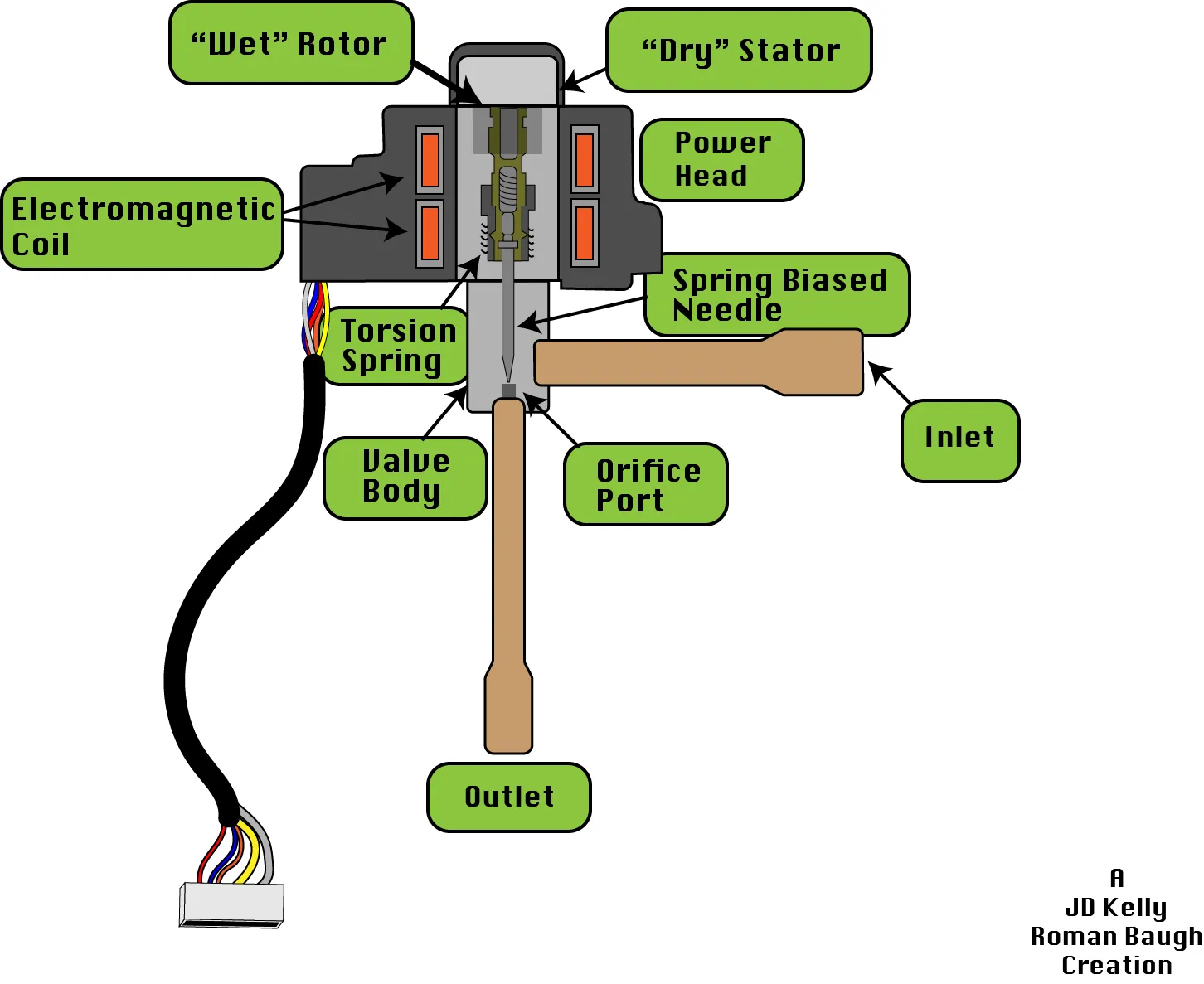
The primary cause of failure is a loss of communication between the main control board and the valve itself. If the control board doesn’t send the correct electrical pulse, the stepper motor inside the valve can’t move the needle to adjust the refrigerant flow.
This often happens after a power surge or if moisture enters the electrical connector and causes corrosion. Because the motor relies on precise electrical steps, even a small amount of resistance on the pins can stop the valve from opening or closing.
Another common cause is physical debris trapped inside the refrigerant line. During the manufacturing or installation process, small pieces of solder or metal shavings can circulate through the system. If this debris reaches the valve, it acts like a wall, preventing the needle from moving even if the motor is working perfectly. This is particularly frequent in systems that were recently serviced or had a line repair performed without proper vacuum procedures.
Finally, the valve itself can reach the end of its mechanical life. The internal gears or the spring mechanism can wear out after years of constant adjustment. When this happens, the valve might become stuck in a partially open position.
According to the U.S. Department of Energy guidelines on system maintenance, restricted refrigerant flow is a major factor that reduces overall unit efficiency and puts strain on the compressor. If the valve is physically broken, it won’t respond to any control signal regardless of the electrical health of the unit.
Safety: Inside a mains-powered machine, the parts behind the outer cover can hold a dangerous electrical charge even after it has been unplugged — that’s why they sit behind a cover. Opening the housing, or testing or replacing anything behind it, is a job for a qualified technician, never a home repair.
Check the electrical connections
This fix is for users who suspect a loose wire or a bad connection. Start by turning off the power to your cooling unit at the breaker panel to ensure you’re safe from electrical shock. Never rely on the thermostat setting alone to cut power; always verify at the source.
Locate the wire harness that connects to the expansion valve, typically found near the outdoor unit’s main access panel. Carefully unplug the connector and inspect the metal pins inside for signs of green or white oxidation.
If the pins look dirty or corroded, clean them with a soft, dry cloth and a specialized electrical contact cleaner. Avoid using metal tools or abrasive pads, as these can strip the protective plating and lead to permanent failure. Ensure the connector snaps back into place firmly when you reattach it, as a loose fit is a frequent cause of intermittent signal loss.
If the wires leading to the connector look frayed or bitten by pests, don’t attempt to splice them yourself. Damaged wiring requires a professional technician to ensure the signal integrity remains within factory specifications.
Once you have reconnected the harness, restore power and listen for a faint clicking or humming sound as the unit initializes. If the cooling performance returns to normal, the issue was likely just a poor contact point. If the unit remains unresponsive or displays a persistent fault code, the internal stepper motor of the valve has likely failed and requires a full component replacement.
Reset the system controller
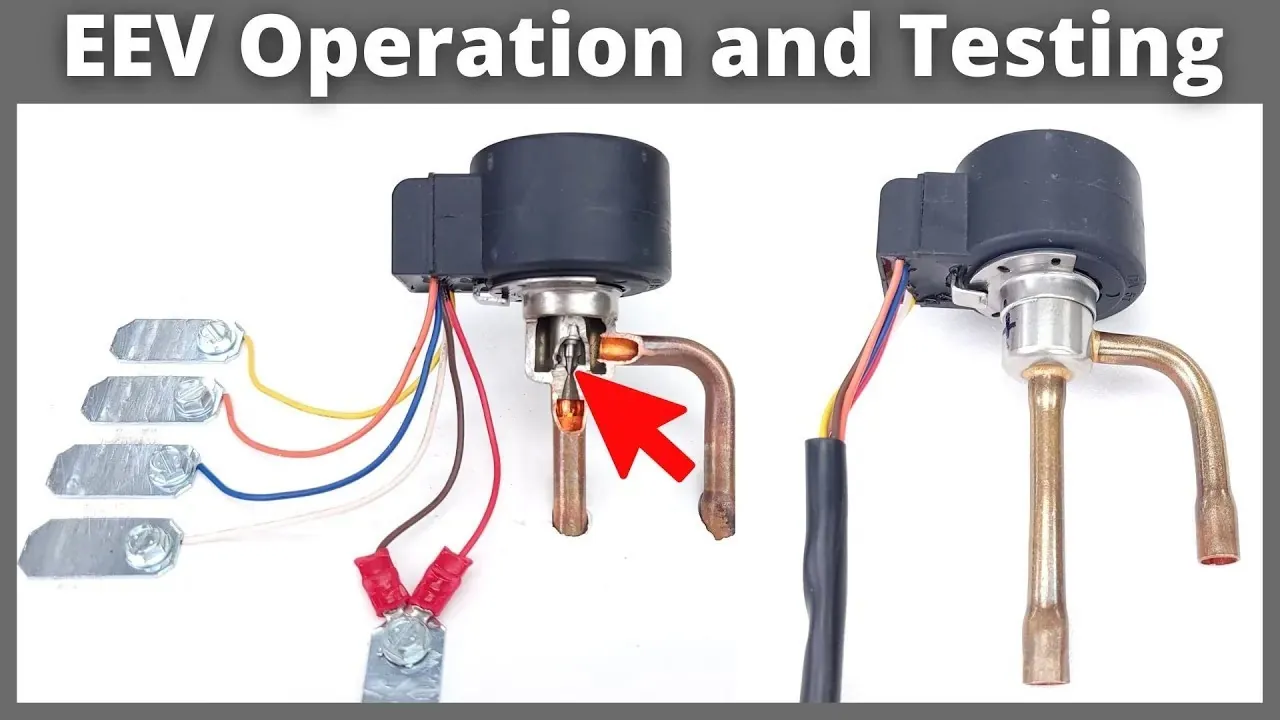
This fix involves resetting the unit’s logic to clear potential software glitches that might be locking the valve. Sometimes, the control board enters a safety mode because it detects a sensor reading that’s out of range, causing it to ignore the expansion valve entirely.
To reset the unit, turn off the main power supply at the breaker for at least 15 minutes. This allows the capacitors on the main control board to fully discharge and forces the system to perform a fresh power-on self-test.
After 15 minutes, turn the power back on and set your thermostat to a cooling mode at least 5 degrees below the current room temperature. Observe the unit for 30 minutes to see if the valve begins to regulate the refrigerant flow. This method is highly effective for minor software errors or temporary communication blocks. However, if the unit displays a specific error code on the control panel, don’t ignore it.
Write down the code and check your owner’s manual, as some error codes indicate a permanent hardware failure that a simple power cycle can’t fix. If the system continues to show an error, you must contact a licensed HVAC professional to perform a deeper diagnostic check.
Evaluate the mechanical condition
This fix is for when you suspect a blockage or a total motor failure. If the unit is running but the evaporator coil remains warm or frozen, the valve might be stuck.
You can test this by feeling the refrigerant lines on both sides of the valve while the unit is running. One side should be significantly colder than the other. If both sides are the same temperature, the valve is likely stuck in a closed or open position and isn’t regulating the flow.
This step is only for confirming the state of the valve; it doesn’t fix a mechanical blockage. If you confirm the valve isn’t creating a temperature drop, it’s time to stop. Further work, such as opening the refrigerant lines or replacing the valve, involves handling pressurized chemicals that are harmful to the environment and require specialized tools.
You must call a certified technician who holds a refrigerant handling license. They have the equipment to recover the refrigerant safely and replace the valve without violating environmental laws. Trying to force the valve open with tools or heat will damage the surrounding components and could lead to a total system failure.
Avoid common repair mistakes
Don’t tap the valve with a hammer to loosen a stuck needle. The housing is brittle brass or thin aluminum; a single sharp strike can cause hairline fractures. These cracks often remain invisible until the system is pressurized, leading to a total refrigerant loss that costs hundreds in professional recharging.
Don’t bypass the control board by wiring the valve directly to a power source. The stepper motor operates on low-voltage pulses. Applying direct 120V current will instantly fry the internal coils, turning a simple diagnostic check into a mandatory full-unit replacement.
Don’t ignore icing on the pipes. If you see frost, the valve is stuck in a partial flow state. This forces the compressor to work against liquid slugging, which destroys the internal bearings within weeks. If the frost persists after a power cycle, the valve is mechanically failed and must be replaced.
Don’t use generic cleaning sprays on electrical connectors. These leave oily residues that disrupt the sensitive signal resistance. Always use a dedicated electronic contact cleaner that evaporates completely. If the pins look discolored, use a soft, dry brush instead of liquid solvents.
Prevent future valve issues
You can avoid many problems by keeping the system clean and stable. The following table helps you compare current habits with better maintenance practices for your cooling system.
| If you’re doing this | Do this instead | Why |
|---|---|---|
| Ignoring small leaks | Fix leaks immediately | Moisture ruins the valve motor |
| Using cheap air filters | Use high-quality pleated filters | Dust clogs the system airflow |
| Leaving power on during storms | Turn off during power surges | Surges fry the control board |
| Skipping annual inspections | Schedule a professional check | Techs find debris before it clogs |
Most homeowners make the mistake of waiting for a total failure before calling a technician. This oversight often costs three times more than a standard preventative visit.
If your system makes a clicking sound, check the valve actuator immediately. If it clicks but doesn’t move, the internal gears are likely stripped. You must replace the motor before the valve body itself warps.
Frequently asked questions
Can I fix a stuck valve myself?
No, you can’t fix a stuck valve yourself if the obstruction is inside the refrigerant line. While you can check electrical connections, a mechanical blockage requires a technician to recover the refrigerant, remove the old valve, and braze in a new one. Attempting this without a vacuum pump and recovery machine will release refrigerant into the atmosphere, which is illegal in many jurisdictions and will leave your system unable to function properly.
How long does an electronic expansion valve last?
An electronic expansion valve typically lasts between 10 and 15 years when the system remains sealed and free of debris. Lifespan depends on environmental conditions and unit cycling frequency. Coastal salt air or frequent power fluctuations may cause the motor and electrical connections to fail significantly sooner.
Is it safe to run the unit if the valve is clicking?
It isn’t safe to run the unit if the valve is making a loud, persistent clicking sound, as this indicates the motor is struggling or slipping. Continued operation in this state can lead to overheating of the motor coils or damage to the main control board. If you hear this noise, turn off the system immediately to prevent further electrical damage and call a technician to inspect the valve’s current draw.
Why is my evaporator coil freezing?
Your evaporator coil is freezing because a stuck valve is restricting refrigerant flow and dropping pressure too low. This low pressure causes moisture from the air to turn into ice on the coil. Turn off the cooling mode and run the fan only to melt the ice while awaiting professional help.
How much does it cost to replace the valve?
Replacing an electronic expansion valve typically costs several hundred dollars, depending on your unit model and local labor rates. The process is labor-intensive because it requires recovering refrigerant, replacing the component, and recharging the system to factory specifications. Contact three local HVAC companies for accurate quotes for your specific equipment.
Conclusion
If you’re still unsure about the diagnosis, don’t hesitate to call a professional technician. They’ll have the right tools to verify the electrical signals and ensure your system runs smoothly again. It’s better to be safe than sorry, so reach out for help if the cooling issues don’t clear up.
Related guides