Is your GE Harmony dryer acting up right when you need it most? You’re not alone, and fixing it might be easier than you think.
Whether your dryer won’t start, isn’t heating properly, or stops mid-cycle, this guide will help you understand what’s going wrong and how to fix it. Keep reading, and you’ll learn simple troubleshooting steps that can save you time, money, and frustration.
Your dryer should make laundry easier—not harder. Let’s get it working like new again!
Common Dryer Problems
Dryers sometimes have problems that stop them from working well. These common issues can make laundry take longer or not get dry at all. Knowing about these problems helps you fix them faster.
Here are some frequent troubles with GE Harmony dryers and what might cause them.
Dryer Not Starting
The dryer may not start due to a power issue or a faulty door switch. Check if the dryer is plugged in and the circuit breaker is on. The door must be closed firmly for the dryer to run.
No Heat Or Inadequate Heat
No heat usually means a problem with the heating element or thermostat. Clean the lint filter and vent to ensure good airflow. A broken heating part can stop the dryer from warming up.
Drum Not Spinning
If the drum does not spin, the belt might be broken or loose. The motor or drum rollers could also be the cause. Listen for unusual sounds that suggest these parts need attention.
Dryer Making Noise
Strange noises can come from worn drum rollers or a loose belt. Check for items stuck in the drum or blower wheel. Regular maintenance reduces noise and keeps the dryer running smoothly.
Dryer Shuts Off Mid-cycle
The dryer stopping during a cycle may be due to overheating or a bad thermostat. Blocked vents cause heat buildup, triggering safety shut-off. Clean vents and check temperature controls to fix this problem.
Basic Checks Before Repair

Before starting any repair on your GE Harmony dryer, perform some basic checks. These steps help find common problems without needing tools or parts. Save time and avoid unnecessary fixes by following these simple inspections.
Power Supply And Connections
Make sure the dryer is plugged in properly. Check the power cord for any damage. Confirm the outlet works by testing with another device. Ensure the circuit breaker is not tripped. A dryer’s power issues often come from simple connection problems.
Lint Filter And Vent Blockages
Clean the lint filter after every use. A clogged filter reduces airflow and drying efficiency. Check the vent hose for blockages or kinks. Remove any lint buildup inside the vent pipe. Proper airflow keeps the dryer running safely and effectively.
Door Switch Functionality
Test the door switch by opening and closing the dryer door. The dryer will not start if the door switch fails. Listen for a click sound when the door closes. If the dryer does not start, the switch might need replacement. This simple check avoids unnecessary repairs.
Fixing Dryer Won’t Start
When your GE Harmony dryer won’t start, it can disrupt your routine. Simple issues often cause this problem. Fixing it may not require a technician. Basic checks and small fixes can bring your dryer back to life quickly.
Resetting The Dryer
Start by unplugging the dryer from the power outlet. Leave it unplugged for one minute. This resets the dryer’s internal computer. Plug the dryer back in and try to start it. Resetting can clear minor errors and glitches.
Inspecting The Start Switch
The start switch signals the dryer to begin. Press the start button and listen for a click. No click means the switch might be faulty. Use a multimeter to test the switch for continuity. Replace the switch if it shows no continuity.
Testing The Thermal Fuse
The thermal fuse prevents overheating. A blown fuse stops the dryer from starting. Locate the fuse near the dryer’s blower housing. Use a multimeter to test the fuse for continuity. Replace the fuse if it has no continuity to restore function.
Resolving Heating Issues
Heating issues are a common problem with GE Harmony dryers. Clothes come out wet or only partially dry. This section helps you find and fix the cause. Follow each step carefully. Small fixes often solve the problem. Save time and money by troubleshooting before calling a technician.
Checking The Heating Element
The heating element warms the air inside the dryer. If it burns out, the dryer won’t heat. First, unplug the dryer for safety. Remove the back panel to access the heating element. Use a multimeter to test for continuity. No continuity means the element is broken. Replace the heating element if needed. This fix restores heat quickly.
Examining The Thermostat
The thermostat controls the dryer’s temperature. A faulty thermostat may stop heating or cause overheating. Unplug the dryer and open the access panel. Locate the thermostat and test it with a multimeter. No reading or irregular reading means it is bad. Replace the thermostat to restore proper heating control. This step ensures safe and consistent drying.
Cleaning The Vent System
Blocked vents reduce airflow and cause heating problems. Lint buildup restricts air and may overheat the dryer. Disconnect the vent hose from the back. Clean out lint from the vent and hose with a brush or vacuum. Check the outside vent for blockages. Clear all lint and debris for better airflow. Regular vent cleaning improves dryer heat and efficiency.
Addressing Drum Problems
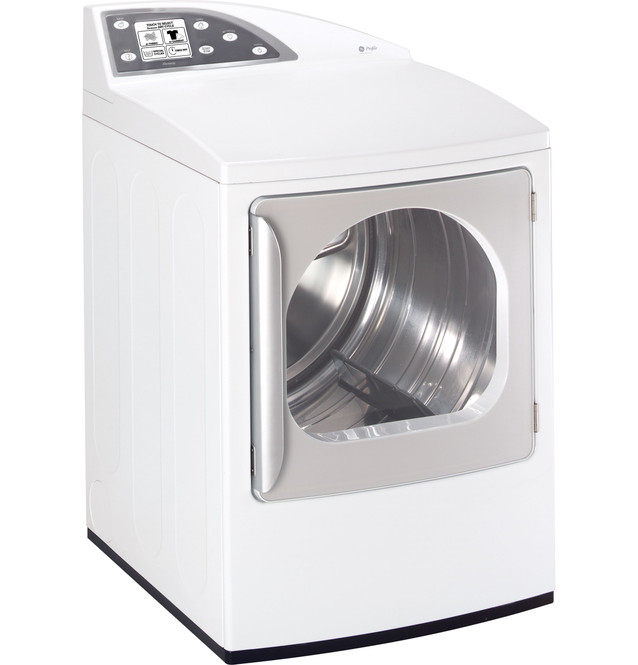
Drum problems in a GE Harmony dryer can cause poor drying or strange noises. Fixing these issues quickly helps your dryer work well and last longer. The drum may stop turning or move unevenly. Common causes include a broken belt, motor troubles, or a faulty idler pulley. Checking these parts saves time and money.
Belt Replacement
The drum belt wraps around the dryer drum and motor pulley. It moves the drum during drying. If the belt breaks, the drum will not turn. To replace it, unplug the dryer first. Remove the front panel and locate the belt. Take off the old belt and loop the new one around the drum and motor pulley. Make sure the belt fits tightly. Reassemble the dryer and test it.
Motor Troubleshooting
The motor powers the drum and fan. If the motor fails, the drum stops spinning. Listen for humming or no sound from the motor. Test the motor with a multimeter to check for electrical issues. Clean any lint or debris around the motor. Replace the motor if it is burnt or does not run. Always unplug the dryer before working on the motor.
Idler Pulley Inspection
The idler pulley holds tension on the belt. It keeps the belt tight for smooth drum movement. Over time, the pulley can wear out or get stuck. Check the pulley for cracks or damage. Spin it by hand to see if it moves freely. Replace the pulley if it is noisy or stuck. Proper pulley function prevents belt slipping and drum problems.
Handling Noise And Vibration
Noise and vibration from your GE Harmony dryer can be annoying. These problems often mean some parts need attention. Fixing noise and vibration helps your dryer run smoothly and last longer. Understanding the cause makes troubleshooting easier.
Identifying The Noise Source
Start by listening carefully to the dryer. Different sounds point to different problems. A thumping sound may mean a loose drum belt. Squeaking often comes from worn rollers or bearings. Rattling could be loose parts or foreign objects inside. Check the dryer while it runs to locate the noise spot.
Lubricating Moving Parts
Dryer parts that move can dry out and cause noise. Use a small amount of high-temperature lubricant on rollers and bearings. Avoid over-lubricating; too much oil can cause other issues. Lubrication reduces friction and quiets the dryer. Regular lubrication keeps the machine running smoothly.
Replacing Worn Components
Old or damaged parts make noise and vibration worse. Check drum belts for cracks or tears. Inspect rollers and bearings for wear or damage. Replace broken or worn parts with new ones made for your GE Harmony model. Using proper parts ensures the dryer works quietly and efficiently again.
Tips To Prevent Future Issues
Preventing problems with your GE Harmony dryer saves time and money. Small efforts now keep your dryer running longer. Simple habits make a big difference. Follow these tips to avoid future issues and keep your dryer efficient.
Regular Maintenance Schedule
Set a routine for checking your dryer. Clean the lint filter after every load. Inspect the drum and seals monthly for wear or damage. Replace parts showing signs of wear quickly. Regular checks prevent breakdowns and improve safety.
Proper Loading Techniques
Do not overload the dryer. Heavy loads strain the motor and reduce drying efficiency. Balance the clothes evenly inside the drum. Mix heavy and light items for better airflow. Avoid drying items with sharp edges that can damage the drum.
Vent Cleaning Best Practices
Clear the dryer vent at least twice a year. Remove lint buildup to prevent fires and improve airflow. Use a vent brush or vacuum for thorough cleaning. Check outside vent caps to ensure they open freely. Proper vent care helps your dryer work safely and faster.
Frequently Asked Questions
How Do I Reset My Ge Harmony Dryer?
Unplug the dryer for one minute, then plug it back in. This resets the control board and may fix minor issues.
Why Is My Ge Harmony Dryer Not Heating?
Check if the lint filter or vent is clogged. A blockage can stop the dryer from heating properly.
What Causes My Ge Harmony Dryer To Stop Mid-cycle?
Power interruptions or a faulty door switch can stop the dryer. Make sure the door is fully closed and power is stable.
How Do I Clean The Ge Harmony Dryer Sensor?
Wipe the moisture sensor bars inside the drum with a soft cloth and mild soap. Clean sensors help the dryer work efficiently.
Why Is My Ge Harmony Dryer Making Loud Noises?
Loose drum rollers or worn belts often cause noise. Inspect these parts and replace them if they look damaged or worn out.
Conclusion
Troubleshooting your GE Harmony dryer can save time and money. Start with simple checks like power and lint filter. Look for common signs like no heat or no tumbling. Small fixes often solve big problems. Regular cleaning helps keep your dryer working well.
Don’t ignore strange noises or smells. Acting early prevents costly repairs later. Remember, safety comes first when handling electrical appliances. Keep this guide handy for quick help. Your dryer will run smoothly with proper care. Stay patient and try each step carefully.