Is your Keurig coffee maker acting up right when you need your perfect cup of coffee? It’s frustrating when your trusted machine won’t brew, won’t turn on, or shows confusing error lights.
But don’t worry—you’re not alone, and most problems can be fixed with a few simple steps. In this guide, you’ll learn easy troubleshooting tips to get your Keurig back to brewing delicious coffee fast. Whether it’s a water flow issue, power problem, or an error message, you’ll find clear, step-by-step solutions designed just for you.
Keep reading, and soon you’ll be enjoying your favorite coffee again without stress or extra costs.
Power Problems
Power problems are common issues that stop your Keurig coffee maker from working. These problems can range from no power or lights to the machine not starting at all. Understanding these issues helps you fix your Keurig quickly and get back to enjoying your coffee.
No Power Or Lights
Check if the power cord is plugged into a working outlet. Sometimes the outlet may be off or faulty. Try plugging another device into the same outlet to test it. If the outlet works, inspect the power cord for damage. A broken or frayed cord can cause power failure. Avoid using extension cords as they can sometimes cause issues.
Machine Won’t Start
If your Keurig has power but does not start, the problem might be inside the machine. Make sure the water reservoir is seated correctly. A loose tank can stop the machine from starting. Check if the handle is fully closed. The machine won’t brew if the handle is open or not locked. Also, look for any error lights or messages on the display.
Power Cycling Steps
Power cycling can reset your Keurig and fix power issues. First, unplug the machine from the outlet. Wait for at least 5 minutes to allow it to reset fully. While unplugged, press and hold the power button for 10 seconds if your model has one. Plug the machine back in and turn it on. This simple step can often clear minor electronic glitches.

Water Flow Issues
Water flow issues are common problems with Keurig coffee makers. These issues stop water from moving through the machine. Without water flow, your Keurig cannot brew coffee. Understanding the causes helps fix the problem fast. Follow these simple steps to solve water flow troubles and enjoy your coffee again.
Water Not Pumping
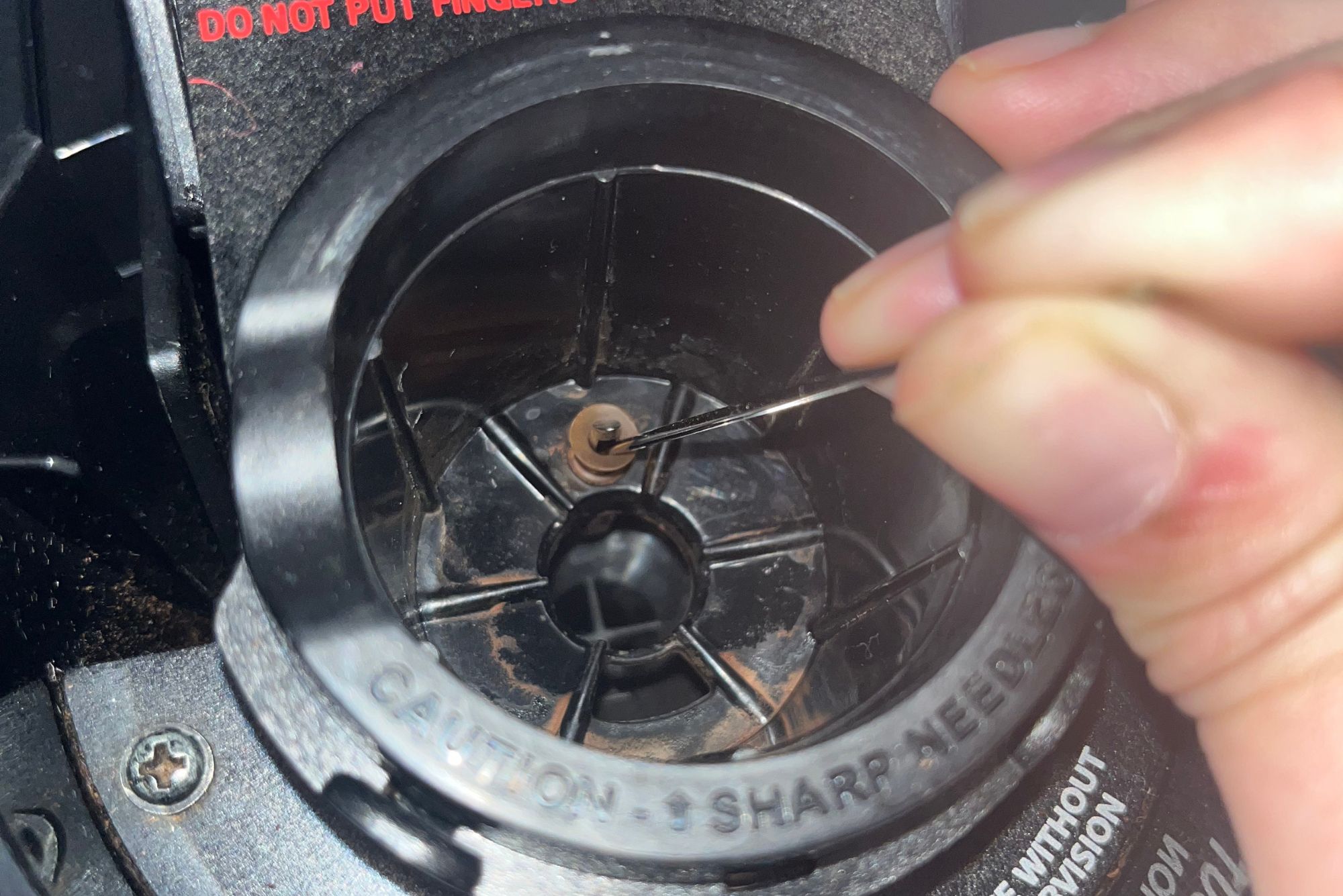
Water may not pump if the machine is clogged or has air inside. Start by unplugging the Keurig. Remove the water reservoir and check for blockages. Clean the needles with a straightened paper clip. Plug the machine back in and try brewing again. This often fixes the problem quickly.
Air Bubbles In Tubing
Air bubbles block water flow inside the machine’s tubes. Tap the sides of the Keurig gently to move air bubbles out. Also, try lifting and reseating the water reservoir. This helps release trapped air. After this, water should flow smoothly through the machine.
Reseating The Water Reservoir
The water reservoir must sit correctly for the machine to work. Remove the reservoir and place it back carefully. Make sure it clicks or fits snugly in place. An incorrectly seated reservoir stops water from reaching the pump. Check for cracks or leaks in the reservoir. Fixing this step often restores water flow.
Brewing Failures
Brewing failures in your Keurig coffee maker can be frustrating. These issues stop you from enjoying your fresh cup of coffee. Understanding common brewing problems helps you fix them quickly. Troubleshooting brewing failures often involves simple checks and adjustments. Keep your Keurig working smoothly with these tips.
No Coffee Dispensed
Your Keurig may not dispense coffee for several reasons. First, check if the water reservoir is full and seated properly. A loose reservoir can stop water flow. The needle that punctures the K-Cup might be clogged. Use a paper clip to clear any blockages. Also, ensure the K-Cup is placed correctly and the lid is closed tightly. Sometimes, trapped air in the water line stops brewing. Tap the sides gently to release air bubbles.
Weak Or Watery Coffee
Weak coffee usually means the water is flowing too fast or too much. Check if you are using the right K-Cup size for your desired brew. Old or stale coffee pods can cause poor taste. Descaling your machine removes mineral build-up that affects brewing pressure. Clean the needles and the brew chamber regularly. Using filtered water improves flavor and machine performance. Adjust the brew size to match your taste preference.
Incomplete Brewing Cycle
An incomplete brewing cycle means the machine stops before finishing. This can happen if the water reservoir is empty or not placed correctly. The heating element may be dirty or faulty, causing the machine to shut off early. Power interruptions or loose electrical connections can stop brewing. Reset your Keurig by unplugging it for a few minutes. Check for error lights and follow the machine’s instructions. Regular cleaning and descaling prevent many brewing cycle problems.

Needle Blockages
Proper descaling and maintenance keep your Keurig coffee maker working well. Over time, minerals build up inside the machine. This buildup can block water flow and affect taste. Regular cleaning helps your Keurig brew better coffee and last longer.
When To Descale
Descale your Keurig every three to six months. If you use hard water, descale more often. Signs you need descaling include slow brewing or strange taste. The machine may also show a descale alert light.
Descaling Process
Start by emptying the water reservoir. Fill it with a descaling solution or equal parts white vinegar and water. Run the brew cycle without a K-Cup until the reservoir is empty. Repeat this with fresh water to rinse. Wipe the machine’s exterior and let it dry before use.
Routine Cleaning Tips
Clean the drip tray and K-Cup holder weekly. Use a damp cloth to wipe the machine’s outside. Clear the entrance and exit needles with a straightened paper clip. Regular cleaning prevents blockages and keeps coffee tasting fresh.
Error Lights And Messages
Resetting your Keurig can fix many common issues fast. It refreshes the machine’s system and clears minor errors.
Resetting can be simple or a full factory reset. Knowing the right method helps avoid frustration.
Soft Reset Steps
Unplug the Keurig from the power outlet.
Remove the water reservoir and reseat it firmly.
Press and hold the power button for 5 seconds, then release.
Plug the machine back in and turn it on.
This process clears small glitches and refreshes the system.
Factory Reset Options
Factory reset erases all settings and returns the machine to default.
Locate the reset button or combination for your model. Usually, hold the power button and the brew button at the same time for 5-10 seconds.
Release the buttons when the lights flash or the machine restarts.
Refer to your user manual if unsure about the exact steps.
Factory reset solves deeper software problems and errors.
When To Reset
Reset the Keurig if it does not power on or respond.
Try resetting if the machine shows error lights or won’t brew.
Use a soft reset before descaling or cleaning.
Perform a factory reset if problems persist after other fixes.
Resetting helps avoid costly repairs or replacements.
Descaling And Maintenance
Additional troubleshooting tips help solve common Keurig coffee maker problems. These steps cover power issues, loose parts, and when to seek expert help. They improve your chances of fixing your machine quickly. Keep your Keurig working well with simple checks.
Checking Power Connections
Ensure the power cord plugs firmly into the wall outlet. Test the outlet by plugging in another device. Avoid using extension cords or power strips. These can cause power issues. Unplug the Keurig, wait 30 seconds, then plug it back in. This power cycle can reset the machine. Check if the power light turns on.
Inspecting For Loose Parts
Turn off and unplug the machine first. Check the water reservoir for secure placement. Loose tanks cause brewing errors. Remove and reseat the reservoir firmly. Examine the K-Cup holder and handle. Make sure no parts are broken or loose. Tighten or adjust any wobbly components. Check the drip tray and pod holder. Clean them to prevent jams.
When To Contact Support
If problems persist after basic fixes, contact Keurig customer support. They offer guidance and repairs. Provide your model number and describe the issue clearly. Mention any error lights or sounds. Avoid opening the machine yourself to keep warranty valid. Professional help prevents further damage. Use support resources like phone, chat, or email.
Frequently Asked Questions
What Is A Common Problem With Keurig?
A common problem with Keurig machines is blocked needles, causing brewing failures or no water flow. Regular cleaning prevents this issue.
How Can I Reset My Keurig Coffee Maker?
Unplug your Keurig for 5 minutes. Reseat the water reservoir. Clear blocked needles with a straightened paper clip. Plug it back in and restart.
What Is The Average Lifespan Of A Keurig Coffee Maker?
The average lifespan of a Keurig coffee maker is about 3 to 5 years with regular use. Proper maintenance can extend its durability.
How To Tell If Your Keurig Is Dying?
Signs your Keurig is dying include no power, brewing failures, blocked needles, and persistent error lights. Frequent descaling won’t help.
Why Is My Keurig Not Turning On Or Showing Power?
Check that the power cord is firmly plugged into a working outlet. Try a different outlet if needed. Unplug the machine for a minute, then plug it back in to reset.
Conclusion
Troubles with your Keurig coffee maker don’t have to ruin your day. Simple steps like checking the power, cleaning the needles, or resetting the machine often fix common problems. Keeping your Keurig clean and well-maintained helps it run smoothly longer.
Remember to follow the right troubleshooting tips based on the issue you face. Stay patient and methodical. Soon, you’ll enjoy your perfect cup of coffee again without stress.