Pressure switches are everywhere—from home wells to industrial machines. These small devices help control pumps, compressors, and other systems by monitoring pressure and turning equipment on or off. But when a pressure switch fails, it can cause major headaches: equipment stops working, safety is compromised, and production can grind to a halt. Knowing how to troubleshoot a pressure switch is a valuable skill, whether you’re a homeowner, a technician, or a factory worker. This guide will walk you through the process, step by step, using clear language and practical advice. You’ll learn how these devices work, common signs of trouble, and proven ways to fix issues. With real examples, data, and expert tips, you’ll be able to solve pressure switch problems confidently.
What Is A Pressure Switch?
A pressure switch is a device that uses pressure (usually from air or water) to control another device, like a pump or compressor. When the pressure reaches a set point, the switch turns something on or off. For example, in a well system, the switch starts the pump when water pressure drops and stops it when pressure is high enough.
Pressure switches are used in:
- Water pumps (well, booster, sump)
- Air compressors
- HVAC systems
- Hydraulic machines
- Industrial processes
Most pressure switches have a diaphragm or piston that moves when pressure changes. This movement opens or closes electrical contacts, sending a signal to the equipment. The switch is usually adjustable, so you can set the pressure levels where you want things to turn on or off.
How Pressure Switches Work
Understanding the inner workings is key to troubleshooting. A typical switch has:
- Pressure sensing element: Usually a diaphragm or piston
- Setpoint adjustment: Lets you change the pressure where the switch operates
- Electrical contacts: Open or close a circuit
- Housing: Protects the internal parts
When pressure rises or falls, the sensing element moves. This movement triggers the contacts. For example, in a water pump, the switch closes (turns on) when pressure drops below a setpoint, and opens (turns off) when pressure climbs above another setpoint.
Here’s a simple example for a home well:
- Pressure drops below 40 psi → switch closes → pump turns on
- Pressure rises above 60 psi → switch opens → pump turns off
Some switches have a differential setting, which is the gap between the cut-in and cut-out pressures.
Credit: www.reddit.com
Types Of Pressure Switches
Different applications require different switches. Knowing the type is important for troubleshooting.
Mechanical Pressure Switches
These are the most common. They use springs and diaphragms and are found in home wells and air compressors. They don’t need external power to sense pressure.
Electronic Pressure Switches
These use sensors and microcontrollers. They are more precise and often found in industrial settings. Electronic switches may have displays, alarms, or digital outputs.
Hydraulic Pressure Switches
Used in hydraulic systems, these switches handle much higher pressures. They are built to withstand oil and harsh environments.
Differential Pressure Switches
These measure the difference between two pressure points. Used in HVAC, filtration, and process control.
Here’s a quick comparison of common types:
| Type | Typical Use | Pressure Range | Features |
|---|---|---|---|
| Mechanical | Home wells, compressors | 0–300 psi | Simple, reliable |
| Electronic | Industrial, HVAC | 0–5000 psi | Digital, adjustable |
| Hydraulic | Machinery | 500–10,000 psi | Robust, oil-resistant |
| Differential | HVAC, filters | 0–100 psi | Measures two points |
Common Signs Of Pressure Switch Problems
Pressure switches can fail in many ways. Here are symptoms to watch for:
- Pump or compressor won’t start or stop: Often, the switch is stuck or electrical contacts are faulty.
- Rapid cycling: Equipment turns on and off quickly. This can wear out the switch and the pump.
- Incorrect pressure readings: Water or air pressure doesn’t match the gauge.
- Equipment stays on/off: The switch is not responding to pressure changes.
- Burned contacts: Visible damage to electrical parts.
- Leaks: Water or air escaping near the switch.
Non-obvious insight: Sometimes, the issue is not the switch itself, but the system around it. For example, clogged pipes, stuck valves, or faulty gauges can mimic switch problems.
Safety Precautions Before Troubleshooting
Before you touch a pressure switch, safety comes first.
- Turn off power: Always shut off electricity at the breaker or disconnect.
- Release pressure: For water or air systems, drain or depressurize the lines.
- Wear safety gear: Gloves, safety glasses, and hearing protection.
- Check for leaks: Water and air can cause injury.
- Use proper tools: Insulated screwdrivers and voltage testers.
Pressure switches deal with electricity and pressurized fluids. Mistakes can be dangerous. Never skip these steps.
Step-by-step Pressure Switch Troubleshooting
Let’s break down the process for mechanical switches, commonly found in homes and small businesses. Most troubleshooting steps apply to other types, but electronic switches may need extra steps.
1. Visual Inspection
Start with a close look.
- Check for signs of water, oil, or dust around the switch.
- Look for burn marks, corrosion, or broken wires.
- Inspect the diaphragm or piston for cracks or wear.
- Check the mounting: Is the switch loose or misaligned?
Tip: Sometimes, just tightening screws or cleaning contacts solves the problem.
2. Test The Electrical Connections
A pressure switch controls an electrical circuit. Faulty wiring is a common cause.
- Use a voltage tester to check incoming power.
- Inspect wires for fraying or loose connections.
- Test the contacts: Are they opening/closing as pressure changes?
- If contacts are burned, they may need replacement.
Example: In a well pump, if you see 230V at the input but nothing at the output, the switch is probably stuck open.
3. Check Pressure Settings
Switches have adjustable setpoints.
- Find the adjustment screw (usually labeled).
- Check the setpoints against the system requirements.
- Adjust if needed. For example, home wells often use 40/60 psi.
If settings are wrong, the switch may not operate. Setting too low can cause rapid cycling; too high may keep the pump running.
4. Inspect The Pressure Sensing Element
The diaphragm or piston can fail.
- Remove the switch cover.
- Look for cracks, holes, or stiffness in the diaphragm.
- If the diaphragm is damaged, replace the switch.
Tip: A stiff diaphragm may not move enough to trigger the contacts.
5. Test The System Pressure
Use a reliable gauge.
- Compare system pressure to the switch setpoints.
- If pressure is too low/high, check for leaks, clogged pipes, or pump issues.
- Sometimes, the gauge is faulty, not the switch.
Example: If the pressure reads 30 psi but the pump won’t start, the switch may need adjustment or replacement.
6. Check For Short Cycling
Short cycling is when the pump or compressor turns on and off quickly.
- Inspect the pressure tank (in water systems). If the tank is waterlogged, it can cause short cycling.
- Check air charge in the tank: Should match system specs.
- Replace or repair the tank if needed.
Non-obvious insight: Short cycling often damages pressure switches, so fixing the underlying cause is critical.
7. Clean Or Replace Contacts
Dirty or burned contacts can block electrical flow.
- Turn off power.
- Use fine sandpaper or contact cleaner.
- If contacts are badly burned, replace the switch.
Tip: Clean contacts gently. Too much force can damage them.
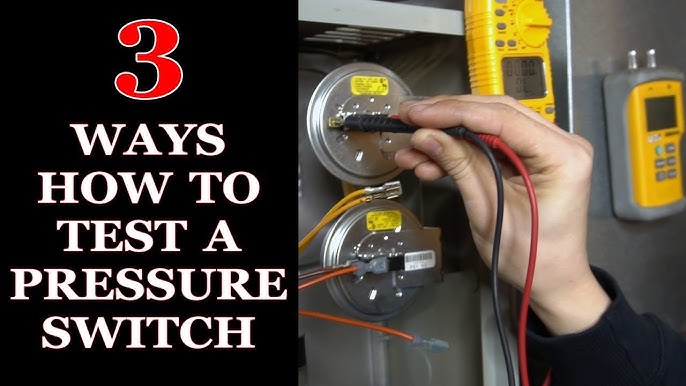
8. Test The Switch With A Multimeter
A multimeter can confirm if the switch is working.
- Set the meter to continuity mode.
- With the switch open (no pressure), contacts should be open.
- With pressure applied, contacts should close (show continuity).
- If the switch doesn’t respond, it’s faulty.
9. Inspect For Leaks
Leaks near the switch can cause false readings or damage.
- Use soapy water for air systems (bubbles reveal leaks).
- Check for wet spots or corrosion in water systems.
- Tighten fittings or replace seals.
10. Replace The Pressure Switch
If all else fails, replace the switch.
- Choose the right model for your system.
- Match pressure range, voltage, and mounting type.
- Install according to manufacturer instructions.
Replacing a pressure switch is usually straightforward. Take photos before removing wires to help with reinstallation.
Troubleshooting Electronic Pressure Switches
Electronic switches need special care.
- Check display or indicator lights for error codes.
- Test the sensor with a multimeter (follow manufacturer guide).
- Inspect wiring for loose connections.
- Reset the switch or controller if needed.
- Update firmware if the switch has digital controls.
Example: In an HVAC system, a digital switch may show “Err” if the sensor is out of range or wiring is faulty.
Tip: Electronic switches often have diagnostic modes. Read the manual for details.
Advanced Troubleshooting Techniques
Some problems are harder to diagnose. Here are advanced tips:
Cross-check With Another Switch
Install a temporary switch to test the system. If the problem disappears, the original switch is faulty.
Use Data Logging
For industrial systems, data loggers can track pressure and switch activity over time. This reveals patterns like short cycling or delayed response.
Inspect System Components
Sometimes, pressure switch issues are caused by other parts:
- Clogged filters
- Stuck valves
- Faulty pumps
- Broken gauges
Example: In a compressed air system, a clogged filter may prevent the switch from seeing correct pressure.
Test Under Different Conditions
Try running the system at different times, with varying loads. Some issues only appear during peak demand or cold weather.
Compare Switches For Performance
Here’s a comparison of mechanical and electronic switches:
| Feature | Mechanical | Electronic |
|---|---|---|
| Cost | Lower | Higher |
| Durability | High | Medium |
| Precision | Medium | High |
| Adjustability | Manual | Digital |
| Diagnostics | None | Advanced |
Key Data For Pressure Switch Troubleshooting
Having the right data helps you diagnose faster.
- Typical lifespan: Most mechanical switches last 5–10 years; electronic switches, 3–7 years.
- Failure rate: Studies show up to 20% of home well switches fail within 5 years due to waterlogging or electrical issues.
- Cost: Mechanical switches average $25–$75; electronic, $80–$250.
Here’s a quick reference for troubleshooting steps and symptoms:
| Symptom | Likely Cause | Action |
|---|---|---|
| Won’t start | Stuck contacts | Clean/replace contacts |
| Rapid cycling | Waterlogged tank | Check tank, replace if needed |
| Stays on | Faulty diaphragm | Replace switch |
| Wrong pressure | Incorrect settings | Adjust setpoints |
| Leaks | Loose fittings | Tighten/replace seals |
Practical Examples
Example 1: Home Well Pump
A homeowner notices their well pump runs constantly. Pressure reads 70 psi, above the switch cut-out (60 psi). Inspection shows the contacts are stuck closed. Cleaning doesn’t help, so the switch is replaced. Problem solved.
Example 2: Air Compressor
An air compressor cycles every 10 seconds. The tank is waterlogged, causing pressure to drop quickly. Draining the tank restores normal cycling, and the switch is fine.
Example 3: Industrial Hydraulic System
A hydraulic machine fails to start. Electronic switch shows error code. Checking the manual reveals a sensor fault. Replacing the sensor fixes the problem.
Preventive Maintenance Tips
Pressure switches last longer with care.
- Inspect switches monthly for leaks, corrosion, or wear.
- Clean electrical contacts yearly.
- Check pressure settings every 6 months.
- Drain tanks in water systems regularly.
- Replace switches every 5–10 years, or sooner if used heavily.
Tip: Record switch maintenance in a log. This helps spot patterns and avoid future failures.
Common Mistakes In Pressure Switch Troubleshooting
Many beginners make errors that can lead to bigger problems.
- Skipping safety steps: Always turn off power and release pressure.
- Assuming the switch is the problem: Check the whole system, not just the switch.
- Wrong settings: Setting pressure too low/high causes rapid cycling or constant running.
- Ignoring leaks: Small leaks can cause big issues.
- Using the wrong switch type: Always match pressure range, voltage, and material.
Tip: Always read the manufacturer’s manual before adjusting or replacing a switch.
Choosing The Right Pressure Switch
If you need to replace a switch, make sure you pick the right one.
- Pressure range: Match system needs. Don’t choose a switch with too high or too low range.
- Voltage: Match system power (120V, 240V, etc. ).
- Material: For water, use corrosion-resistant materials. For oil or harsh chemicals, use switches rated for those environments.
- Mounting: Make sure the switch fits your system. Some mount directly to pipes, others require brackets.
Here’s a quick guide:
- Home well pumps: Mechanical, 40–60 psi, corrosion-resistant
- Air compressors: Mechanical, 90–120 psi, oil-resistant
- Industrial: Electronic, high precision, digital display
Non-obvious insight: Many switches look alike, but small differences in specs can mean big performance changes.
When To Call A Professional
Some problems need expert help.
- If you see sparks, smoke, or smell burning, shut down the system and call an electrician.
- If troubleshooting doesn’t solve the problem, call a plumber, HVAC technician, or industrial mechanic.
- For electronic switches with complex error codes, contact the manufacturer or a specialist.
Tip: Don’t risk injury or damage. Professionals have tools and training for tricky issues.
Environmental And Regulatory Considerations
Pressure switches must meet safety and environmental rules.
- UL/CSA certification: Look for certified switches for electrical safety.
- Lead-free materials: For drinking water, use switches labeled lead-free.
- Environmental rating: Outdoor switches should be weatherproof (IP65 or higher).
Regulations are important for both safety and insurance. For more details, see the OSHA official site.
Frequently Asked Questions
What Causes A Pressure Switch To Fail?
Many things can cause failure: electrical contact wear, diaphragm cracks, waterlogging in tanks, incorrect settings, or environmental damage like corrosion and dust. Sometimes, pressure switches fail simply due to age and repeated use.
How Do I Know If My Pressure Switch Is Faulty?
Common signs are equipment not starting or stopping, rapid cycling, wrong pressure readings, or visible damage. Testing with a multimeter, checking contacts, and inspecting the diaphragm can confirm faults.
Can I Adjust My Pressure Switch, And How?
Most mechanical switches have an adjustment screw. Turn clockwise to increase pressure, counterclockwise to decrease. Always check the manual for your model. Use a gauge to confirm settings after adjustment.
Should I Use A Mechanical Or Electronic Pressure Switch?
Mechanical switches are simple and reliable, good for home and small business. Electronic switches offer precision and diagnostics, ideal for industrial or complex systems. Choose based on your needs, budget, and system requirements.
Is It Safe To Troubleshoot A Pressure Switch Myself?
Basic troubleshooting is safe if you follow safety steps: turn off power, release pressure, and use proper tools. For complex issues, electrical faults, or industrial systems, call a professional.
CONCLUSION
Pressure switch troubleshooting is a practical skill that helps keep systems running smoothly. With the steps, tips, and data here, you can solve many common problems and avoid costly downtime. Remember to work safely, check the whole system, and don’t hesitate to ask for expert help when needed.
The right approach saves time, money, and hassle—making you a smarter, safer technician or homeowner.