Is your Craftsman garage door remote acting up when you need it most? You rely on that remote every day, and when it stops working, it can throw off your whole routine.
But before you call a repair service or buy a new remote, there are simple steps you can take to fix the problem yourself. In this guide, you’ll discover easy troubleshooting tips that save you time, money, and frustration. Keep reading to get your garage door remote back in perfect working order—fast and hassle-free.
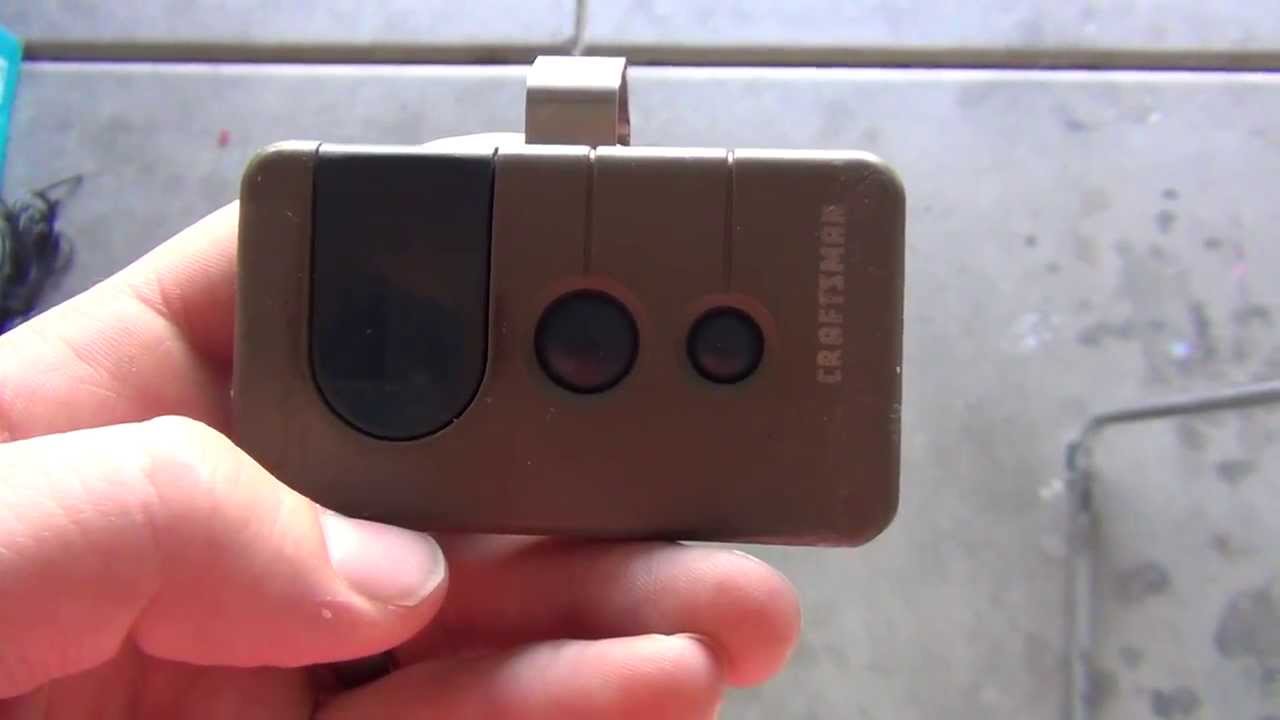
Common Remote Issues
Craftsman garage door remotes can face common problems. These issues stop the remote from working properly. Understanding these problems helps to fix them quickly. Here are some frequent remote troubles and how they show up.
Unresponsive Remote
The remote does not open or close the garage door. Pressing buttons gives no reaction. This can happen due to signal loss or remote failure. Checking the remote’s settings and connection helps identify the cause. Sometimes, resetting the remote solves this problem fast.
Intermittent Signal
The remote works sometimes, but not always. You might need to press the button multiple times. This issue happens when the signal is weak or blocked. Objects or distance can reduce signal strength. Moving closer or removing obstacles often restores proper function.
Battery Problems
Weak or dead batteries stop the remote from working. The remote may respond slowly or not at all. Replacing the batteries with fresh ones usually fixes this. Use the right battery type for best results. Check battery contacts for dirt or corrosion too.
Checking The Remote Battery
Checking the remote battery is the first step in troubleshooting your Craftsman garage door remote. A weak or dead battery often causes the remote to stop working. Testing and replacing the battery is simple and can save time and money.
Replacing Batteries
Start by opening the remote casing carefully. Most remotes have a small screw or a snap-fit case. Remove the old battery and note its size and type. Insert a new battery, matching the polarity marks inside the remote. Close the case securely. Test the remote by pressing any button. The garage door should respond immediately if the battery is good.
Battery Compatibility
Use only batteries compatible with your remote model. Check the manual or look inside the remote for the battery type. Common types include CR2032 and CR2025. Using the wrong battery may cause poor contact or damage. Choose fresh batteries from a reliable brand for best results. Avoid mixing old and new batteries to prevent power issues.
Resetting The Remote
Resetting the Craftsman garage door remote can fix many common issues. It clears old codes and sets up a fresh connection. This process can solve problems like unresponsive buttons or delayed opening. Resetting is simple and takes only a few minutes.
Step-by-step Reset
Start by locating the garage door opener motor unit. Find the “Learn” or “Program” button on the back or side of the unit. Press and hold this button until the indicator light turns off, usually about 6 seconds. Release the button once the light goes out.
Next, press and hold the remote button you want to program. Hold it until the motor unit light blinks or you hear a click. This means the remote is now synced with the opener. Test the remote by pressing the button to open or close the door.
When To Reset
Reset the remote if it stops working suddenly. Also, reset it after changing batteries without success. Resetting helps if the door opens by itself or the remote controls multiple doors. Use reset when you buy a new remote or lose the old one.
Reprogramming The Remote
Reprogramming the Craftsman garage door remote is a common task. It helps fix connection issues between the remote and the garage door opener. This process is simple and saves time. No need to call a technician for every small problem. Follow clear steps to sync your remote and solve programming errors quickly.
Syncing With The Garage Door Opener
Start by locating the “Learn” button on the garage door opener. Press and release this button. You usually have 30 seconds to complete the next step. Now, press and hold the button on your remote. Hold it until the garage door opener light blinks or you hear a click. This means the remote is synced. Test the remote by pressing its button to open or close the door.
Troubleshooting Programming Errors
If syncing fails, try these tips. Check the remote battery and replace it if weak. Make sure you press the “Learn” button properly. Sometimes, press it longer or shorter. Move closer to the garage door opener while syncing. Clear old codes by pressing the “Learn” button for 10 seconds before starting again. Repeat the process carefully. These steps fix most programming errors fast.
Inspecting The Garage Door Opener
Inspecting the garage door opener is the first step in troubleshooting your Craftsman garage door remote. This process helps find simple issues that stop the remote from working. Check the opener unit carefully to spot any obvious problems. Sometimes, small fixes can restore full function quickly.
Power Supply Check
Ensure the garage door opener is plugged into a working outlet. Look for loose cords or damaged plugs. A power outage or tripped breaker can stop the opener from working. Test the outlet by plugging in another device to confirm power supply.
Antenna Position
Check the antenna on the garage door opener. It should hang down freely and not be bent or broken. A damaged antenna can block the remote’s signal. Adjust the antenna for better signal reception and avoid covering it with metal objects.
Signal Interference
Look for devices that may cause interference near the opener. Wireless routers, cordless phones, and other electronics can block signals. Move or turn off these devices to test if the remote starts working. Clear any obstacles between the remote and opener.
Testing Remote Range
Testing the range of your Craftsman garage door remote helps find problems with signal strength. It shows if the remote works well at different distances from the garage door opener. This testing is simple and helps you decide if the remote needs new batteries or other fixes.
Optimal Distance
The best distance for your remote is usually around 30 to 50 feet. This range lets the remote send a strong signal to the opener. Stand at different spots within this distance to check if the door opens every time. If it fails at close range, the remote might have a weak battery or internal issue.
Obstruction Effects
Objects like walls, cars, or metal items can block the remote’s signal. Even thick doors or windows reduce the range. Test the remote with no obstacles between you and the garage door. Notice if the door opens easier without anything in the way. Clear paths improve remote performance and reduce signal loss.
When To Replace The Remote
Knowing when to replace your Craftsman garage door remote saves time and frustration. A remote that no longer works well can cause delays and inconvenience. Timely replacement keeps your garage access smooth and secure.
Signs Of Wear
Look for buttons that stick or do not respond. Cracks or broken parts on the remote’s body show damage. Weak or dead batteries can cause trouble, but if changing them does not help, the remote may be failing. Sometimes, the remote stops syncing with the garage door opener. These are clear signs the remote needs replacement.
Choosing A Compatible Replacement
Select a remote that matches your Craftsman garage door model. Check the model number on your opener or old remote. Use remotes with the same frequency to avoid issues. Buying from trusted brands ensures good quality and compatibility. A compatible remote makes programming easy and keeps your system secure.
Credit: heritagedoor.com

Frequently Asked Questions
How Do I Reset My Craftsman Garage Door Remote?
Press and hold the remote’s reset button for 10 seconds. Then, reprogram it with your garage door opener. This clears old codes and fixes many issues.
Why Is My Craftsman Remote Not Opening The Garage Door?
Check the battery first; weak batteries cause most problems. Also, ensure the remote is within range and aimed at the sensor.
How Can I Reprogram My Craftsman Garage Door Remote?
Locate the “Learn” button on your garage door opener. Press it, then press your remote’s button to sync them.
What Causes Craftsman Garage Door Remote Interference?
Other wireless devices or metal objects nearby can block signals. Move away from Wi-Fi routers or cordless phones for better connection.
How Do I Replace The Battery In A Craftsman Remote?
Open the remote case carefully with a small screwdriver. Replace the old battery with a new one of the same type.
Conclusion
Troubleshooting your Craftsman garage door remote can save time and money. Start with simple checks like battery life and signal range. Clean the remote and sensor areas regularly. Resetting the remote often fixes many issues quickly. If problems continue, consider consulting the manual or a professional.
Staying patient and following these steps helps keep your garage door working smoothly. Simple solutions can prevent bigger problems later. Keep your remote in good shape for reliable use every day.