Is your Hoover carpet cleaner not working the way it should? You rely on it to keep your carpets fresh and spotless, but when it starts acting up, it can be frustrating.
Don’t worry—you’re not alone, and many common issues have simple fixes. You’ll discover easy troubleshooting tips that can help you get your Hoover carpet cleaner back to peak performance quickly. Keep reading, and you’ll save time, avoid costly repairs, and bring your carpets back to life with confidence.
Common Hoover Carpet Cleaner Issues
Hoover carpet cleaners are popular for keeping carpets fresh and clean. Sometimes, these machines face issues that stop them from working well. Knowing common problems helps fix them fast. This saves time and avoids extra costs.
Below are some frequent issues users meet with Hoover carpet cleaners. Each problem has easy tips to check and solve. Understanding these can keep the cleaner working longer and better.
Machine Won’t Start
Check if the machine is plugged in correctly. Sometimes the power switch is off or the outlet has no power. Look for a blown fuse or tripped circuit breaker. If the machine still won’t start, the power cord may be damaged. Avoid using a broken cord. Contact support if needed.
Poor Suction Power
Dirty filters often cause weak suction. Clean or replace filters regularly. Check the hose for clogs or holes. Remove blockages to restore airflow. Make sure the water tank is filled properly. Low water levels can affect suction. Also, check if the vacuum bag is full and empty it if needed.
Water Not Dispensing
Water may not spray if the tank is empty. Fill it with clean water and detergent. Check for clogs in the spray nozzle or hose. Clear any blockages carefully. Inspect the water pump for damage. If the pump is faulty, it may need replacement. Use clean water to avoid buildup inside the machine.
Brushes Not Spinning
Brushes stop if the belt breaks or slips. Open the cleaner and check the belt condition. Replace a worn or broken belt. Remove any hair or debris wrapped around the brush roll. Make sure the brush motor runs properly. Faulty motors need professional repair or replacement.
Unpleasant Odors
Bad smells come from dirty tanks or filters. Empty and rinse the water tank after each use. Clean or replace filters regularly. Use a mixture of water and vinegar to remove odors. Avoid letting water sit inside the machine for long periods. Store the cleaner in a dry place.
Quick Fixes For Power Problems
Power problems can stop your Hoover carpet cleaner from working. These quick fixes help solve common issues fast. Check the power source, inspect the cord, and reset the machine to get it running again. Each step is easy and takes just a few minutes.
Checking The Power Source
Make sure the outlet has power. Plug in a lamp or phone charger to test it. If the outlet is dead, try a different one. Avoid using extension cords that may cause power drops. A steady power supply is vital for your Hoover cleaner.
Inspecting The Power Cord
Look for cuts, frays, or damage on the power cord. A broken cord can stop the machine from turning on. Do not use a damaged cord. Replace it or get professional help. Keep the cord away from sharp objects and water to avoid problems.
Resetting The Machine
Unplug the Hoover cleaner and wait 5 minutes. Press the reset button if your model has one. Plug it back in and try turning it on. Resetting clears minor errors and can restore power. This simple step often fixes many issues quickly.
Improving Suction And Cleaning Performance
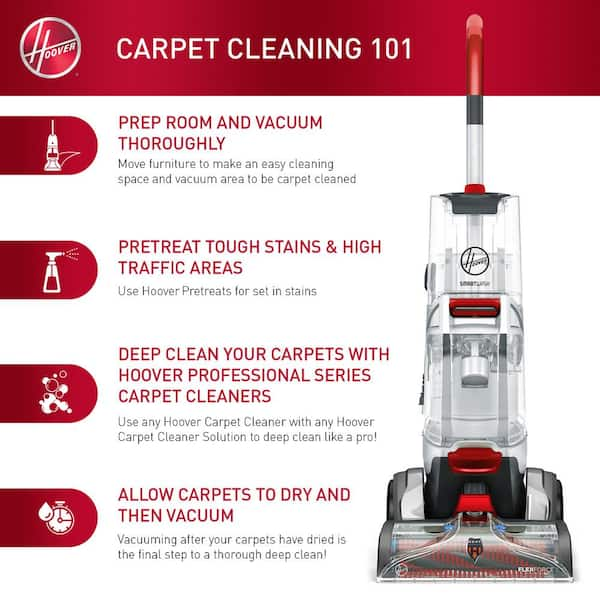
Improving suction and cleaning performance of your Hoover carpet cleaner is key to getting fresh, spotless carpets. Dirt, dust, and debris can clog the machine and reduce its power. Simple maintenance steps can help your cleaner work like new again. Check for blockages, clean the tanks, and replace filters regularly. These small tasks keep your cleaner running smoothly and extend its life.
Clearing Blockages
Blockages reduce suction and slow cleaning. Hair, threads, and dirt often get stuck inside the hose or brush. Turn off and unplug the machine before checking. Remove any visible debris carefully. Use a straightened wire or stick to clear deep clogs. Check the suction path and brush area thoroughly. Clear blockages to restore strong suction and better cleaning.
Emptying And Cleaning Tanks
Dirty water tanks harm cleaning performance. Empty the dirty water tank after each use. Rinse it with warm water to remove leftover dirt. Clean the clean water tank too. This prevents mold and bad smells. Dry tanks completely before reattaching. Regular tank cleaning ensures fresh water flows well. It keeps your Hoover working at its best every time.
Replacing Filters
Filters trap dirt and protect the motor. Clogged filters reduce suction power. Check the filter often for dirt buildup. Remove and rinse the filter with water. Let it dry fully before putting it back. Replace the filter if it looks worn or damaged. Fresh filters improve airflow and boost cleaning results. Keep your Hoover’s filters clean for strong, lasting suction.
Restoring Water Flow
Restoring water flow in your Hoover carpet cleaner ensures effective cleaning. Water moves through nozzles and tubes to spray the cleaning solution. Blockages or poor setup can stop the water from flowing. Fixing these issues helps your cleaner work well again.
Unclogging Nozzles
Nozzles often get clogged with dirt or debris. Turn off and unplug the cleaner before cleaning. Remove the nozzle carefully to check for blockages. Use a thin wire or a needle to clear any dirt. Rinse the nozzle under warm water to wash away residue. Dry it before placing it back.
Ensuring Proper Tank Placement
The water tank must sit correctly on the cleaner. Check if the tank locks into place firmly. A loose tank can stop water from flowing properly. Align the tank with the cleaner’s base carefully. Press down until you hear a click. This ensures a good connection for water flow.
Cleaning Water Lines
Water lines can get blocked by minerals or dirt. Detach the water lines gently from the cleaner. Flush them with warm water to clear buildup. Use a soft brush to clean inside the tubes if needed. Reconnect the lines securely to avoid leaks. Clean lines keep water flowing smoothly during use.
Fixing Brush Roll Issues
The brush roll plays a key role in your Hoover carpet cleaner. It helps lift dirt and dust from carpet fibers. Problems with the brush roll can reduce cleaning power. Fixing these issues can restore your cleaner’s performance.
Brush roll issues often involve debris, belt problems, or worn brushes. Each problem needs a simple fix. Start with cleaning the brush roll to remove stuck debris and hair. Then check the brush belt for damage or looseness. Finally, replace any worn brushes for better cleaning action.
Removing Debris And Hair
Turn off and unplug the cleaner. Locate the brush roll under the machine. Use scissors or your fingers to cut and pull away hair and debris. Remove any thread wrapped tightly around the brush. Clear both ends of the brush roll. Clean debris from inside the brush housing. A clean brush roll spins freely and works well.
Checking Brush Belt
Remove the brush roll to see the belt. Check the belt for cracks or stretching. A loose or broken belt stops the brush roll from turning. Replace the belt if it looks worn or damaged. Tighten the belt to ensure proper brush roll movement. A good belt keeps the brush roll spinning during cleaning.
Replacing Worn Brushes
Brushes wear down after long use. Worn brushes do not clean effectively. Remove the old brushes from the brush roll. Buy new brushes made for your Hoover model. Attach the new brushes firmly to the brush roll. Test the cleaner to confirm the brushes work well. New brushes improve dirt pickup and carpet cleaning.

Eliminating Odors
Bad smells from your Hoover carpet cleaner can spoil your cleaning experience. Odors often come from dirt, mold, or leftover moisture inside the machine. Removing these smells keeps your cleaner fresh and your carpets smelling good. Follow these steps to eliminate odors effectively.
Cleaning The Machine Thoroughly
Start by unplugging the machine and emptying all water tanks. Rinse the tanks with warm water to remove dirt and residue. Use a soft brush to clean the brushes and nozzles. Check the filters and remove any trapped debris. Let all parts dry completely before reassembling. This stops mold and bacteria growth that cause bad smells.
Using Deodorizing Solutions
Fill the clean water tank with a mixture of water and a mild deodorizing solution. Run the cleaner on a low setting to spread the solution inside. This helps kill odor-causing bacteria. Avoid harsh chemicals that can damage the machine. Use solutions made for carpet cleaners or simple natural options like vinegar. Rinse the machine with clean water afterward to remove any leftover solution.
Regular Maintenance Tips
Empty water tanks after each use to prevent stagnant water. Wipe the machine’s exterior and clean all removable parts weekly. Store the cleaner in a dry, well-ventilated place. Check hoses and filters often for blockages or buildup. Regular maintenance keeps the machine fresh and working well. Clean machines mean fresher carpets every time.
When To Seek Professional Help
Knowing when to seek professional help for your Hoover carpet cleaner saves time and effort. Some problems need expert skills to fix. Attempting complex repairs can cause more damage. Understanding the signs helps you decide the right moment to call a technician.
Identifying Complex Problems
Some issues are not easy to spot or fix. Strange noises, persistent leaks, or motor failure need expert attention. If your cleaner stops working suddenly or does not start, it might be a serious problem. Internal parts might be broken or worn out. Professionals have tools to diagnose these problems correctly.
Authorized Service Centers
Authorized service centers offer reliable repairs for Hoover cleaners. They use genuine parts made for your model. Repairs done here keep your machine working well longer. These centers have trained technicians who understand Hoover products. Choosing authorized help ensures quality and safety.
Warranty And Repair Options
Check if your Hoover carpet cleaner is still under warranty. Warranty can cover parts and labor for repairs. Avoid repairs by unapproved technicians during the warranty period. They might void your warranty. Knowing your repair options helps you save money and get the best service.

Frequently Asked Questions
Why Is My Hoover Carpet Cleaner Not Suctioning Water?
Clogged hoses or filters often block suction. Check and clean these parts to restore water flow. Also, ensure the tank is not full.
How Do I Fix A Hoover Carpet Cleaner Brush Not Spinning?
Debris or hair can jam the brush roll. Remove obstructions and check the belt for wear or breakage. Replace the belt if needed.
What Causes My Hoover Carpet Cleaner To Leak Water?
Leaks usually come from loose or damaged seals and tanks. Tighten connections and inspect seals for cracks or breaks. Replace faulty parts to stop leaks.
Why Does My Hoover Carpet Cleaner Smell Bad?
Dirty water tanks or filters cause bad odors. Clean and rinse the tanks after each use. Replace filters regularly to keep smells away.
How Can I Reset My Hoover Carpet Cleaner?
Unplug the machine and wait 10 minutes to reset internal controls. Plug it back in and turn on to see if it works properly. This often fixes minor errors.
Conclusion
Troubleshooting your Hoover carpet cleaner can save you time and money. Simple fixes often solve common problems. Check the filters, hoses, and brushes regularly. Keep the machine clean to avoid blockages. Remember to follow the user guide for best results.
Small steps prevent bigger issues later. With patience and care, your carpet cleaner will work well again. Stay calm and try each tip one by one. Cleaning your carpets can be easy and stress-free.