The Emtek EmTouch is a sophisticated electronic keypad lock designed for residential security, but users often require emtek emtouch troubleshooting when the interface becomes unresponsive or the motor fails to engage. Dealing with these issues requires a systematic approach, starting with power verification and moving toward internal mechanical adjustments. Whether you’re facing a dead keypad, a jammed bolt, or a failure to recognize your master code, solving these problems usually involves resetting the internal logic or addressing battery-related power degradation.
Key Takeaways
- Always replace all four batteries simultaneously with high-quality alkaline AA cells.
- The master code must be four to six digits long for the system to register inputs correctly.
- A factory reset restores the lock to original settings if the programming becomes corrupted.
- Check for mechanical friction between the latch and the strike plate to prevent motor strain.
- Ensure the ribbon cable between the interior and exterior units isn’t pinched or damaged.
Why is my keypad unresponsive?
When the EmTouch keypad fails to light up or register touch, the primary culprit is almost always power delivery. These units are highly sensitive to voltage drops. If you’re using rechargeable batteries, the lower nominal voltage often causes the touch screen to flicker or ignore input entirely.
Pro Tip: Always use fresh, brand-name alkaline batteries, as lithium batteries may sometimes cause voltage regulation errors in older firmware versions of the EmTouch system.
Troubleshooting Emtek EmTouch power issues
- Remove the interior cover and verify that the battery pack is securely seated.
- Check for corrosion on the battery terminals; use a soft cloth with a small amount of white vinegar to clean any blue or white residue.
- Ensure the wire harness is firmly plugged into the interior circuit board.
- Test the keypad immediately after a fresh battery installation to rule out a deep-sleep power cycle.
Is my lock jammed?
If you hear the motor whirring but the bolt doesn’t extend or retract, you likely have a physical obstruction. The EmTouch relies on a smooth path for the deadbolt to move. If the strike plate is misaligned, the motor will detect resistance and automatically stop to prevent gear damage.
| Component | Potential Issue | Recommended Fix |
|---|---|---|
| Strike Plate | Misalignment | Adjust strike plate hole depth |
| Deadbolt | Friction | Lubricate with dry silicone spray |
| Motor | Binding | Re-align the mounting screws |
| Chassis | Loose fit | Tighten the through-bolt screws |
How to perform a factory reset
If your programming has become erratic or you have forgotten the master code, a full factory reset is necessary. This process erases all stored user codes and returns the lock to the default state. You must have physical access to the interior side of the door to perform this action.
Factory reset procedure steps
- Remove the battery cover and disconnect the battery pack.
- Hold down the “EMTEK” button located on the interior assembly.
- While holding the button, reconnect the battery pack.
- Continue holding the button for ten seconds until you hear a series of beeps.
- Release the button and allow the system to initialize for thirty seconds.
Dealing with invalid code errors
Users frequently report that their valid codes are being rejected. This often happens if the lock has entered a “lockout” mode due to multiple failed entry attempts. Most Emtek models trigger a temporary lockout period after five incorrect entries. Wait at least five minutes before attempting to enter the code again. Ensure you aren’t accidentally pressing the “EMTEK” button before your code, as this can confuse the entry sequence on specific firmware versions.
Ribbon cable inspection techniques
The thin ribbon cable that connects the exterior keypad to the interior controller is the most fragile component of the system. If this cable is pinched during installation, it can cause intermittent connectivity. Inspect the cable for visible crimps, tears, or exposed copper wires. If the cable is damaged, the exterior unit will likely require a complete replacement, as these components are rarely user-serviceable.
Mechanical alignment and friction
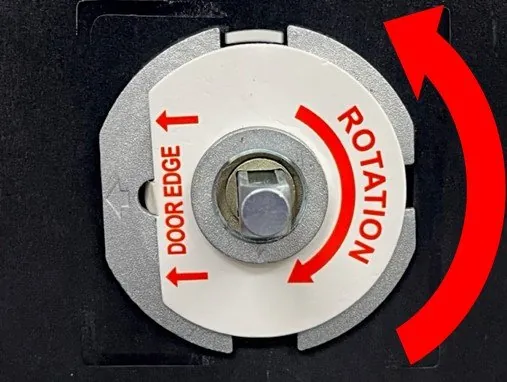
Even if the electronics are functioning perfectly, mechanical resistance can cause the lock to hang up. If you have to push or pull the door to get the bolt to lock, the hole in your door frame is likely misaligned or too shallow.
Improving bolt performance
- Use a file to deepen the strike plate mortise.
- Verify that the door isn’t sagging on the hinges.
- Check that the tailpiece is centered within the deadbolt cam.
- Ensure the mounting screws are tightened evenly to prevent chassis twisting.
How do I update firmware?
The Emtek EmTouch doesn’t support user-side firmware updates. Unlike modern smart locks that connect to Wi-Fi, the EmTouch is a standalone electronic device. If your unit is suffering from a major logic failure that a factory reset doesn’t resolve, the internal circuit board has likely reached the end of its service life. Contact the manufacturer directly for support regarding warranty claims if your unit is within the standard coverage period.
Cleaning the touch screen
A dirty or oily touch screen can cause ghost touches or failure to register your finger. Use a microfiber cloth slightly dampened with water to clean the surface. Never use harsh chemical cleaners, as these can strip the protective finish or damage the capacitive touch sensors beneath the glass.
| Cleaning Method | Status | Best Practice |
|---|---|---|
| Microfiber cloth | Safe | Daily maintenance |
| Isopropyl alcohol | Risky | Use only on stubborn grease |
| Glass cleaner | Avoid | Can damage sensitive seals |
| Abrasive sponges | Forbidden | Causes permanent surface scratching |
Understanding beep codes
The EmTouch uses a series of beeps to communicate status. A single long beep usually indicates a successful operation, while three short, sharp beeps typically signify an error. If you hear a continuous, high-pitched tone, this is often a warning that the battery voltage is critically low and requires immediate replacement to prevent a total lockout.
Battery replacement best practices
When replacing batteries, ensure you’re using high-quality alkaline cells. Avoid mixing brands or combining old batteries with new ones. This creates an uneven discharge rate, which can lead to rapid failure of the new batteries.
Warning: Never leave dead batteries inside the lock for an extended period, as leakage can corrode the circuit board and render the entire unit irreparable.
Troubleshooting motor noise
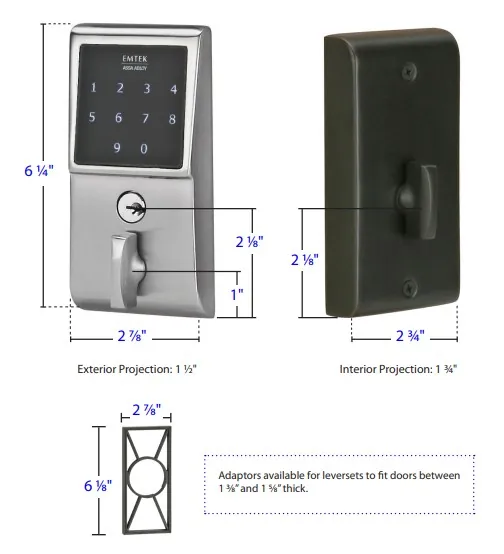
If the motor produces a grinding or screeching noise, it’s a sign of internal gear wear. This is often caused by years of operating against a misaligned strike plate. While you can sometimes lubricate the gears with a small amount of white lithium grease, this is usually a temporary fix. If the noise persists, the motor assembly is likely failing and will eventually seize.
Frequently Asked Questions
Why does my lock beep three times?
Three beeps indicate that the lock has rejected your input. This is most commonly caused by an incorrect entry code, a temporary security lockout due to too many failed attempts, or a mechanical binding issue where the deadbolt can’t fully extend. Wait five minutes, check for obstructions in the door frame, and attempt to enter the code again slowly.
Can I use rechargeable batteries?
While you can physically fit rechargeable batteries into the EmTouch, they’re generally not recommended. Standard rechargeable NiMH batteries provide a lower voltage output compared to fresh alkaline batteries. This can cause the lock to report a low battery status prematurely or cause the touch screen to become unresponsive, as the lock’s circuitry is calibrated for the higher voltage of alkaline cells.
How long should the batteries last?
Under typical residential usage—defined as approximately ten cycles per day—a set of high-quality alkaline batteries should last between six and twelve months. If your batteries are draining in less than three months, check for excessive mechanical friction in the bolt, which forces the motor to work harder and consume significantly more power than a well-aligned installation.
What is the master code default?
The default master code for new Emtek EmTouch locks is usually 1-2-3-4-5-6, but this should be changed immediately upon installation. If you purchased a pre-owned lock or can’t find your manual, you must perform a factory reset to return the lock to its default state. Once the reset is complete, you can program a new, secure master code of your choosing.
Will the lock work in extreme heat?
The EmTouch is rated for standard exterior residential use, but extreme temperatures can affect battery performance and touch screen sensitivity. In direct, intense sunlight, the capacitive touch sensors may occasionally become sluggish. If the lock is exposed to direct heat, ensure the batteries are fresh, as cold or heat-stressed batteries lose their ability to provide the surge current needed to actuate the motor.
Conclusion
Regular maintenance and attention to the mechanical alignment of your door are the most effective ways to ensure your EmTouch remains reliable over time. If you have exhausted these troubleshooting steps and the system remains unresponsive, it may be time to consult a professional locksmith or contact the manufacturer regarding a hardware replacement. Always keep a physical key handy as a backup for any electronic locking system.