Is your Fellowes shredder acting up right when you need it most? Whether it’s refusing to start, jamming constantly, or running non-stop, these frustrating problems can bring your shredding tasks to a halt.
But don’t worry—your shredder isn’t broken beyond repair. With a few simple checks and quick fixes, you can get it back to smooth shredding in no time. In this guide, you’ll discover easy troubleshooting steps tailored specifically for your Fellowes shredder.
You’ll learn how to clear paper jams safely, reset sensors, and keep your machine running longer with simple maintenance tips. Keep reading, and take control of your shredder’s performance today!
Common Issues
Power problems are a common issue with Fellowes shredders. These issues often prevent the machine from turning on or running properly. The cause usually relates to safety features designed to protect the user and the shredder. Two frequent causes are the waste bin not being seated correctly and dirty sensors that block operation. Fixing these is often simple and does not need special tools. Follow the steps below to address these power problems.
Reseating The Waste Bin
The shredder will not power on if the waste bin is not in place. The machine has a safety switch that stops operation to avoid accidents. Turn off the shredder and unplug it before handling. Remove the waste bin and empty all shredded paper. Check that the bin is clean and dry. Place the bin back evenly, making sure it fits tightly. Press the bin in until you hear a click or feel it lock. Plug in the shredder and try to turn it on. This action often solves the power issue.
Cleaning Sensors
Dirty sensors inside the shredder can block power to the machine. These sensors detect paper and safety conditions. Use a dry cotton swab or compressed air to clean the sensor area carefully. Do not use water or liquid cleaners as they can damage the electronics. Unplug the shredder before cleaning. Open the feed slot and find the small sensors near the entry point. Gently remove dust, paper bits, and debris. After cleaning, plug the shredder back in and test the power. This simple step can restore normal function.
Paper Jam Fixes
Overheating issues can cause your Fellowes shredder to stop working and may damage the motor. The motor heats up during heavy use or if the shredder runs for too long without breaks. Knowing how to handle overheating helps protect your shredder and keeps it running smoothly.
Shredders have safety features that shut off the motor to prevent damage from heat. Understanding these features helps you avoid long-term problems and extend your shredder’s life.
Cooling Down The Motor
Turn off and unplug the shredder immediately. Let the machine rest for at least 30 minutes. This pause allows the motor to cool naturally.
Place the shredder in a well-ventilated area during cooling. Avoid covering vents or placing the shredder near heat sources. Proper airflow helps reduce motor temperature faster.
Wait until the shredder feels cool to touch before using it again. Running it too soon may cause the motor to overheat again.
Recognizing Overheat Indicators
The shredder may stop working suddenly without warning. Some models display a red light or a flashing warning signal.
You might hear the motor slow down or notice a burning smell. These signs show the motor is too hot.
Check the user manual for specific error codes related to overheating. Knowing these codes helps you act quickly to prevent damage.
Power Problems
Resetting your Fellowes shredder can solve many common problems quickly. Sometimes the shredder stops working due to a minor error or overload. A reset clears these issues and allows the shredder to work again. Follow the correct steps to reset your specific model safely. Always unplug the shredder before resetting it to avoid injury or damage.
Model-specific Steps
Each Fellowes shredder model may have a different reset process. Some models have a reset button located near the power switch. Press and hold this button for a few seconds to reset the machine.
Other models require unplugging the shredder for five to ten minutes. This cools down the motor and clears the internal memory. After this, plug the shredder back in and switch it on.
Check your user manual for exact reset instructions. Using the wrong method can cause damage or fail to fix the problem.
Error Code Meanings
Fellowes shredders use error codes to show what went wrong. These codes appear as blinking lights or digital displays. Understanding these codes helps you reset the machine correctly.
For example, a red light often means the shredder is overheated. Let the shredder cool before resetting. A blinking green light could indicate a paper jam. Clear the jam before pressing the reset button.
Refer to your manual or the Fellowes website for a full list of error codes. Knowing what each code means saves time and prevents damage.

Frequently Asked Questions
How To Reset Fellowes Paper Shredder?
To reset a Fellowes paper shredder, turn it off and unplug it. Clear any jams using the reverse mode. Reseat the waste bin properly. Clean the sensors with a dry Q-tip. Plug it back in and turn on the shredder.
This resets most common issues.
Why Did My Shredder Suddenly Stop Working?
Your shredder may stop due to paper jams, overheating, an unseated bin, or dirty sensors. Turn it off, unplug, clear jams using reverse mode, reseat the bin, and clean sensors. Let the motor cool if overheated. Regularly oil blades to maintain performance.
What Is The Life Expectancy Of A Paper Shredder?
A paper shredder typically lasts 5 to 10 years with proper use and regular maintenance. Frequent heavy use may shorten its lifespan.
How Often Do I Need To Oil My Fellowes Shredder?
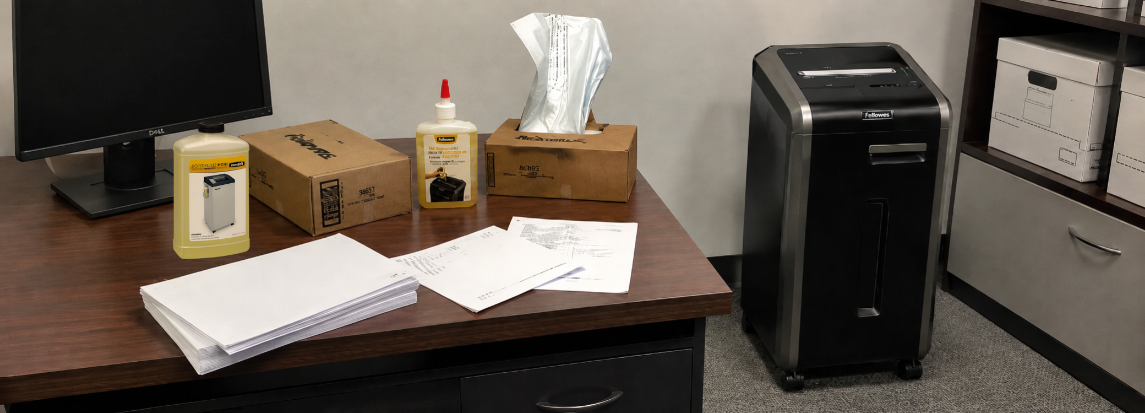
Oil your Fellowes shredder every time you empty the waste bin. Use Fellowes Shredder Oil or vegetable-based oil only. Avoid aerosol lubricants.
Why Is My Fellowes Shredder Not Turning On?
Check if the waste bin is seated properly to trigger the safety switch. Clean the feed slot sensors with a dry Q-tip or compressed air. Make sure the shredder is plugged in and the power switch is on.
Conclusion
Troubleshooting your Fellowes shredder becomes simple with these easy steps. Regularly check for jams and clean sensors to keep it running smoothly. Always unplug the shredder before any maintenance. Use proper oil to protect the blades and prevent damage. Small problems often have quick fixes you can do at home.
Remember to handle the machine gently and avoid forcing paper through. Consistent care extends your shredder’s life and improves performance. Keep your Fellowes shredder working well and avoid frustration with these tips.