To fix a light that stays on or blinks during the day, you should perform ge dusk to dawn light bulb troubleshooting by first checking for light interference or blocked sensors. The most common cause is a nearby light source—such as a streetlamp, porch light, or reflected glare—tricking the sensor into thinking it’s still nighttime. If the bulb flickers, it’s often due to an incompatible dimmer switch or a loose socket connection that interrupts the power supply.
Why light prevents the dusk to dawn bulb
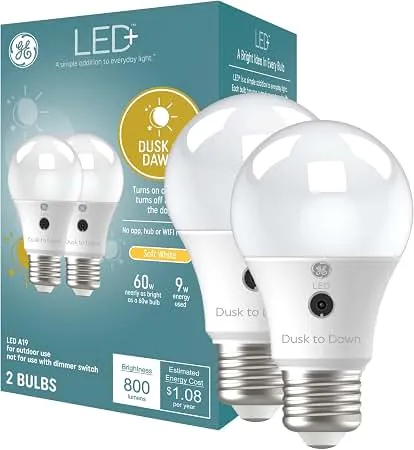
The primary reason these bulbs fail to turn off is the presence of ambient light hitting the sensor. These bulbs contain a small photocell designed to detect natural darkness; if it detects artificial light, it remains in its active state. This is a common issue in entryways where motion-sensor floodlights or decorative path lights shine directly onto the bulb’s sensor surface.
Another factor is the orientation of the socket. If the bulb is installed in a fixture where the sensor faces a wall or is tucked deep inside a metal shroud, it may not receive enough daylight to trigger the “off” mode. The Energy Star lighting guidance notes that proper placement is essential for sensors to function as intended. If the bulb isn’t receiving adequate light, it will stay on regardless of the time of day.
Finally, internal hardware failure can occur if the bulb was used on a circuit with a dimmer. These bulbs aren’t designed for dimming, and the voltage fluctuations can damage the internal control chip. If you have ruled out light interference and the bulb still fails to cycle, the internal photocell sensor has likely reached the end of its functional life.
Safety: Inside a mains-powered machine, the parts behind the outer cover can hold a dangerous electrical charge even after it has been unplugged — that’s why they sit behind a cover. Opening the housing, or testing or replacing anything behind it, is a job for a qualified technician, never a home repair.
Adjust the surrounding light environment
If you suspect the sensor is confused by nearby light, you must block that light from reaching the bulb. This is the most effective fix for lights that stay on during the day. Move any decorative lights that point toward your porch or entryway, or use a small piece of opaque tape to shield the sensor from a specific, offending light source if you can’t move the fixture itself.
Check if your light fixture has a glass cover or a metal cage that obscures the sensor. If the cover is dirty or tinted, clean it thoroughly with a dry cloth. If the sensor is still blocked, you may need to switch to a fixture with more open space. This fix is for homeowners who have already confirmed that their bulbs aren’t controlled by a wall-mounted dimmer switch.
A common mistake is assuming the sensor is broken when it’s actually experiencing “cycling.” This happens when the bulb turns on, illuminates a nearby wall, and the reflected light tricks the sensor into shutting off again. If your light flickers rapidly at dusk, move the fixture or rotate the bulb socket so the light beam faces away from reflective surfaces like white siding or brick.
If you find that the bulb works perfectly when moved to a different, more exposed socket, the issue is definitely the light environment. If the bulb fails in every socket you try, the internal sensor is likely faulty. If you’re uncomfortable working with fixtures or wiring, contact a licensed electrician to inspect your sockets for safety.
Reset the power and check the socket
A quick power cycle can resolve minor logic errors in the bulb’s internal timer. Turn off the light switch, wait for 30 seconds, and then turn it back on. This allows the internal capacitor to discharge and forces the bulb to re-scan its environment. Ensure the bulb is screwed firmly into the socket, as a loose connection causes intermittent power that mimics a sensor failure.
This method works best when the bulb is flickering or behaving erratically rather than staying on constantly. If you hear a buzzing sound, this often indicates a poor electrical connection between the bulb base and the socket tabs. If the socket looks corroded or burnt, don’t force the bulb, as this is a fire hazard.
Use this decision rule to determine if the hardware is at fault. If the bulb remains dark in a second, known-working lamp, the internal controller has failed. If it lights up elsewhere, the issue lies with the fixture’s wiring or the socket’s tension spring.
This isn’t for bulbs that have sustained physical damage or visible cracks in the housing. If the socket shows signs of melting, stop using the fixture immediately and have it replaced. If you have checked the tightness and the power cycle hasn’t helped, the bulb has likely suffered a permanent component failure. Avoid the common mistake of overtightening the bulb, which can permanently flatten the center contact tab and prevent future connectivity.
Replace the incompatible switch or bulb
If your light is connected to a wall dimmer, you must replace the switch with a standard “on/off” toggle. Dusk-to-dawn bulbs require a steady, full-voltage current to power their internal light-sensing circuits. Using a dimmer—even one set to 100%—often sends a “chopped” wave of electricity that confuses the sensor and causes the bulb to cycle rapidly or flicker.
This fix is necessary for anyone using these bulbs on a circuit controlled by a rotary or slider dimmer. Many homeowners assume that keeping the dimmer at maximum output bypasses the hardware limitations, but internal circuitry still detects the voltage modulation. This oversight often costs the user the life of the bulb, as the constant rapid switching stresses the capacitor.
If you aren’t familiar with home electrical systems, hire a professional to swap the switch. If you have already replaced the switch and the behavior continues, the bulb has likely been permanently damaged by the previous incompatible setup.
In this case, the only solution is to replace the bulb with a new one. Once you install the new bulb on a standard, non-dimming switch, it should operate correctly. If you find that even a new bulb fails to cycle, there may be a deeper issue with the electrical wiring in that specific fixture. Test the bulb in a lamp plugged into a known-good wall outlet; if it works there, the fixture’s socket or neutral wire is the culprit.
Common mistakes to avoid
Applying paint or heavy stickers to the sensor area permanently blinds the light, forcing it to remain on regardless of the time of day.
Using these bulbs inside an enclosed fixture prevents the sensor from detecting true ambient light levels. If the sensor can’t see the room, it defaults to “on” to ensure safety.
Leaving the bulb in a socket controlled by a dimmer switch is a critical error. The fluctuating voltage quickly ruins the internal electronics, often causing the bulb to flicker or fail within weeks. If your wall switch has a slider or a dial, replace it with a standard toggle before installing the bulb.
Attempting to open the bulb housing to repair the sensor voids the warranty immediately. Furthermore, the internal capacitor can hold a dangerous electrical charge even after the power is cut, posing a serious risk of shock.
Preventing future sensor issues
To keep your outdoor lighting working, match the bulb type to the fixture location. If you have a specific setup, see how to improve your results below.
| If you’re doing this | Do this instead | Why |
|---|---|---|
| Using a dimmer switch | Install a standard toggle switch | Dimmers disrupt the sensor signal |
| Installing in deep shades | Use an open or clear fixture | Sensors need a wide view of light |
| Facing sensor toward walls | Rotate the bulb or fixture | Sensors must see the open sky |
| Cleaning with wet cloths | Use a dry, soft microfiber cloth | Moisture can damage the seal |
Most homeowners fail by placing sensors near high-intensity security floodlights. If your sensor sits within three feet of another light source, the reflected glare forces the unit into a perpetual “daytime” mode. You’ll know this is happening if your lights flicker rapidly at dusk.
To fix this, install a small, opaque physical shield between the sensor and the competing light. If the flicker persists, your sensor is likely suffering from internal voltage leakage.
Frequently asked questions
Can I use a dusk to dawn bulb in an enclosed porch light?
No, you shouldn’t use these bulbs in enclosed fixtures because the sensor needs to detect natural daylight to function correctly. If the bulb is trapped behind glass or metal, the sensor can’t see the sun, which causes the light to stay on all day. You’ll get the best results by using an open fixture where the sensor has a clear line of sight to the sky.
How long does a ge dusk to dawn light bulb usually last?
These bulbs are typically rated for 15,000 to 25,000 hours of use, assuming they’re used in a compatible, non-dimming fixture. This lifespan can be much shorter if the bulb is frequently exposed to extreme heat or if it’s installed on a circuit with a dimmer switch. You can check the specific lifespan rating printed on the original product packaging or the manufacturer’s official specification sheet.
Why does my bulb flicker during the day?
Flickering is almost always caused by a voltage drop or an incompatible dimmer switch interfering with the internal sensor. When the bulb tries to turn off but detects a slight change in light, it may rapidly switch on and off, creating a strobe effect. If you have confirmed there’s no dimmer on the circuit, ensure the bulb is screwed in tightly to provide a stable connection.
Is it safe to leave a light on all day?
Yes, it’s physically safe for the bulb to stay on during the day, but it will significantly reduce the lifespan of the electronics inside. Leaving the light on constantly generates extra heat, which can cause the internal components to fail faster than intended. If the bulb is stuck on, you should address the sensor interference or replace the bulb to ensure it operates efficiently.
What happens if I use this bulb with a smart switch?
You should avoid using these bulbs with smart switches or timers, as the two systems will conflict with each other. The bulb’s internal sensor will try to turn the light on based on darkness, while the smart switch will try to control the power based on its own programming. This leads to unpredictable behavior, such as the light failing to turn on when you need it or blinking during the night.
Conclusion
Replacing the bulb is the most reliable solution if you have confirmed that your fixtures and switches are compatible but the light still fails to cycle. If the issue persists across different locations in your home, the fault lies with the bulbs themselves. For any persistent electrical issues that involve flickering or humming in your home’s wiring, always contact a professional electrician to ensure your home remains safe.
Related guides