Is your Hisense TV acting up when you least expect it? Frustration sets in when your favorite shows freeze, the screen goes blank, or the sound suddenly disappears.
But don’t worry—you’re not alone, and most problems have simple fixes. In this guide, you’ll discover easy ways to troubleshoot common Hisense TV issues quickly. By the end, you’ll feel confident handling your TV troubles without calling for expensive help.
Keep reading to regain control and enjoy your viewing experience again.

Picture Problems
Picture problems with your Hisense TV can be frustrating. These issues affect how you enjoy your favorite shows and movies. Understanding common picture problems helps you fix them quickly. This section covers typical picture issues and easy ways to solve them.
No Picture Or Black Screen
Sometimes, the TV screen stays black or shows no picture. Check if the TV is turned on and the power cable is secure. Make sure the input source matches the device you want to watch. Restart the TV by unplugging it for 30 seconds. If the problem continues, the HDMI cable or device may be faulty.
Fuzzy Or Blurry Image
A fuzzy or blurry picture makes it hard to see details. Check the cable connections to ensure they are tight. Adjust the picture settings by increasing sharpness and contrast. Lower resolution content can also cause blurriness. Try using a different input or streaming source to test the image clarity.
Color Issues
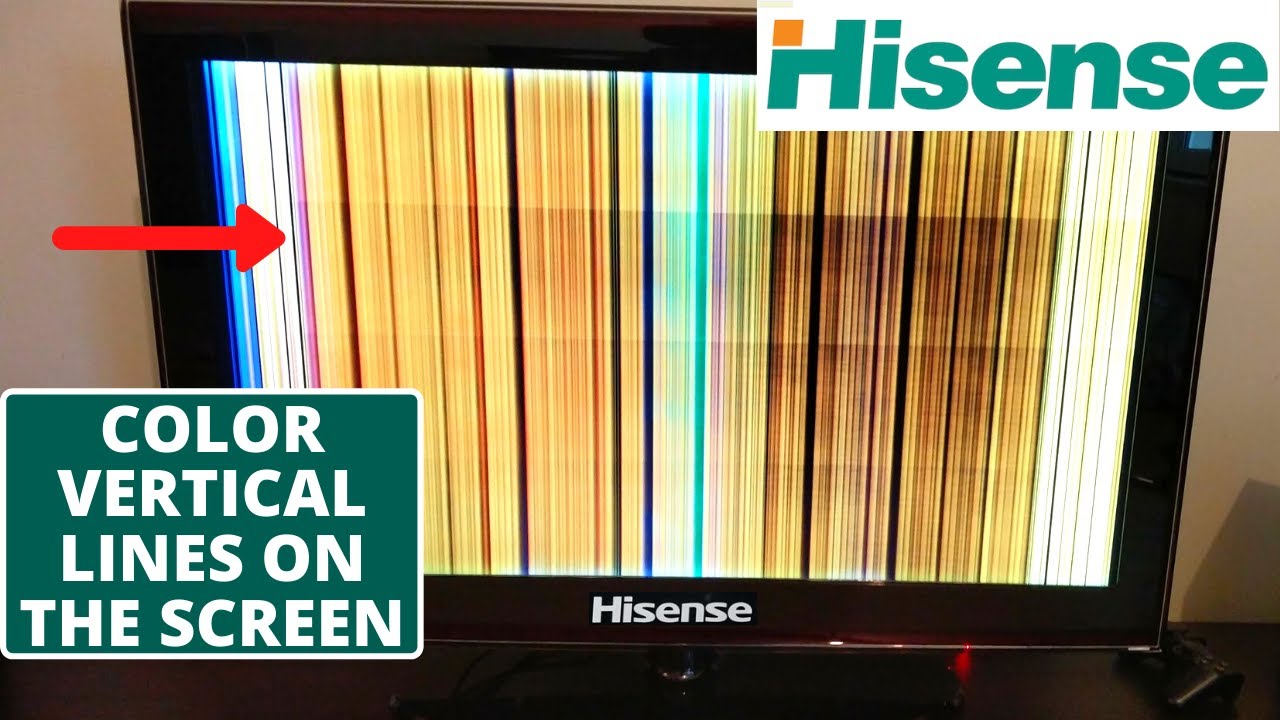
Color problems include dull, washed-out, or incorrect colors. Reset the TV’s picture settings to default. Check the color settings and adjust hue and saturation. Poor cable connections or damaged cables can cause color loss. Test with another cable or input device to find the cause.
Screen Flickering
Screen flickering disrupts viewing and can strain your eyes. This may happen due to loose cables or electrical interference. Secure all connections and move devices that may cause interference. Update the TV’s firmware to fix software bugs. If flickering persists, contact Hisense support for help.
Sound Issues
Sound issues on Hisense TVs can disrupt your viewing experience. These problems can range from no sound at all to strange distortions. Identifying the exact issue helps in fixing it quickly.
Below are common sound problems and easy steps to solve each one.
No Sound
No sound may be due to muted audio or wrong settings. Check if the mute button is on. Verify the volume level is up. Ensure the TV audio output matches your connected devices. Restart the TV to reset sound settings.
Distorted Audio
Distorted audio sounds unclear or crackling. This can happen from loose cables or interference. Tighten all audio cables and replace any damaged ones. Lower the volume if it’s too high. Reset the TV’s audio settings to default.
Volume Problems
Volume may not change or work unevenly. Test the remote control batteries. Use the TV buttons to adjust volume. Check for software updates that fix volume bugs. Unplug the TV for a few minutes to reset it.
Audio Sync Errors
Audio sync errors occur when sound and video do not match. This creates a delay that distracts viewers. Restart the TV and source device. Change the HDMI port or cable. Adjust audio delay settings in the TV menu.
Connectivity Challenges
Connectivity challenges can stop your Hisense TV from working well. These issues affect streaming, screen sharing, and overall TV use. Fixing these problems improves your viewing experience.
Common connection troubles include Wi-Fi, Bluetooth, HDMI ports, and Ethernet. Each has simple fixes to get your TV back online and working smoothly.
Wi-fi Not Connecting
Wi-Fi issues often cause slow or no internet on your TV. Check your router and TV distance. Restart both devices to refresh the connection. Enter the correct Wi-Fi password carefully. Ensure your TV software is up to date. Try forgetting the network and reconnecting.
Bluetooth Pairing Failures
Bluetooth devices may not pair with your Hisense TV easily. Turn Bluetooth off and on again on both devices. Make sure the device is in pairing mode. Remove old paired devices from the TV list. Restart the TV and the Bluetooth device. Keep devices close to avoid signal loss.
Hdmi Port Issues
HDMI port problems can cause no picture or sound. Check that the HDMI cable is firmly connected. Use a different HDMI cable to rule out damage. Test other HDMI ports on your TV. Clean the ports gently to remove dust or dirt. Restart your TV after reconnecting the cables.
Ethernet Troubles
Ethernet connection problems affect wired internet access. Confirm the Ethernet cable is securely plugged in. Try another Ethernet cable to check for faults. Restart your modem and TV for a fresh connection. Check your network settings on the TV menu. Ensure your router supports the TV’s Ethernet speed.
Remote Control Problems
Remote control problems can disrupt your TV viewing experience. They cause frustration and limit your access to features. Understanding common remote issues helps you fix them quickly. This section covers typical problems and easy solutions for Hisense TV remotes.
Unresponsive Remote
The remote may stop working suddenly. Check if the batteries are dead or inserted wrong. Dirt on the remote sensor or TV sensor can block signals. Clean both sensors gently with a soft cloth. Try aiming the remote directly at the TV. Test the remote from a close distance. Replace batteries if needed and test again.
Buttons Not Working
Some buttons may not respond when pressed. Dirt or dust can block button contacts inside the remote. Press each button several times to clear any dirt. If the problem stays, the remote might be damaged. Consider using a smartphone app as a temporary remote. Cleaning or replacing the remote may solve the issue.
Remote Pairing Tips
Hisense remotes sometimes lose connection with the TV. Turn off the TV and unplug it for 30 seconds. Press and hold the pairing button on the remote. Plug the TV back in while holding the button. Release the button after the TV powers on. Wait for a confirmation message on the screen. This process re-establishes the remote connection quickly.
Software Glitches
Software glitches can disrupt your Hisense TV experience. These issues often cause slow responses, crashes, or errors. Understanding common software problems helps you fix them quickly. Below are typical software glitches and ways to handle them.
Firmware Update Failures
Firmware updates improve your TV’s performance and security. Sometimes, updates fail to install properly. This can cause bugs or stop your TV from working right. Check your internet connection before updating. Restart the TV and try the update again. If problems persist, download the update file from the Hisense website and install it via USB.
App Crashes
Apps may crash due to bugs or outdated versions. Close the app completely and reopen it. Clear the app cache in the TV settings to free up space. Update the app to the latest version for better stability. Uninstall and reinstall the app if crashes continue. This often solves most app-related problems.
Tv Freezing Or Lagging
Freezing or lagging happens when the TV’s software runs slowly. Restart the TV to clear temporary files and free memory. Reduce the number of running apps to improve speed. Check for software updates and install them. If lagging continues, reset the TV to factory settings. This removes all data but often fixes deep software issues.

Power And Startup Issues
Power and startup problems are common with Hisense TVs. They stop the TV from working properly. These issues can be caused by simple errors or hardware faults. Understanding the problem helps fix it fast. Below are common power and startup problems and how to solve them.
Tv Won’t Turn On
When the TV does not turn on, check the power source first. Make sure the power cord is plugged in firmly. Try a different outlet to rule out socket problems. Press the power button on the TV, not just the remote. Sometimes the remote batteries are dead. If the TV still won’t start, reset it by unplugging for one minute. Plug it back and try again.
Random Shutdowns
Random shutdowns can be annoying and interrupt viewing. This often happens due to overheating. Ensure the TV has space around it for air flow. Dust inside the vents can cause heat build-up. Clean the vents gently with a soft brush or air blower. Check for software updates; outdated software may cause crashes. If problems continue, a power supply issue might be the cause.
Power Indicator Light Problems
The power indicator light shows the TV’s status. If it is off, the TV may not get power. A blinking light can mean a system error or standby mode. Note the blinking pattern; it often signals specific issues. Refer to the user manual for light codes. Resetting the TV can sometimes fix indicator light issues. Persistent problems may need professional repair.
Factory Reset And Maintenance
Factory reset and maintenance are key to keeping your Hisense TV working well. Regular care helps avoid many common problems. Resetting your TV can fix issues by restoring original settings. Proper cleaning keeps the screen clear and hardware safe. Knowing when to ask for help can save time and effort.
Performing A Factory Reset
Turn on your Hisense TV. Press the Menu or Settings button on your remote. Find the “System” or “Support” section. Select “Factory Reset” or “Reset to Default.” You may need to enter a PIN code. Confirm the reset to start. The TV will restart automatically. Remember, this deletes all your settings and apps.
Cleaning And Care Tips
Turn off and unplug your TV before cleaning. Use a soft, dry cloth for the screen. Avoid using water or harsh chemicals. Clean vents and ports gently with a soft brush. Keep the TV away from dust and direct sunlight. Do not spray cleaners directly on the screen. Regular cleaning improves picture quality and TV life.
When To Contact Support
Contact support if the TV won’t turn on. If the picture or sound is missing after reset, ask for help. Reach out when the remote doesn’t work or buttons are stuck. Support can guide you through complex issues or repairs. Keep your model number and purchase details ready for faster service.
Frequently Asked Questions
Why Is My Hisense Tv Not Turning On?
Check if the power cable is properly connected and the outlet works. Try pressing the power button on the TV itself. A reset may help if the TV remains unresponsive.
How To Fix No Sound On Hisense Tv?
Ensure the volume is not muted or too low. Check if external speakers or headphones are connected and working. Restart the TV to resolve temporary sound issues.
What To Do If Hisense Tv Remote Is Not Working?
Replace the remote batteries with new ones. Make sure there are no obstacles between remote and TV sensor. Try re-pairing the remote if it uses Bluetooth.
Why Is The Picture On My Hisense Tv Blurry?
Check the input source resolution matches the TV’s supported resolution. Adjust picture settings like sharpness and contrast in the menu. Clean the screen gently with a soft cloth.
How To Connect Hisense Tv To Wi-fi?
Go to TV settings and find the network or Wi-Fi section. Select your Wi-Fi network and enter the correct password. Restart the TV if it fails to connect initially.
Conclusion
Troubleshooting your Hisense TV can save time and money. Simple steps often fix common problems quickly. Start with basic checks like power and connections. Resetting the TV can solve many issues. Keep your software updated for best performance. If problems continue, contact Hisense support for help.
Taking action early prevents bigger issues later. Enjoy watching your favorite shows without interruptions. Stay calm and follow easy fixes first. Your Hisense TV can work smoothly again with patience.