Is your Honeywell QuietSet Tower Fan not working as it should? Don’t sweat it!
You’re not alone. Many of us rely on these fans to keep cool, and when they suddenly stop blowing air or won’t turn on, it can be incredibly frustrating, especially during hot weather. You’ve probably tried a few things already, maybe even unplugging it and plugging it back in.
But what if the problem is a little more complex? Don’t let a malfunctioning fan leave you feeling hot and bothered. This guide is here to help you quickly find solutions and get your Honeywell QuietSet Tower Fan back to its quiet, cooling glory. Let’s dive in and fix that fan!

Power Problems
Your Honeywell Quietset fan has no power. This problem can happen. Check the plug for a reset button or fuse. Unplugging it briefly might help.
When your Honeywell QuietSet Tower Fan won’t turn on, power issues are the first thing to check. These problems can be frustrating. Let’s fix them. No Power at All Your fan shows no signs of life. It will not turn on. This is a common problem. Intermittent Power Issues The fan turns on and off randomly. It may work for a bit. Then it stops working. This can be tricky. Checking the Plug and Outlet Make sure the fan is plugged in. Check the wall outlet. Is it working correctly? Try another appliance. Safety Reset Button Some fans have a safety reset button. Look on the plug. It might be a small red button. Press it firmly.
Fan Not Blowing Air
Your Honeywell QuietSet fan might not blow air due to simple issues. Check the power connection. Make sure the fan is properly assembled.
Your Honeywell QuietSet tower fan is not blowing air. This can be frustrating. Let’s find the cause. Airflow Obstructions Something might block the air. Check the vents carefully. Debris can collect inside. Remove any obstructions you see. Make sure nothing is in the way. Motor Issues The motor might have a problem. It powers the fan blades. Listen for any strange noises. A humming sound could mean trouble. The motor may need service. Blade Problems The fan blades could be the issue. They might be loose or stuck. Gently try to spin them by hand. They should turn freely. If they don’t, investigate further.
Unusual Noises
Strange sounds from your Honeywell QuietSet Tower Fan? Often, a quick fix is possible. Loose parts can cause rattling. Check the base for secure connections.
When your Honeywell QuietSet Tower Fan makes strange sounds, it can be concerning. These noises often signal a problem. Don’t worry. Many unusual sounds have simple fixes.
Grinding Or Scraping Sounds
Grinding or scraping means something is rubbing. A loose part could be the cause. Check the fan blades. Make sure they spin freely. Debris can get stuck inside. This causes friction. Remove any visible obstructions.
Rattling Noises
Rattling sounds often come from loose components. The fan’s housing might be loose. Check all screws. Tighten them if needed. The base could also be loose. Ensure the fan is stable on the floor. A wobbly fan rattles.
Fan Bearing Fixes
Worn fan bearings cause noise. They may also cause grinding. Bearings need lubrication. Over time, lubricant dries out. You can add more lubricant. This often quiets the fan. Sometimes, bearings need replacement. This is a more involved repair.
Remote Control Fails
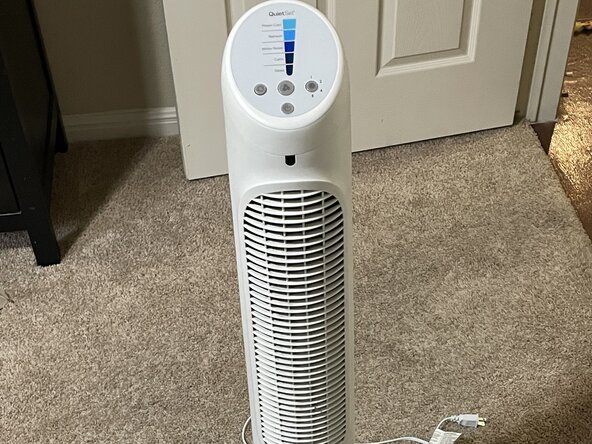
Remote control issues can be frustrating. When your Honeywell Quietset Tower Fan acts up, simple checks often help. Try these fixes for common problems.
Your Honeywell QuietSet tower fan is great. It offers convenience. Sometimes the remote control stops working. Do not worry. We can fix this. Several common issues can cause this problem. Let’s explore them.
Battery Check
The remote needs power. Batteries might be dead. Open the battery compartment. Check the battery orientation. Ensure they are placed correctly. Try new batteries. This often solves the issue.
Signal Interference
Other devices can block signals. Microwaves are a common culprit. Wireless phones can interfere too. Move the fan. Relocate other electronics. Try the remote again. A clear path helps.
Remote Repair Or Replacement
The remote might be broken. Physical damage can occur. Dropping the remote is common. Inspect the remote for cracks. If damaged, repair is unlikely. You may need a new remote. Contact Honeywell support. They can help you find a replacement.
Fan Stops Working Suddenly
Your Honeywell Quietset fan stopped working? Don’t worry. A few simple checks can often fix it. Try unplugging it, then plugging it back in.
Your Honeywell QuietSet tower fan suddenly stopped. This can be frustrating. Do not worry. We can help you fix it.
Overheating Protection
Fans have safety features. They stop working if they get too hot. This protects the motor. Let the fan cool down. Unplug it for some time. Then try turning it on again. Make sure vents are clear. Dust can block airflow.
Internal Component Failure
Sometimes parts inside break. The motor might fail. A wire could come loose. This is harder to fix yourself. You might need professional help. Or consider a replacement fan.
Resetting The Fan
A simple reset often works. Unplug the fan from the wall. Wait about 60 seconds. Plug it back in. Try turning it on. This can clear temporary glitches. Check the power cord too. Ensure it is plugged in securely.
Disassembly And Cleaning
Deep cleaning helps your Honeywell QuietSet tower fan. It ensures better airflow. It also makes the fan quieter. Follow these steps for a thorough clean.
Accessing Internal Parts
First, unplug the fan. This is important for safety. Lay the fan on its side. You will see a collar at the bottom. Unscrew this collar. Remove the base. Look for screws on the casing. These are usually Torx or Phillips screws. Remove these screws carefully. Gently pull the casing apart. This exposes the internal parts. Be gentle. Do not force anything. You can now reach the fan blades.
Cleaning Fan Blades And Vents
Dust builds up on fan blades. It also clogs the vents. Use a soft brush. Clean the fan blades. Wipe them down. Use a damp cloth if needed. Make sure the cloth is not too wet. Clean the vents thoroughly. Remove all dust and debris. A vacuum cleaner with a brush attachment works well. Ensure all parts are dry. Reassemble the casing later.
Lubricating Moving Parts
Some parts need lubrication. This reduces noise. It also improves fan performance. Identify moving parts. These include the motor shaft. Apply a small amount of lubricant. Use a product designed for electric motors. Do not use too much. Excess lubricant can attract dust. Reapply lubricant sparingly. This keeps the fan running smoothly. Ensure all parts are dry before reassembly.
Base Assembly Issues
The base is crucial for stability. Loose parts cause wobbling. This section addresses base assembly problems. It helps your fan stand firm.
Securing The Fan Housing
The fan housing must fit the base. Align the notches carefully. Gently rotate the housing. It should click into place. This ensures a snug fit. A secure housing prevents movement.
Tightening The Locking Nut
The locking nut secures the base. Thread the power cord through it. Bring the nut up inside the base. Tighten it firmly by hand. Do not overtighten this nut. A proper fit stops wobbling. Check it periodically.
Cord Management
Manage the power cord well. It exits through the base. Ensure the cord is not pinched. Proper routing keeps it safe. This also aids stability. Avoid tangles.
Seeking Further Help
Still having trouble with your Honeywell Quietset tower fan? You can find more specific repair guides online. Look for videos showing how to fix common issues. These resources offer detailed steps for troubleshooting.
When simple fixes do not work, more help is available. Do not worry if your fan still has problems. You can find more solutions.
Honeywell Support Resources
Honeywell offers official help. Visit their website. Look for a “Support” or “Contact Us” link. They have FAQs. They also have customer service phone numbers. You can get direct answers there.
Diy Repair Guides
Online videos show repairs. Search for your fan model. Many people share fix guides. These guides use simple steps. They can help you fix common issues. Watch the videos carefully.
When To Call A Professional
Some problems need expert help. If you are unsure, stop. Do not force any parts. A broken fan is frustrating. A repair person can help. They have special tools. They can fix complex issues. Your fan will work again.
Frequently Asked Questions
Why Isn’t My Honeywell Quietset Tower Fan Blowing Air?
Check the power cord and outlet. Ensure the fan is plugged in securely. Look for a reset button on the plug. Clean dust from the fan blades. The motor might be locked.
How To Take Apart A Honeywell Quietset Tower Fan?
Unplug your fan first. Lay it on its side. Unscrew the bottom collar. Remove the fan base. Take out the casing screws. Gently pull the fan casing apart.
Why Did My Honeywell Fan Just Stop Working?
Your Honeywell fan may stop working due to a power issue. Check the outlet and plug. A tripped reset button or blown fuse can also cause this. Try unplugging it for a minute. Then, plug it back in. This often resolves the problem.
Why Did My Tower Fan Stop Working?
Your tower fan may not work due to power issues. Check the outlet and cord. A reset button or fuse could be the problem. Ensure it is properly assembled. Overheating can also cause it to shut down.
Fan Not Turning On? Try This First.
Unplug the fan. Wait a minute. Plug it back in. This simple step often fixes power issues.
Conclusion
Your Honeywell QuietSet fan problems are solvable. Simple fixes often work best. Check the power source first. Ensure all parts are secure. Clean out dust for better airflow. These steps can restore your fan. Enjoy cool air again soon.