Is your Keurig K-Duo giving you trouble brewing your favorite coffee? You’re not alone.
Whether it’s not brewing a full pot, showing an “Add Water” error, or simply not turning on, these issues can quickly ruin your morning routine. But don’t worry—you don’t need to toss your machine or spend hours figuring it out.
In this guide, you’ll discover simple, clear troubleshooting steps that anyone can follow. From clearing clogs to performing a reset, you’ll learn how to get your Keurig K-Duo back to perfect brewing in no time. Ready to fix your coffee maker and enjoy that fresh cup again? Let’s dive in!
Power And Reset Issues
Power and reset issues are common reasons your Keurig K-Duo might stop working properly. These problems can prevent the machine from turning on or cause it to freeze. Knowing how to handle these issues can save you time and frustration.
Below are simple steps to fix power problems and reset your Keurig K-Duo. Follow each method carefully to get your coffee maker back in action.
Won’t Turn On
Check if the machine is plugged in securely. Sometimes, the outlet may not have power, so try another one. Make sure the power switch is turned on. If the machine still does not turn on, inspect the power cord for damage. A damaged cord may need replacement. Clean the machine’s contacts where the power cord connects. Dust or debris can block the connection. If these steps fail, try resetting the machine.
Processor Reset Steps
Unplug the Keurig K-Duo from the wall outlet. Wait at least 60 seconds to allow the processor to clear. While unplugged, press and hold the brew button for 5 seconds. Release the button and plug the machine back in. Wait for the machine to power on fully. This soft reset can fix minor software glitches. Test the machine by brewing a cup of coffee.
Hard Reset Method
Turn off the Keurig and unplug it from the power source. Remove the water reservoir and any pods inside. Hold down the power button for 10 seconds. While holding the button, plug the machine back in. Continue to hold the button for another 10 seconds. Release the button and replace the water reservoir. Turn on the machine and check if it works normally. This hard reset clears deeper errors that the soft reset cannot fix.
Water Flow And Add Water Errors
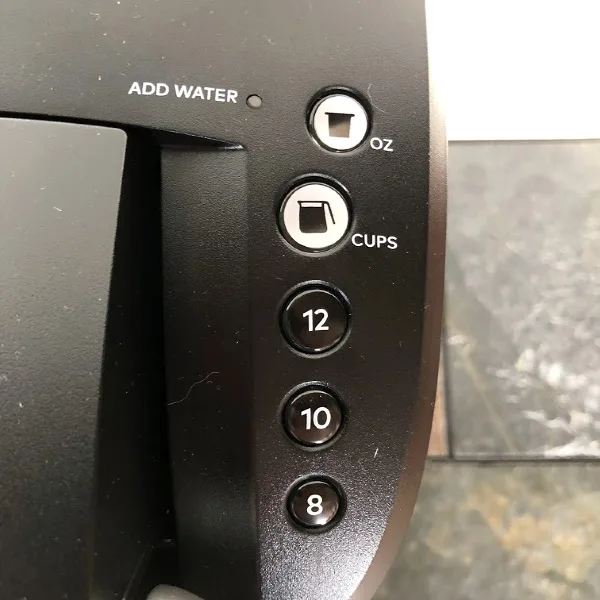
Water flow and add water errors are common issues with the Keurig K-Duo. These errors can stop your machine from brewing coffee properly. They usually occur due to problems with water supply or sensor malfunctions. Fixing these errors helps your Keurig work like new again.
Checking Water Reservoir
Start by removing the water reservoir from the machine. Check if it has enough water for brewing. Clean the reservoir to remove any dirt or debris. Make sure the reservoir is seated correctly on the machine. If the machine still shows an add water error, try filling the reservoir with fresh water. This simple step often solves the problem.
Descaling The Machine
Mineral buildup can block water flow inside the Keurig. Descaling removes these deposits and improves performance. Use a descaling solution or white vinegar for this process. Run the descaling cycle as per the machine’s instructions. Rinse the machine thoroughly afterward to remove any residue. Descaling prevents clogs and keeps water flowing smoothly.
Filter And Sensor Cleaning
Dirty filters and sensors can trigger add water errors. Remove the water filter from the reservoir and clean it gently. Use a soft cloth or brush to wipe the sensors inside the machine. Be careful not to damage any parts. Clean sensors help the machine detect water levels correctly. This step often clears false add water alerts and restores normal brewing.
Clogs And Grounds In Coffee
Clogs and coffee grounds often cause issues in the Keurig K-Duo. These blockages stop water flow and reduce brewing quality. Regular cleaning prevents buildup and keeps your machine working well. Simple steps clear the needles, brew basket, and grounds quickly. Follow these easy fixes to enjoy fresh coffee every time.
Clearing Blocked Needles
Blocked needles stop water from passing through the coffee pod. Use a paperclip or a needle to gently poke through the holes. Remove the pod holder and find the needles inside. Carefully clear any debris or coffee grounds stuck in the needles. Rinse the area with warm water to flush out leftover particles. This restores water flow and improves brewing.
Cleaning Brew Basket
The brew basket holds the coffee pod during brewing. Coffee oils and grounds build up here and cause clogs. Remove the basket from the machine and rinse it under warm water. Use a soft brush to scrub away residue from all corners. Dry the basket completely before placing it back. Clean baskets help maintain strong coffee flavor and smooth brewing.
Removing Coffee Grounds
Loose coffee grounds can block water pathways and affect taste. Open the top lid and remove any leftover grounds from the pod area. Wipe the inside with a damp cloth to clear hidden grounds. Check the drip tray and clean it regularly to avoid overflow. Keeping the machine free of grounds ensures fresh coffee every brew.
Brewing Problems
Brewing problems can spoil your coffee routine and cause frustration. The Keurig K-Duo is a reliable machine, but issues may arise. Understanding common brewing problems helps fix them fast. This section covers three frequent issues: not brewing full pots, stopping mid-cycle, and uneven coffee temperature.
Not Brewing Full Pots
When your Keurig K-Duo does not brew a full pot, check the water reservoir. Ensure it has enough water for the selected brew size. A clogged needle can block water flow. Clean the needle using a paperclip or the cleaning tool provided. Also, descale the machine regularly. Mineral buildup can reduce water flow and affect brewing volume.
Stopped Brewing Mid-cycle
Your machine may stop brewing in the middle of a cycle. This often happens due to blockages in the water line or pump issues. Turn off the machine and unplug it for a few minutes. Clean the needles and check the water reservoir. Make sure the coffee grounds or pod are correctly placed. If the problem persists, descaling might be necessary to clear internal buildup.
Uneven Coffee Temperature
Coffee that is too hot or cold can ruin your drink. Uneven temperature usually points to a heating element problem. Run a water-only brew cycle to check temperature consistency. Clean the machine’s internal parts to remove scale that may block heat transfer. Avoid placing the machine near cold drafts or heat sources. Proper maintenance keeps your coffee warm and tasty every time.
Error Messages And Indicators
Error messages and indicator lights on your Keurig K-Duo help you understand machine issues quickly. They guide you to fix problems without guesswork. Recognizing these signals saves time and avoids frustration.
Knowing what each message or light means allows you to act fast. This section explains common error codes, flashing lights, and simple troubleshooting steps. Keep your coffee maker working smoothly with clear instructions.
Common Error Codes
The Keurig K-Duo shows error codes on its display to signal problems. One common code is “Add Water,” meaning the water reservoir is empty or not seated correctly. Another code is “Descale,” which alerts you to clean mineral buildup inside the machine.
“Error” codes may also appear if the brew basket is not locked in place. Sometimes, the machine will display “Check Drip Tray,” indicating the tray is full or missing. Recognizing these codes helps you know exactly what needs attention.
Flashing Lights Meaning
Flashing lights on your Keurig K-Duo indicate different statuses or errors. A blinking brew button usually means the machine is heating up. If the water button flashes, it may signal low water or a problem with the water sensor.
Rapid flashing of all lights often points to a system error that requires a reset. Slow blinking lights might show the machine is in standby or cleaning mode. Understanding the pattern helps you decide the next step.
How To Troubleshoot Errors
Start troubleshooting by checking the water reservoir. Make sure it is full and properly seated. Remove and reseat the reservoir to ensure good contact with the machine.
Clean the brew basket and drip tray. Remove any coffee grounds or debris that might block sensors. Descale your machine regularly to avoid mineral buildup that causes errors.
If lights flash rapidly, unplug the machine for 5 minutes. Plug it back in to reset the system. If error codes persist, consult the user manual or contact Keurig support for help.
Maintenance Tips
Keeping your Keurig K-Duo in great shape needs regular care. Proper maintenance helps avoid common issues. It also keeps coffee tasting fresh. Simple habits can extend the life of your machine. Follow these easy maintenance tips for smooth brewing every day.
Regular Descaling Schedule
Descaling removes mineral build-up inside the machine. Hard water causes these deposits over time. Set a descaling schedule every 3 months. Use a descaling solution made for coffee makers. Run the solution through the machine as instructed. This step stops clogs and heating problems. Clean water flows better for better coffee.
Needle Cleaning Routine
The needles pierce coffee pods and can clog easily. Residue blocks water flow and causes errors. Clean the needles once a week for best results. Remove the needles carefully using the manual guide. Use a paperclip or a needle cleaning tool to clear holes. Wash removable parts with warm, soapy water. Dry well before reassembling to avoid damage.
Proper Storage Practices
Store your Keurig K-Duo in a dry, cool place. Avoid spots near heat or direct sunlight. Empty the water reservoir if not used for days. Keeping water inside invites mold and scale build-up. Cover the machine to keep dust and dirt out. Regularly check and clean the drip tray and pod holder. Proper storage keeps your machine fresh and ready.
When To Contact Support
Knowing when to contact Keurig support can save time and frustration. If your K-Duo shows persistent errors, stops brewing, or fails to heat water properly, support might be necessary. Minor problems like cleaning or descaling can be handled at home, but serious issues need expert help. Here’s when and how to reach out for assistance.
Warranty And Repairs
Check your Keurig K-Duo warranty before seeking repairs. Most models have limited warranties covering parts and labor. If your machine breaks down within the warranty period, repairs might be free. Avoid fixing complex problems yourself to keep the warranty valid. Contact Keurig support to start a warranty claim or ask about repair options.
Finding Authorized Service Centers
Use authorized service centers to ensure proper repairs. Keurig-approved centers use genuine parts and trained technicians. Visit the official Keurig website or call support to find the nearest center. Avoid unauthorized repair shops to prevent voiding your warranty or causing further damage.
Common Replacement Parts
Some parts wear out and need replacement over time. Common parts include water filters, drip trays, and needles. Keurig offers genuine replacement parts through its website and authorized sellers. Use only original parts for best results and to keep your machine working well. Support can guide you on what parts fit your K-Duo model.
Frequently Asked Questions
How Do I Reset My Duo Keurig?
To reset your Duo Keurig, unplug it for 5 minutes. Press and hold the power button for 5 seconds. Plug it back in and power on. This clears minor errors and refreshes the system.
What Is A Common Problem With Keurig?
A common Keurig problem is clogged needles caused by trapped coffee grounds. This blocks water flow and stops brewing.
How Long Should A Keurig Duo Last?
A Keurig Duo typically lasts 3 to 5 years with regular cleaning and proper maintenance. Lifespan varies by usage and care.
How Do I Do A Hard Reset On My Keurig?
To hard reset your Keurig, unplug it for 5 minutes. Press and hold the brew button while plugging it back in. Release the button when the lights flash. This resets the machine and may fix power or brewing issues.
Why Is My Keurig K-duo Not Brewing Coffee?
A common cause is clogged needles or water lines. Clean the needles and descale the machine regularly to fix this.
Conclusion
Troubles with your Keurig K-Duo can be fixed with simple steps. Check power sources and reset the machine if needed. Clean the needles carefully to avoid clogs and improve water flow. Descaling removes mineral buildup and keeps your coffee fresh.
Regular maintenance helps your Keurig work longer and better. Small fixes often solve common problems quickly. Keep your coffee maker clean and dry for best results. Enjoy brewing without hassle by following easy troubleshooting tips. Your Keurig can brew great coffee again soon.