Is your Somfy remote acting up and leaving your motorized blinds or shades unresponsive? It’s frustrating when your smart home convenience gets interrupted by a simple remote issue.
But don’t worry—you’re not alone, and most Somfy remote problems have quick, easy fixes. Whether your remote won’t connect, the buttons don’t work, or the motor won’t respond, this guide will walk you through step-by-step troubleshooting tips. By the end, you’ll know exactly how to reset, re-pair, and get your Somfy system back to smooth operation.
Keep reading, and take control of your blinds again without calling a technician or buying new gear!
Common Remote Issues
Somfy remotes are designed for ease and comfort. Still, common issues can disrupt your control over shades or blinds. Identifying these problems quickly helps restore smooth operation. Below are typical remote issues and simple ways to spot them.
Battery Problems
Low or dead batteries often cause remote failure. Check the battery level first if the remote stops responding. Replace old batteries with fresh ones. Ensure batteries are inserted correctly, matching the positive and negative ends. Use high-quality batteries for longer life and better performance.
Signal Interference
Signal interference blocks commands from reaching the motor. Electronic devices nearby can cause this problem. Wi-Fi routers, cordless phones, and microwaves may interfere with the remote signal. Keep the remote away from such devices. Test the remote closer to the motor to see if it works better.
Physical Damage
Drops or spills can harm the remote’s internal parts. Cracked buttons or broken casing prevent proper use. Inspect the remote for visible damage. Clean buttons gently with a soft cloth. If damage is severe, consider repair or replacement to avoid further issues.
Power And Connection Checks
Power and connection problems often cause Somfy remote issues. Checking these basics first saves time and effort. A quick inspection can restore proper remote function. Follow simple steps to ensure your motor and remote have power and good connections.
Verify Motor Power
Start by confirming your motor has power. For wired motors, ensure the power source is active. Check that the plug is firmly inserted in the outlet. Look for any visible damage to the power cord. If the motor is battery-powered, make sure the batteries are charged.
Inspect Battery Wand Connections
Battery wands need secure connections for proper operation. Examine the wand’s plug for tightness. Clean any dirt or corrosion on contacts using a dry cloth. Loose or dirty contacts can stop the motor from receiving power. Reconnect the wand firmly to restore power flow.
Confirm Remote Battery Installation
Check the remote control’s battery placement carefully. Remove the battery cover and ensure the battery is installed correctly. Match the positive (+) and negative (-) ends to the markings inside. Replace weak or dead batteries with fresh ones. Faulty batteries often cause remote failure.
Resetting Rts Motors
Resetting RTS motors is a key step in troubleshooting Somfy remote issues. This process helps clear errors and reconnects the motor to the remote. It often solves problems like unresponsive blinds or shutters. Follow the simple methods below to reset your RTS motor safely and effectively.
Performing Motor Reset
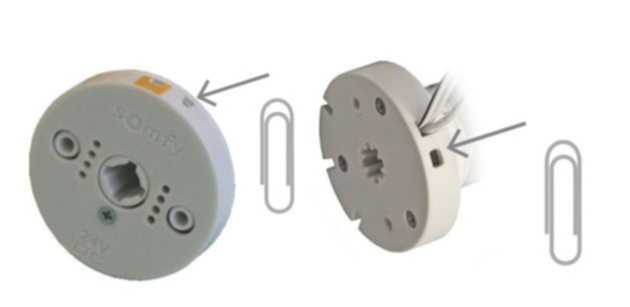
To perform a motor reset, first locate the motor’s power source. For wired motors, disconnect power for a few seconds. For battery-powered motors, remove the battery or unplug the wand. Wait about 10 seconds to ensure a full power down. Reconnect power or replace the battery. The motor should jog, indicating a reset. This resets the motor’s internal memory and clears faults.
Using The Prog Button
Most RTS motors have a small PROG button for programming. Press and hold this button for about 5 seconds. Release when the motor jogs or moves slightly. This action resets the motor’s connection to the remote. Afterward, you may need to re-pair the remote to the motor. The PROG button is often found on the motor or on the control box. Always check your motor’s manual for exact details.
Power Cycling Techniques
Power cycling is a quick way to reset your motor. Turn off the power supply to the motor. Wait at least 10 seconds before turning it back on. This brief power interruption helps clear minor software glitches. If your motor is battery-powered, remove the battery for 10 seconds. Reinstall the battery and test the motor with your remote. Power cycling often restores normal function without complex steps.
Re-pairing The Remote
Re-pairing your Somfy remote is essential when your motorized blinds or shades stop responding. This process reconnects the remote control to the motor, ensuring smooth operation. It is a simple step that often resolves many common issues with your Somfy system.
Below are clear instructions for pairing your remote with RTS motors, syncing multiple remotes, and fixing common pairing problems.
Pairing Steps For Rts Motors
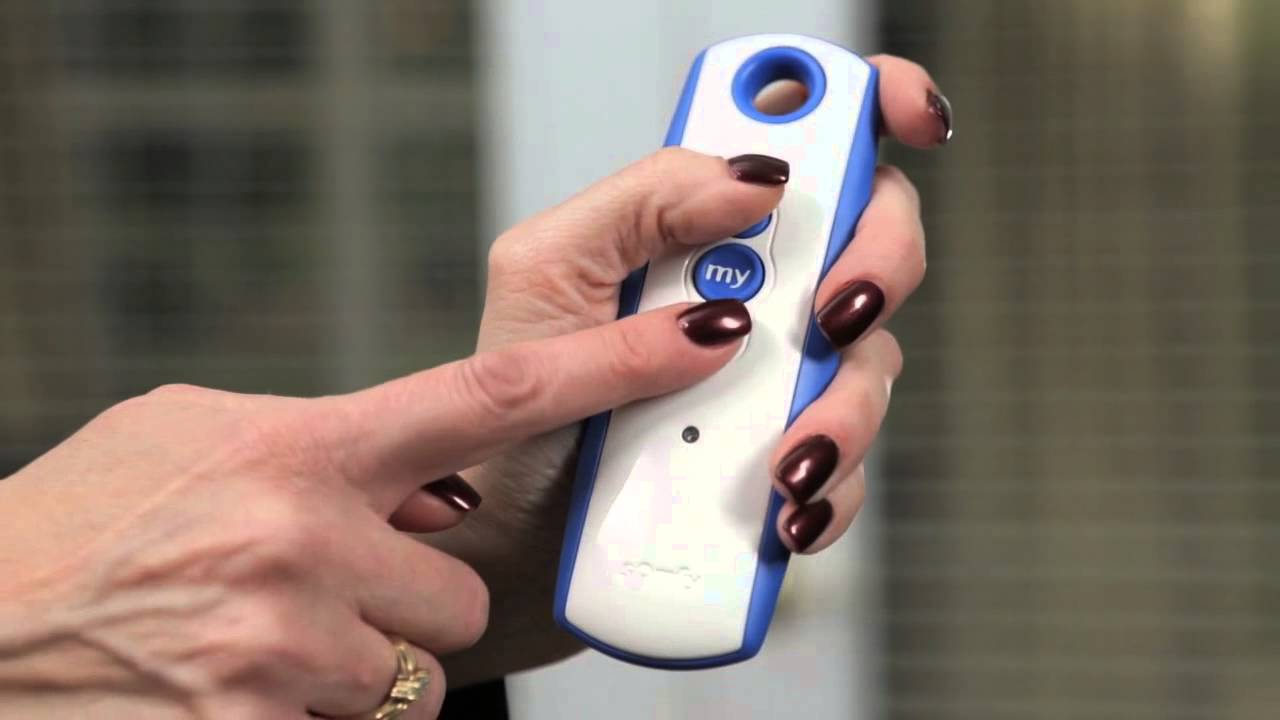
Begin by pressing the PROG button located on the back of the remote. Hold it until the motorized product jogs, signaling it is ready to pair. Release the button once the jog is complete. Test the remote by pressing any control button to confirm the connection.
This method works for most Somfy RTS motors and is the quickest way to restore control.
Syncing Multiple Remotes
You can control one motor with multiple remotes. To sync additional remotes, repeat the pairing steps for each remote individually. Each remote will send commands to the same motor after successful pairing.
Ensure you pair each remote close to the motor to avoid signal interference. This keeps all remotes working perfectly with your Somfy system.
Troubleshooting Pairing Failures
Check the remote battery first. Weak batteries often cause pairing issues. Replace them if needed. Also, verify the motor has power and is within range.
If pairing still fails, reset the motor by disconnecting power for a few seconds. Then try pairing again. Remove any obstacles between the remote and motor that may block the signal.
Contact support if problems continue after these steps. Most pairing troubles can be fixed with patience and the right method.
Advanced Troubleshooting
Advanced troubleshooting helps solve complex issues with your Somfy remote. These steps go beyond basic checks and power issues. Follow these to identify and fix deeper problems. Each step targets specific causes that may stop your motor or remote from working properly.
Checking For Thermal Shutdown
Somfy motors have a safety feature called thermal shutdown. It stops the motor if it gets too hot. This protects the motor from damage. To check, let the motor cool down for about 15 minutes. Avoid trying to move the blinds during this time. If the motor works after cooling, thermal shutdown was active. Make sure nothing blocks the motor or blinds to prevent overheating in the future.
Running A Jog Test
A jog test moves the motor a short distance in both directions. It checks if the motor responds correctly to commands. To run the test, press and hold the remote’s program button until the motor jogs. The motor should move slightly up and down. If it does not, the motor may need resetting or repair. This test helps isolate motor or remote issues quickly.
Resetting Limit Positions
Limit positions tell the motor where to stop. Incorrect limits cause blinds to stop too soon or go too far. To reset, use the remote’s programming mode. Follow the manual steps to reprogram upper and lower limits. This usually involves moving the blinds fully up and down during setup. Resetting limits restores proper travel range and smooth operation.
Remote Maintenance Tips
Proper maintenance keeps your Somfy remote working smoothly. Small steps help avoid common remote problems. These tips save time and extend remote life. Follow simple care rules to ensure your remote stays responsive. Regular attention to your remote prevents frustrating malfunctions.
Cleaning Contacts
Dirty contacts can stop your remote from working. Use a dry cloth or cotton swab to clean the battery contacts. Avoid using water or liquid cleaners. Gently remove dust or corrosion to improve connection. Clean contacts help maintain steady power flow.
Battery Replacement Best Practices
Replace batteries before they run out completely. Use the exact battery type recommended by Somfy. Insert batteries with correct polarity to avoid damage. Remove old batteries if you won’t use the remote for a long time. Check battery compartment for corrosion before inserting new batteries.
Avoiding Signal Blockage
Keep the remote clear of objects that block signals. Avoid metal surfaces or thick walls between remote and motor. Point the remote directly at the device for best results. Store the remote in an open area, not inside drawers or cabinets. Signal blockage often causes unresponsive controls.
When To Contact Support
Knowing when to contact Somfy support can save time and avoid frustration. Not all issues require professional help. Some problems are simple and can be fixed at home. Others need expert attention to prevent damage or safety risks.
Contact support if basic troubleshooting steps do not solve the problem. This ensures you get the right guidance for your specific device and setup. Professional help avoids unnecessary repairs or replacements.
Identifying Hardware Failures
Hardware failures often cause remote control problems. Look for physical damage on the remote or motor. Check for broken buttons or cracked casing. Listen for unusual sounds from the motor. No response or weak signals can also indicate hardware issues. If these signs appear, contacting support is necessary. They can confirm the problem and suggest repair options.
Gathering System Information
Before reaching out, gather all system details. Note the model number of your Somfy remote and motor. Record the type of power supply used, such as battery or wired. Write down any error lights or codes shown on the device. Describe the steps already taken to fix the issue. This information helps support diagnose the problem faster and provide accurate solutions.
Preparing For Professional Help
Prepare your system for a smooth support experience. Keep your remote and motor accessible. Ensure the area around your blinds or shades is clear. Charge or replace remote batteries before the call. Have your warranty or purchase details ready. These steps allow the technician to assist you quickly and effectively.
Frequently Asked Questions
How Do I Reset My Somfy Remote?
To reset your Somfy remote, press and hold the PROG button until the motor jogs. This re-pairs the remote with the motor. Ensure the battery is correctly installed before resetting.
Why Does My Somfy Remote Not Work?
Your Somfy remote may not work due to dead batteries, improper pairing, or power issues with the motor. Check battery installation, motor power, and re-pair the remote by holding the PROG button until the motor jogs. Ensure connections are secure and clean for proper function.
Why Is The Green Light Flashing On My Somfy Motor?
The green light flashing on your Somfy motor indicates a pairing or programming mode. It may also signal low battery or a connection issue. Check power, battery contacts, and re-pair the remote by holding the PROG button until the motor jogs.
Why Are My Electric Blinds Not Responding To The Remote?
Check the remote’s battery and replace if needed. Ensure the motor has power and is connected properly. Re-pair the remote by holding the PROG button until the blinds jog. Clean contacts and confirm no thermal shutdown occurred.
How Do I Reset A Somfy Remote Control?
To reset a Somfy remote, press and hold the PROG button until the motor jogs. This re-pairs the remote with the motor. The remote itself cannot be fully reset.
Conclusion
Troubleshooting your Somfy remote can be quick and simple. Start by checking the batteries and power supply. Next, try resetting and re-pairing the remote with the motor. Small steps often fix common issues fast. Keep instructions handy for easy reference.
Don’t hesitate to seek support if problems persist. Your motorized shades will work smoothly again soon.