If you own a Nespresso machine, you know how convenient it is to get quality coffee with just a button press. But what happens when your Nespresso starts flashing lights and refuses to make your morning espresso? These blinking lights can be confusing, and many owners worry about what’s wrong. The good news: flashing lights are not random. Nespresso machines use light codes to tell you what they need. You just need to know how to “read” the signals.
This guide will walk you through Nespresso machine troubleshooting for flashing lights. You’ll learn what each pattern means, how to fix common problems, and when it’s time to call for help. We’ll cover popular models like the Nespresso Vertuo, Essenza Mini, and Citiz, and share real examples. By the end, you’ll feel confident solving most issues—without stress or wasted time.
Understanding Nespresso Machine Light Codes
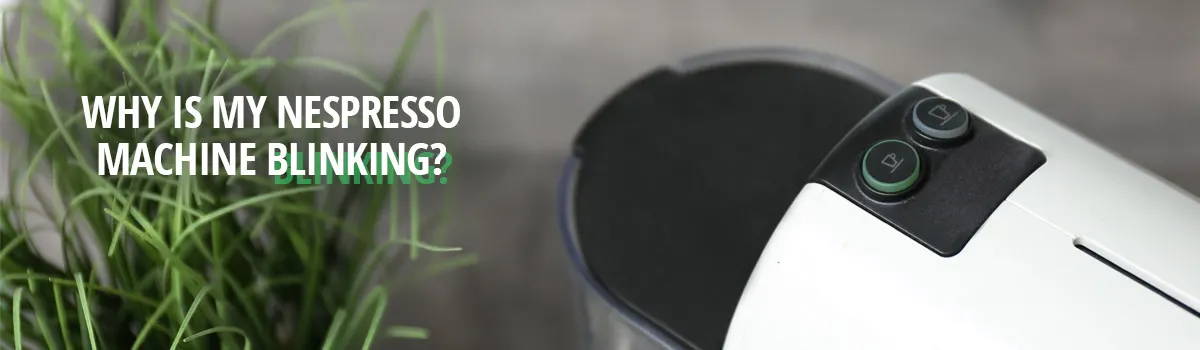
Nespresso machines use flashing lights as a way to communicate. The lights are usually on the brew buttons or the top of the device. Each light color, speed, and pattern has a specific meaning. The most common signals are:
- Steady light (machine is ready)
- Slow blinking (warming up or cooling down)
- Fast blinking (error or attention needed)
- Alternating lights (descaling or maintenance mode)
- Red or orange lights (serious error)
Different models may use different colors or patterns, but the core logic is similar. Always check your machine’s manual for exact details. However, many issues and codes are universal across Nespresso’s line.
Why Do Nespresso Machines Blink?
The light codes help you:
- Know if the machine is heating or ready
- Get alerts about empty water tanks
- Learn when to descale or clean
- Identify if there is a mechanical jam
- Understand if there’s a more serious error
If your Nespresso is blinking, don’t panic. Most problems are simple to fix at home.
Common Flashing Light Patterns And What They Mean
Let’s look at the most common Nespresso flashing light patterns, what they signal, and how to respond.
1. Steady Light
- Meaning: The machine is on and ready.
- What to do: Insert a capsule and brew.
2. Slow Blinking (white Or Green)
- Meaning: Pre-heating or cooling down.
- What to do: Wait 20–30 seconds until the light becomes steady.
3. Fast Blinking (2–3 Times Per Second)
- Meaning: Error detected (could be water tank, capsule, or internal issue).
- What to do: Check water level, capsule, and any obvious blockages.
4. Alternating Or Dual Blinking Lights
- Meaning: Often means descaling or cleaning is required.
- What to do: Start the descaling process using Nespresso solution.
5. Red Or Orange Light (steady Or Flashing)
- Meaning: More serious error or overheating.
- What to do: Unplug for 15 minutes, let it cool, then restart. If it persists, see the troubleshooting section.
6. Pulsing Or Fading Light
- Meaning: Software update or system reset in progress (rare, mostly on newer models).
- What to do: Do not unplug. Wait until the process finishes.
Credit: www.gourmesso.com
Troubleshooting Steps For Each Light Code
Not all blinking lights mean the same thing. Here’s how to solve the most frequent Nespresso flashing light problems.
Nespresso Vertuo Machine
The Vertuo series uses a large button with a ring light. Here’s what the main patterns mean:
| Light Pattern | Meaning | Solution |
|---|---|---|
| Steady green | Ready to brew | Insert capsule, press button |
| Slow blinking green | Heating up | Wait 30 seconds |
| Fast blinking green | Water tank empty / not detected | Refill, reseat tank |
| Alternating red & green | Descale needed | Run descaling cycle |
| Steady red | Machine error or overheating | Unplug 15 min, restart |
| Fast blinking red | Serious error | Contact support if reset fails |
Nespresso Originalline (essenza Mini, Pixie, Citiz)
These models use two small brew buttons, each with a light.
| Light Pattern | Meaning | Solution |
|---|---|---|
| Both lights steady | Ready to brew | Insert capsule |
| Both lights blinking rapidly | Water tank empty or not in place | Check and refill tank |
| Both lights blinking slowly | Warming up | Wait 20 seconds |
| One light blinking, one steady | Descale needed or lever not closed | Descale or close lever firmly |
| Both lights blinking alternately | Reset or error mode | Try resetting machine |
Nespresso Lattissima Models
Lattissima machines have milk frother lights and coffee button lights.
- Milk frother light blinking: Clean the milk system.
- All lights flashing: Machine error; unplug and restart.
- Descale light on: Descaling required.
Non-obvious Insight 1
Some users ignore the water tank sensor. Even if your tank looks full, if it’s not seated perfectly, the machine will blink rapidly and not brew. Always lift the tank out and reseat it firmly. Invisible air bubbles or misalignment can stop the machine from detecting water.
Non-obvious Insight 2
If your machine blinks after brewing but doesn’t reset, check the capsule container. If it’s full, the Nespresso won’t cycle again. Empty the used capsule bin, close the lever, and try again.
Step-by-step Fixes For Flashing Lights
Let’s break down the most effective troubleshooting steps for when your Nespresso machine starts flashing.
1. Check The Water Tank
- Remove and refill the tank with fresh water.
- Reseat the tank firmly; listen for a click.
- Make sure there are no cracks or leaks.
2. Inspect And Insert Capsule
- Open the capsule lever.
- Remove any stuck capsules.
- Insert a new capsule and close the lever fully.
3. Empty The Capsule Container
- Take out the used capsule bin.
- Dispose of old capsules and rinse the bin.
- Re-insert the container securely.
4. Descale The Machine
- Use official Nespresso descaling solution.
- Follow the model-specific instructions (usually involves holding down both brew buttons for 3–5 seconds).
- Rinse the machine thoroughly after descaling.
5. Power Cycle The Machine
- Turn off and unplug the machine.
- Wait at least 15 minutes.
- Plug it back in and turn on.
6. Reset To Factory Settings
- For Vertuo: Hold the button down for 7 seconds with the lever in the unlock position.
- For OriginalLine: Press and hold both buttons for 3 seconds, then release when lights blink.
- This clears many errors.
7. Clean All Parts
- Wipe the capsule area and water tank with a soft cloth.
- Run a water-only cycle (no capsule) to flush out blockages.
- Clean the milk system if your model has one.
8. Check For Blockages
- Look for coffee grounds or debris in the spout and capsule area.
- Use a toothpick or cleaning tool to gently clear any blockages.
9. Examine Power Source
- Plug the machine directly into a wall outlet (avoid power strips).
- Test a different outlet if the machine won’t power up.
10. Contact Nespresso Support
If you’ve tried all steps and the lights keep flashing, contact Nespresso Customer Service. Persistent blinking red or orange often means a technical fault that needs repair.
Why Descaling Is Critical For Flashing Light Errors
Descaling removes mineral deposits inside your Nespresso. Hard water can cause lime buildup, leading to:
- Poor water flow
- Overheating errors
- Flashing lights (especially alternating or orange/red codes)
Nespresso recommends descaling every 3 months or after 300 capsules. If you notice the machine struggling or lights blinking after brewing, it’s often a sign descaling is overdue.
How To Descale (general Steps)
- Empty the machine: Remove any capsule and empty the used capsule bin.
- Add descaling solution: Mix Nespresso solution with water and pour into the tank.
- Start descaling mode: Usually by pressing and holding both brew buttons.
- Run cycles: Let the mixture run through until the tank is empty.
- Rinse: Fill with clean water and run again to flush out residue.
Always check your manual for model-specific instructions.
Model-specific Troubleshooting: Examples
While many solutions are universal, each Nespresso model has some unique codes. Here are examples for three popular machines.
Nespresso Vertuo Next
- Flashing orange 2 times/second: Water tank is empty or not detected.
- Fix: Reseat the tank, check for air bubbles.
- Steady red light: Machine overheated.
- Fix: Unplug and let cool for 20 minutes.
Nespresso Essenza Mini
- Both lights blink rapidly for 10 seconds: Needs reset.
- Fix: Hold both buttons for 5 seconds, unplug and restart.
- One light steady, one blinking: Lever not fully closed or descale needed.
- Fix: Close lever or descale.
Nespresso Citiz
- Both lights blink alternately: Possible system error.
- Fix: Reset machine, check for blockages, or descale.
Real-world Example: Fixing A Blinking Nespresso
Maria owns a Nespresso Vertuo Plus. One morning, the button started blinking rapidly and refused to brew. She checked the water tank—it was full. But the machine still blinked.
She then:
- Removed and reseated the water tank.
- Opened the capsule lever and found a used capsule stuck.
- Cleared the capsule, emptied the bin, closed the lever.
- The light returned to steady, and she could brew again.
Lesson: The flashing light was not a serious error but a stuck capsule and misaligned water tank. Many errors are simple fixes if you know where to look.
When To Worry: Serious Flashing Codes
Most blinking patterns are warnings, not emergencies. However, call Nespresso support if:
- The light is solid red and won’t reset after unplugging
- The light blinks orange or red rapidly for more than 30 seconds
- The machine is hot to the touch or smells burned
- Water leaks from the base
These signs may mean an internal electrical or heating problem. Do not try to open the machine yourself, as this may void your warranty.
Comparing Common Nespresso Models And Their Light Codes
Here’s a quick reference for how three top models handle flashing lights:
| Model | Light Color | Normal Operation | Descale Warning | Error Code |
|---|---|---|---|---|
| Vertuo Plus | Green/Red | Steady green | Red/green alternate | Steady red |
| Essenza Mini | White | Steady white | One light blinking | Both lights flash fast |
| Lattissima One | White/Orange | Steady white | Steady orange | All lights flashing |
How To Prevent Flashing Light Problems
You can avoid most Nespresso flashing light errors with simple habits:
- Use filtered water: Reduces mineral buildup.
- Descale regularly: Every 3 months or as soon as the descale light appears.
- Clean the capsule area: Remove used capsules and wipe down after each use.
- Check the water tank daily: Always refill and reseat properly.
- Unplug if not used for days: Helps reset minor software errors.
- Follow the manual: Each model has specific maintenance steps.
Common Myths About Nespresso Flashing Lights
Let’s clear up some common misunderstandings.
- Myth: “Flashing lights always mean the machine is broken.”
Truth: Most flashing codes are routine maintenance, not hardware faults.
- Myth: “You can use any descaler.”
Truth: Nespresso recommends their own solution. Some generic descalers can damage seals or sensors.
- Myth: “You need to open the machine if lights flash.”
Truth: Opening the machine can void your warranty and usually isn’t needed.
- Myth: “Unplugging always fixes flashing lights.”
Truth: This helps for overheating or software bugs, but not if you need to descale or clear blockages.
When To Call Nespresso For Service
If you experience any of the following, call support:
- Flashing lights don’t stop after all reset and cleaning steps
- The machine leaks or makes loud, strange noises
- The power light won’t come on at all
- The machine is still under warranty (never open it yourself)
Nespresso’s customer service will walk you through advanced troubleshooting and may arrange a repair or replacement.
Additional Tips For Reliable Operation
- Only use original Nespresso capsules. Off-brand pods can cause jams.
- Store your machine in a dry area. Moisture can affect sensors.
- Check the drip tray and used capsule container weekly.
- For milk frother models, clean the milk pipe after each use.
Key Takeaways
- Flashing lights are a built-in communication system, not random errors.
- Most issues can be fixed by checking water, capsules, and cleaning.
- Descaling is one of the most important maintenance steps.
- If in doubt, reset the machine or consult your manual.
- Persistent errors need professional help—don’t force or disassemble the machine.
For more details, the official Nespresso support site provides step-by-step guides for every model. See their advice at Nespresso Customer Care.
Frequently Asked Questions
What Does A Flashing Red Light Mean On My Nespresso?
A flashing red light usually signals a serious error, overheating, or internal fault. Unplug your machine for 15–20 minutes. If the light stays red after restarting, contact Nespresso support. Do not try to brew or open the machine.
How Often Should I Descale My Nespresso Machine?
Descale every three months or after about 300 capsules, whichever comes first. Hard water areas may need more frequent descaling. A blinking descale light is a clear sign it’s time.
Why Is My Nespresso Blinking But Not Brewing?
This could mean the water tank is empty, not properly seated, or a used capsule is stuck. Also check for a full capsule container. If all else fails, try resetting the machine.
Can I Use Vinegar To Descale My Nespresso?
Nespresso does not recommend vinegar because it can damage machine seals and sensors. Always use the official Nespresso descaling solution for best results.
What Should I Do If All Lights Are Flashing On My Nespresso?
If all lights are flashing, unplug your machine and let it rest for at least 15 minutes. This usually means a system error or overheating. If the issue returns, contact Nespresso customer service.
CONCLUSION
Nespresso machines are reliable, and most flashing light problems are easy to solve at home. With a little troubleshooting, you’ll be back to enjoying your espresso in no time.