Is your phone line acting up at the worst possible time? You’re not alone, and fixing it might be easier than you think.
Imagine picking up your phone and hearing nothing, or dealing with constant static that drives you crazy. These problems can disrupt your day and cause serious frustration. But don’t worry—this guide will walk you through simple steps to troubleshoot your phone line quickly.
By the end, you’ll know exactly what to check and how to get your calls clear again. Keep reading, because your solution is just a few easy fixes away.
Common Phone Line Issues
Phone line problems can be frustrating and disrupt your daily communication. Understanding common issues helps in quick troubleshooting. These problems often have simple causes and fixes.
No Dial Tone
No dial tone means you cannot hear any sound when picking up the phone. This issue may occur due to loose connections or damaged wires. Check if the phone is properly plugged into the wall jack. Sometimes, the problem comes from the phone device itself. Try using a different phone to test the line.
Static Or Noise On Line
Static or noise makes it hard to hear the other person clearly. It can sound like crackling, buzzing, or humming. This often happens because of poor wiring or electrical interference nearby. Keep phones away from electronic devices that may cause noise. Inspect the phone cord and replace it if worn out.
Dropped Calls
Dropped calls end unexpectedly during conversations. This can happen due to weak signal strength or faulty equipment. Check if the phone jack is secure and not damaged. Sometimes, the problem lies with the service provider. Restarting the phone or modem might help restore a stable connection.
Intermittent Connection
Intermittent connection means the phone line works only sometimes. Calls may cut in and out without warning. This is often caused by loose wires or bad phone jacks. Weather conditions can also affect the line quality. Regularly inspect all connections and replace any faulty parts.

Basic Troubleshooting Steps
Basic troubleshooting steps help fix common phone line problems fast. These steps are simple and do not need special tools. Follow each step carefully to find and solve the issue.
Check Phone And Cords
Look at your phone and cords first. Make sure the cords are plugged in tightly. Look for cuts, bends, or damage on the wires. Replace any broken cords. A loose or damaged cord often causes no sound or bad sound quality.
Test Different Handsets
Try using a different phone handset. This checks if the problem is with the phone itself. If the other handset works fine, your first phone may need repair or replacement. Testing helps narrow down the cause quickly.
Inspect Phone Jacks
Check the phone jacks on the wall. Look inside for dust or dirt. Clean the jacks gently with a dry cloth. Make sure the jack is not loose or broken. A dirty or loose jack can stop the phone from working properly.
Restart Phone Equipment
Turn off your phone and any connected equipment. Wait for 10 seconds and then turn them back on. Restarting can clear minor faults and reset connections. This step often fixes many common phone line problems.
Fixing No Dial Tone
Fixing a no dial tone issue is the first step to restoring your phone line. Without a dial tone, calls cannot connect. This problem can result from various causes like service interruptions or hardware issues. Finding the root cause quickly helps you fix the problem and get back to normal.
Verify Service Status
Check if your phone service is active. Sometimes, providers perform maintenance or face outages. Contact your phone company or visit their website to see service updates. Confirming this saves time before you check your equipment.
Reset Modem Or Router
Power cycle your modem or router. Unplug the device from the power outlet. Wait about 30 seconds. Plug it back in and wait for the lights to stabilize. This simple step can fix minor glitches affecting your phone line.
Replace Faulty Cables
Inspect all cables connected to your phone. Look for cuts, bends, or loose ends. Swap old or damaged cables with new ones. Using good cables ensures a clear connection and often restores the dial tone quickly.
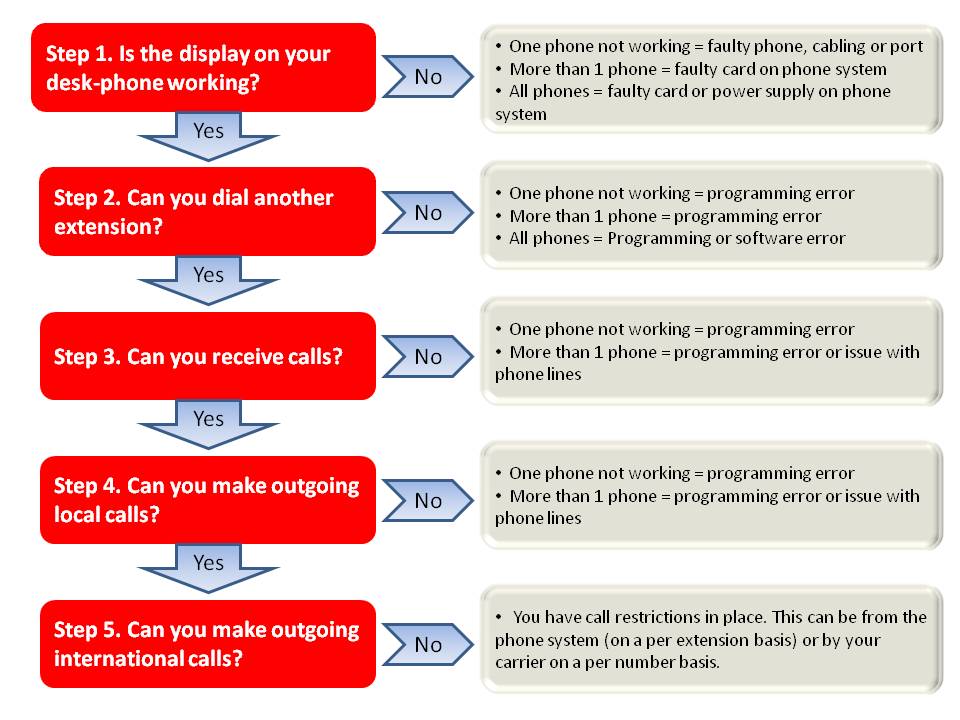
Eliminating Static And Noise
Static and noise on phone lines cause poor call quality. These interruptions make conversations hard to follow. Eliminating these issues improves clarity and user experience. Simple steps can reduce or remove static and noise effectively.
Remove Interference Sources
Electronic devices near your phone line can cause interference. Move cordless phones, routers, and other gadgets away from the phone. Unplug devices one by one to find the source of noise. Keep the area around your phone line clean and free of cables.
Use Noise Filters
Noise filters block unwanted signals from entering your phone line. Plug the filter into the phone jack before connecting the phone. These filters are inexpensive and easy to install. They reduce static caused by electrical interference on the line.
Check Wiring For Damage
Damaged wiring often causes static and noise problems. Inspect cords and connectors for cuts, bends, or wear. Replace any damaged cables immediately. Loose connections can also create noise; make sure plugs fit tightly into sockets.
Resolving Dropped Calls
Dropped calls can frustrate anyone. They interrupt conversations and cause missed messages. Fixing dropped calls is often easier than it seems. Small steps can improve your phone line performance quickly.
Test Signal Strength
Check your phone’s signal strength first. Weak signals often cause dropped calls. Move to a different spot or near a window. Use your phone’s signal indicator to see changes. A stronger signal usually means fewer dropped calls.
Update Firmware
Old firmware may cause connection problems. Update your phone’s software regularly. Manufacturers release updates to fix bugs and improve stability. Updating can reduce dropped calls and improve call quality. Make sure your device stays current.
Contact Service Provider
Your service provider can help with persistent issues. They can check for network problems or outages. Sometimes, your account or settings need adjustments. Contact them for support if problems continue. They may offer solutions or repair services.

Handling Intermittent Connections
Intermittent phone line connections cause frustration and disrupt communication. These brief drops or crackling sounds make calls difficult. Troubleshooting these issues can restore clear, steady service. Start by checking common problem areas step-by-step.
Secure Connections
Loose or faulty connections often cause intermittent signals. Check the phone cord at both ends. Make sure plugs fit tightly into the phone and wall jack. Wiggle the cords gently to find any crackling or breaks. Replace damaged cords with new ones. Tight connections reduce noise and signal loss.
Inspect Splitters And Adapters
Splitters and adapters can weaken the phone signal. Remove any unnecessary splitters to test the line. Examine adapters for cracks or worn parts. Replace any damaged devices with high-quality versions. Using fewer devices between the phone and wall improves clarity.
Schedule Professional Check
Persistent problems may need expert help. A technician can test the phone line outside your home. They find issues in wiring or the phone network. Scheduling a professional check ensures proper diagnosis and repair. This step prevents ongoing interruptions and restores stable service.
Preventive Maintenance Tips
Preventive maintenance helps avoid phone line problems before they start. Small steps can keep your phone system working well. Regular care saves time and money on repairs. It also keeps your calls clear and reliable.
Regular Equipment Checks
Check your phone and cables often. Look for loose connections or damaged cords. Test the handset and base for sound quality. Replace any worn or broken parts quickly. This keeps your system running smoothly.
Avoid Excessive Cord Stretching
Do not pull or stretch phone cords too much. Stretched cords can break inside and cause noise or drop calls. Keep cords untangled and neat. Use cord organizers or clips to prevent damage.
Keep Equipment Dry And Clean
Moisture and dust harm phone equipment. Wipe devices regularly with a dry cloth. Avoid placing phones near water or humid areas. Keep your phone area clean to prevent dirt buildup.
Frequently Asked Questions
What Causes A Phone Line To Have Static Noise?
Static noise on a phone line usually comes from loose or damaged wiring. It can also happen due to electrical interference nearby. Checking and tightening connections often solves this issue.
How Can I Test If My Phone Line Is Working?
Plug a phone directly into the wall jack and listen for a dial tone. If no tone is present, the line might be down. Testing this way helps identify if the problem is inside or outside your home.
Why Does My Phone Line Drop Calls Randomly?
Random call drops can result from poor signal quality or faulty wiring. Weather and physical damage to cables may also cause interruptions. Inspecting cables and contacting your provider can help fix this.
How Do I Fix A Dead Phone Line At Home?
Start by checking all connections and cables for damage or looseness. Restart your phone equipment and test again. If the line stays dead, contacting your service provider is the next step.
Can Electrical Devices Cause Phone Line Interference?
Yes, devices like microwaves or cordless phones can cause interference. Keeping phones away from such devices reduces noise and improves call quality. Simple changes often make a big difference.
Conclusion
Phone line problems can be frustrating but fixable. Start by checking all cables and connections. Test the phone on another line to find the issue. Clear any static or noise by removing devices one by one. Keep your phone and equipment clean and dry.
Contact your phone service provider if problems persist. Simple steps often solve common phone line troubles. Stay patient and follow each step carefully. Reliable phone service helps you stay connected every day.