Are you struggling with a four-way switch that just won’t work right? Whether your lights flicker, won’t turn on, or behave unpredictably, it can be frustrating and confusing.
But don’t worry—understanding how to troubleshoot your four-way switch can save you time, money, and stress. In this guide, you’ll discover simple steps to identify and fix common problems quickly, even if you’re not an expert. Keep reading to take control of your home’s lighting and get everything working smoothly again.
How Four Way Switches Work
Understanding how four way switches work is key to troubleshooting them. These switches control one light or a group of lights from three or more locations. This setup is common in long hallways or large rooms with multiple entrances. The wiring and switch roles differ from simple single or three way switches.
Basic Wiring Setup
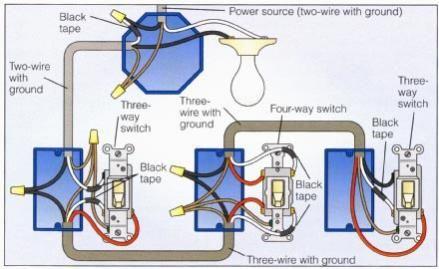
A four way switch works with two three way switches. The three way switches go at each end of the circuit. The four way switch sits between them. It connects to the travelers from both three way switches. Inside the four way switch, the traveler wires cross or stay straight. This action changes the path of electricity to turn lights on or off.
Role Of Each Switch
The first three way switch sends power to the circuit. The four way switch changes the traveler wire connections. This switch either keeps the wires straight or crosses them. The last three way switch controls the light fixture directly. Each switch can turn the light on or off regardless of the others’ position.
Common Four Way Switch Problems
Four way switches control lights from three or more locations. They offer great convenience in large rooms or long hallways. Yet, these switches can face common problems that affect their function. Understanding these issues helps to fix them quickly and safely.
Light Not Turning On Or Off
This problem often happens due to wiring errors or a faulty switch. Loose connections inside the switch can stop the light from responding. Check the wiring to ensure all wires are tight and connected properly. Sometimes, the switch itself needs replacement.
Switch Feels Loose Or Stuck
A switch that feels loose or hard to move can be a sign of wear. The internal parts might be damaged or worn out. This can cause the switch to fail or work intermittently. Replacing the switch usually resolves this issue and restores smooth operation.
Flickering Lights
Flickering lights often point to loose wiring or a poor connection. It can also mean the switch contacts are dirty or worn. This causes the electrical current to jump or cut out. Tightening connections or replacing the switch can stop flickering.
Switch Sparks Or Buzzes
Sparks or buzzing sounds from a switch indicate a serious problem. It could be caused by loose wires or a short circuit. This issue creates a fire risk and needs urgent attention. Turn off power and replace the switch immediately to stay safe.
Tools Needed For Troubleshooting
Troubleshooting a four way switch requires the right tools. These tools help find problems quickly and fix them safely. Using proper equipment saves time and avoids mistakes. Prepare your toolkit before starting any electrical work.
Essential Electrical Tools
A digital multimeter is crucial for testing voltage and continuity. Wire strippers make removing insulation easy without damaging wires. A screwdriver set with insulated handles helps reach screws in tight spots. Needle-nose pliers allow bending and holding wires firmly. A voltage tester checks if wires carry power before touching them.
Safety Equipment
Wear insulated gloves to protect against electric shocks. Safety glasses shield your eyes from sparks or debris. Use rubber-soled shoes to reduce the risk of grounding yourself. Turn off the power supply at the circuit breaker before starting. Keep a fire extinguisher nearby for emergencies.
Step-by-step Troubleshooting Guide
Troubleshooting a four way switch can seem tricky. This guide breaks down the process into simple steps. Follow each step carefully to find and fix the issue. Safety comes first, then check the wiring and switch parts. This approach saves time and avoids mistakes.
Turning Off Power Safely
Always turn off the power before touching any switch parts. Find the correct circuit breaker and switch it off. Use a voltage tester to confirm no electricity flows. This step protects you from electric shock. Never skip this safety check.
Inspecting Switch Wiring
Remove the switch cover gently to see the wires. Check if any wire looks damaged or burnt. Compare the wiring to your switch diagram or manual. Look for wires connected to wrong terminals. Correct wiring is key to proper switch function.
Testing Switch Functionality
Use a multimeter to test the switch. Set the meter to continuity mode. Press the switch and watch the meter reading. A good switch shows continuity when on and none when off. Replace the switch if it fails this test.
Checking For Loose Connections
Loose wires cause flickering or no power. Tighten all terminal screws firmly but gently. Wiggle wires to see if they move in the terminal. Secure any loose connections found. Tight connections ensure stable switch operation.
Quick Fixes For Common Issues
Four way switch problems can be frustrating and may cause lights to flicker or not work at all. Many issues have simple solutions. These quick fixes help save time and avoid extra costs. Basic troubleshooting steps often fix the problem fast.
Tightening Loose Wires
Loose wires are a common cause of switch issues. Turn off the power before checking the wires. Use a screwdriver to tighten any loose screws. Secure connections prevent flickering and power loss. Check both the switch terminals and wire nuts.
Replacing Faulty Switches
Switches can wear out or break over time. Test the switch with a voltage tester to confirm if it’s bad. Remove the old switch carefully. Install a new four way switch following wiring instructions. A new switch often restores normal function immediately.
Cleaning Contacts
Dirt and corrosion can block electrical contacts inside the switch. Turn off the power and remove the switch cover. Use a small brush or contact cleaner to clean the contacts gently. Clean contacts ensure good electrical flow and reduce flickering. Let the contacts dry completely before reassembling.

When To Call A Professional
Knowing when to call a professional for four-way switch problems saves time and prevents damage. Some issues seem simple but hide bigger electrical faults. Calling an expert avoids costly repairs and keeps your home safe.
Signs Of Complex Electrical Problems
Frequent switch flickering can mean wiring issues. Sparks or burning smells near the switch need immediate attention. Switches that feel hot or get very warm also show a serious problem. Lights that go on and off by themselves suggest loose connections. These signs require a professional’s skill to fix safely.
Avoiding Safety Hazards
Working with electricity can cause shocks or fires. Incorrect repairs increase these dangers. Professionals know the proper tools and safety steps. They ensure all work meets safety codes. Avoid risks by leaving complex switch troubleshooting to trained electricians.
Preventing Future Switch Problems
Preventing future switch problems saves time and money. Taking small steps helps keep your four way switch working well. Regular care and simple upgrades protect your home’s electrical system. A bit of attention today avoids big troubles tomorrow.
Regular Maintenance Tips
Check switches for loose screws and tight connections. Dust and dirt can block switch parts. Clean switches gently with a dry cloth. Test switches often to spot issues early. Replace worn switches before they stop working. Keep switches dry and away from moisture. Use a flashlight to see inside switch boxes clearly. Listen for unusual sounds when switching on or off.
Upgrading Old Wiring
Old wiring can cause switch problems and safety risks. Replace damaged wires with new, safe ones. Use wiring that meets current electrical codes. Hire a professional electrician for wiring upgrades. New wiring improves switch function and home safety. Upgrade wiring in older homes to avoid frequent issues. Modern wiring handles more electricity efficiently. Check wiring condition during home renovations or repairs.

Frequently Asked Questions
What Is A Four Way Switch And How Does It Work?
A four way switch controls a light from three or more locations. It works by changing the path of the electrical current. This lets you turn lights on or off from different spots.
Why Is My Four Way Switch Not Working Properly?
A four way switch may fail due to loose wires or bad connections. Check all wiring for tightness and proper placement. Faulty switches also need replacement for proper function.
How Do I Test A Four Way Switch Safely?
Turn off power at the breaker before testing. Use a multimeter to check for continuity between terminals. This shows if the switch is working or broken.
Can A Four Way Switch Cause Flickering Lights?
Yes, loose connections or worn switches can cause flickering. Tighten wires or replace the switch to stop flicker. Consistent flicker might also mean other electrical issues.
What Tools Do I Need For Four Way Switch Troubleshooting?
You need a screwdriver, voltage tester, and multimeter for most checks. These tools help find wiring problems and test switch function. Safety gear like gloves is also important.
Conclusion
Troubleshooting a four-way switch can seem tricky at first. Take your time and check each connection carefully. Use a tester to find where power stops. Remember, safety comes first—always turn off the power before working. Small steps make the job easier.
With patience, you can fix common issues yourself. Clear wiring and tight connections keep switches working well. Don’t rush; double-check your work. This guide helps you understand and solve basic problems clearly. Keep these tips handy for any future switch troubles.
Simple tools and careful checks lead to success.