Is your Shark vacuum losing suction, shutting off unexpectedly, or refusing to pick up debris? These issues can be frustrating, especially when you need your vacuum to work efficiently and keep your home spotless.
But before you rush to replace it or call for costly repairs, there’s good news: many common Shark vacuum problems are simple to fix with the right guidance. You’ll learn easy troubleshooting tips that anyone can follow to get your Shark vacuum back to peak performance.
Stick with me, and you’ll save time, money, and the hassle of dealing with a broken vacuum. Ready to solve your Shark vacuum troubles? Let’s dive in!
Loss Of Suction
Loss of suction is a common issue with Shark vacuums. It reduces cleaning power and makes vacuuming less effective. Several simple fixes can restore suction quickly. Check the dust bin, hose, floor head, and filters. Each part can block airflow and lower suction.
Empty The Dust Bin
The dust bin fills up with dirt and debris. If it reaches the MAX fill line, suction drops. Remove the bin from the vacuum. Empty all contents into the trash. Clean the bin with water and dry it fully before replacing. A clean dust bin helps maintain strong suction.
Clear Clogs In Hose And Wand
Blockages inside the hose or wand stop airflow. Detach the hose and wand from the vacuum. Shine a flashlight inside to spot any clogs. Use a long, flexible brush or a broomstick to push out trapped debris. Make sure both parts are clear before reattaching. This restores smooth airflow and suction.
Inspect And Clean Floor Head
The floor head can get tangled with hair and fibers. Flip the vacuum over and unlock the soleplate using a coin. Remove any hair or debris wrapped around the brush roll. Clean the brush and inside the floor head with a damp cloth. Clear blockages here to improve suction and cleaning performance.
Check And Replace Filters
Dirty filters reduce suction power. Locate the vacuum’s pre-motor and post-motor filters. Remove and tap them gently to remove dust. Wash washable filters with cold water and let them dry completely. Replace filters that are worn or damaged. Clean filters allow better airflow and restore suction strength.

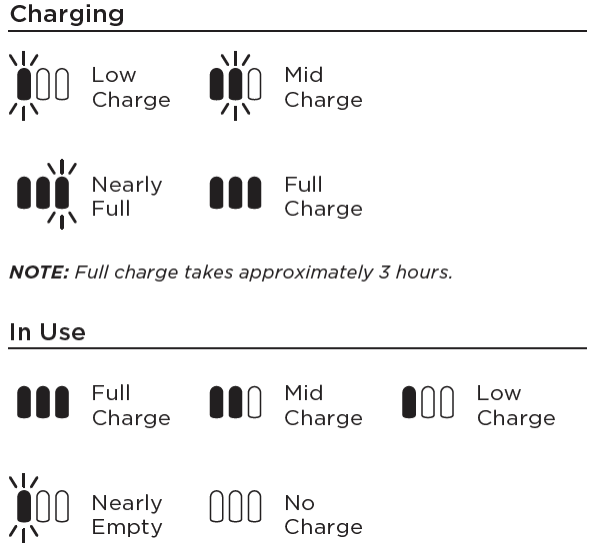
Vacuum Shuts Off Or Flashes Red
The brushroll is a key part of your Shark vacuum. It helps pick up dirt, dust, and hair from floors. Brushroll issues can make your vacuum less effective. Your vacuum may stop picking up debris properly. It might even make strange noises or stop spinning. Fixing brushroll problems can restore your vacuum’s cleaning power quickly.
Remove Hair And Debris
Hair and threads often get wrapped around the brushroll. This blocks its movement. Turn off and unplug your vacuum first. Remove the brushroll cover by unlocking the screws or clips. Use scissors or your fingers to cut and pull away hair and debris. Clear all sides of the brushroll for smooth spinning. Reattach the cover securely before using the vacuum again.
Check Wand And Electrical Connections
The brushroll needs power to spin. Check the wand and electrical connections next. Detach the wand from the vacuum and inspect it for blockages. Remove any clogs or dirt inside the wand. Make sure the electrical connections are clean and dry. Dirty or loose contacts can stop the brushroll from working. Reconnect everything firmly to restore power flow to the brushroll.
Brushroll Issues
Proper filter maintenance keeps your Shark vacuum running smoothly. Filters trap dust and dirt, protecting the motor and improving suction. Clean and replace filters regularly to avoid clogs and loss of power.
Cleaning Pre-motor Filters
Remove the pre-motor filters carefully from your vacuum. Tap them gently to remove loose dust. Rinse the filters under cold water without using soap. Let the filters air dry completely for 24 hours. Never use a dryer or direct heat. Clean filters improve airflow and suction power.
Washing Exhaust Filters
Locate the exhaust filter near the vacuum’s rear. Take it out gently to avoid damage. Wash the filter with cold water only. Avoid soap or detergents that can harm the filter. Let it dry fully before placing it back. Clean exhaust filters help keep the air fresh and prevent overheating.
Replacing Filter Packs
Filter packs wear out after months of use. Check your vacuum’s manual for replacement schedules. Purchase genuine Shark filter packs for best results. Remove old filters and install new ones firmly. Replace both pre-motor and exhaust filters together. Fresh filters maintain strong suction and prolong vacuum life.
Filter Maintenance
Hidden blockages often cause Shark vacuums to lose suction or stop working. These clogs can be hard to spot but affect performance greatly. Detecting them early helps keep your vacuum running smoothly and prevents damage.
Examining the vacuum carefully and using simple tools can reveal these hidden issues. A thorough inspection saves time and money by avoiding unnecessary repairs or replacements.
Using Flashlight And Coin Test
Start by turning off and unplugging the vacuum. Shine a flashlight into the hose, wand, and handle to spot any debris. Look for dirt, hair, or small objects stuck inside.
Next, use a coin to unlock parts like the floor nozzle or dustbin cover. Removing these covers helps access hidden areas where blockages hide. Clear any clogs found with your hands or a soft brush.
Common Blockage Spots
Blockages often form in the hose, wand, and floor nozzle. Hair, string, and dust build up in these parts. Check the brush roll and its housing for tangled debris.
The dustbin and filters also trap dirt. Empty the bin and clean filters regularly. A blocked filter reduces suction and strains the motor.
Frequently Asked Questions
What Are Common Shark Vacuum Problems?
Common Shark vacuum problems include loss of suction due to clogs or full bins, brushroll not spinning from hair wrap, and overheating causing shutdowns. Users often face blocked hoses, dirty filters, and electrical connection issues affecting performance and power. Regular maintenance resolves most issues quickly.
Is There A Reset Button On Shark Vacuum?
Shark vacuums do not have a reset button. To fix issues, unplug the vacuum, clear blockages, and clean or replace filters.
What Is The Life Expectancy Of A Shark Vacuum?
A Shark vacuum typically lasts 5 to 7 years with regular use and proper maintenance. Lifespan varies by model and care.
Is It Worth Fixing A Shark Vacuum?
Fixing a Shark vacuum is worth it if repair costs are low and the model is relatively new. Regular maintenance often restores performance.
Why Is My Shark Vacuum Losing Suction?
Loss of suction often happens due to blockages or a full dustbin. Check and clear the hose, wand, and floor head for clogs. Empty the dustbin if it is past the max fill line.
Conclusion
Troubleshooting a Shark vacuum can be simple and quick. Regularly check for blockages and clean filters to keep suction strong. Clearing hair from the brushroll prevents spinning problems. Always empty the dustbin before it gets too full. Overheating issues often happen due to clogs or dirty filters—fixing these helps your vacuum run smoothly.
Small steps like these save time and extend your vacuum’s life. Keep your Shark vacuum working well with easy care and attention.