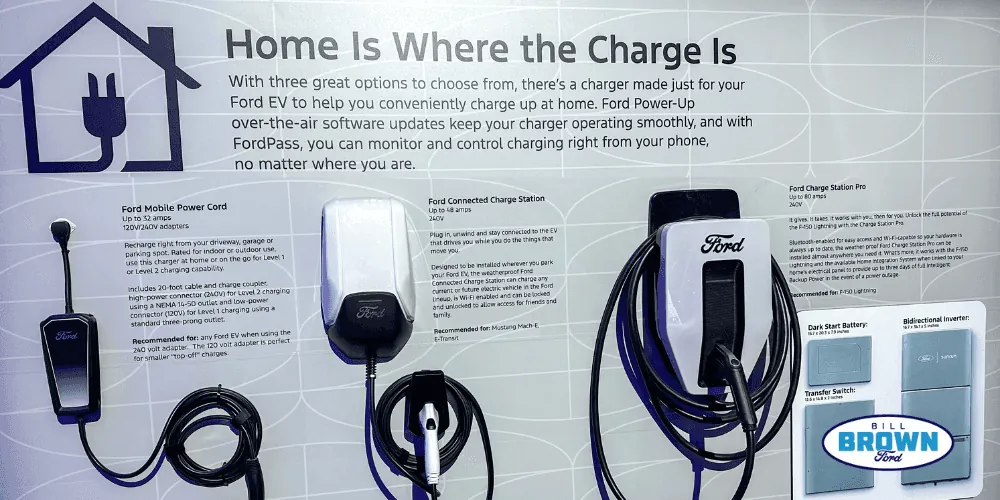
When your home charging setup fails to deliver power to your Ford F-150 Lightning, performing ford charge station pro troubleshooting is the first step toward restoring your vehicle’s energy. Issues with residential EV charging hardware can be frustrating, but most malfunctions are linked to simple connectivity, communication protocols between the charger and the truck, or basic electrical fault triggers. By understanding the diagnostic light patterns and the underlying requirements for a secure handshake, you can often resolve these issues without needing an immediate service appointment.
Key Takeaways
- Check the LED status light on the front of the station to identify specific fault codes.
- Ensure the J1772 plug is fully seated and locked into the vehicle’s charging port.
- Verify your home Wi-Fi signal strength, as connectivity is required for remote monitoring and firmware updates.
- Perform a hard power cycle by flipping the dedicated circuit breaker to reset the internal processor.
- Confirm that your vehicle’s software is up to date to ensure compatibility with the charging station’s latest protocols.
Safety: Inside a mains-powered machine, the parts behind the outer cover can hold a dangerous electrical charge even after it has been unplugged — that’s why they sit behind a cover. Opening the housing, or testing or replacing anything behind it, is a job for a qualified technician, never a home repair.
Troubleshooting Ford Charge Station Pro Light Codes
The Ford Charge Station Pro uses a series of LED indicators to communicate its operational state. If you see a solid green light, the station is in standby mode. A pulsing green light indicates that charging is currently in progress. However, when the light shifts to amber or red, you’re likely facing an error that requires intervention.
| LED Color | Status Meaning | Action Required |
|---|---|---|
| Solid Green | Ready for use | None – plug into vehicle |
| Pulsing Green | Charging active | Monitor charging progress |
| Solid Amber | Communication error | Check Wi-Fi and cable connection |
| Pulsing Amber | Firmware update | Wait for process to complete |
| Solid Red | Hardware fault | Hard reset via circuit breaker |
| Pulsing Red | Ground fault detected | Inspect charging cable for damage |
Warning: Never attempt to open the main enclosure of your charging station. Internal components carry high-voltage electricity that can cause severe injury or death if handled improperly.
Why is my charger not starting?
If your vehicle is plugged in but the charging process doesn’t initiate, the issue is frequently a communication failure. The truck and the charger must perform a “handshake” to verify safety protocols before high-voltage power is released. Start by checking the FordPass app on your smartphone; it often provides specific error messages detailing why the charge has been delayed or rejected.
Common triggers for a failure to start include:
- Scheduled Charging: Your FordPass settings might be set to a specific time window, preventing the vehicle from drawing power immediately upon being plugged in.
- Plug Engagement: The J1772 connector must be firmly pushed into the charge port until you hear a distinct click. If the latch isn’t fully engaged, the station will refuse to energize the cable.
- Software Mismatch: If either the truck’s internal gateway module or the charger’s firmware is significantly outdated, the handshake may fail to complete.
How to perform a hard reset?
When software-based fixes fail, a hard reset is the most effective way to clear temporary glitches. Locate the dedicated circuit breaker in your home’s electrical panel that controls the charger. Flip the breaker to the “Off” position and leave it there for at least 60 seconds. This allows the capacitors within the charging unit to fully discharge and the onboard memory to clear.
After the minute has elapsed, flip the breaker back to the “On” position. The station will undergo a self-diagnostic sequence, which typically lasts between two and five minutes. During this time, the LED indicator will blink through various colors. Once the light returns to a steady green, attempt to plug your vehicle in again to see if the connection is restored. If the red light returns immediately, there may be a permanent hardware failure.
Managing Wi-Fi and Connectivity Issues
The charger relies on a stable internet connection to manage load-balancing features and receive important software updates. If your unit is offline, you may lose the ability to track your energy consumption or schedule charging sessions through your phone.
- Signal Interference: Ensure your router isn’t blocked by large metal objects or dense masonry, which can degrade the signal reaching your garage.
- Network Security: If you have recently changed your home Wi-Fi password, you must use the FordPass app to update the network credentials stored on the charger.
- 2.4GHz Band: Most EV charging hardware operates on the 2.4GHz frequency band rather than 5GHz. Ensure your router has the 2.4GHz band enabled and that the charger is connected to this network.
Pro Tip: If your charger is physically located in a spot with weak Wi-Fi, consider installing a range extender or a mesh networking node in your garage to maintain a consistent connection.
Troubleshooting the Charging Cable
Physical damage to the charging cable is a common cause of charging faults. Inspect the entire length of the cable for cuts, abrasions, or exposed wiring. Even small nicks in the insulation can trigger a ground fault protection circuit, which will cause the station to disable power delivery instantly for safety reasons.
Furthermore, examine the pins inside the J1772 connector on the vehicle side and the port on the truck. Look for signs of corrosion, bent pins, or debris. If the pins are dirty, use a dry, soft-bristled brush to gently remove any dust or foreign material. Don’t use liquid cleaners or metal tools inside the charging port, as this can lead to short circuits or damage to the delicate contact surfaces.
Is my circuit breaker tripping?
If your circuit breaker trips every time you plug in your vehicle, the issue is likely electrical rather than a software bug. This usually points to an overcurrent condition or a short circuit. If the station is hardwired to a circuit that’s too small for the amperage settings configured in the software, the breaker will naturally trip to prevent a fire hazard.
You must verify that the installation complies with the National Electrical Code standards, which dictate the necessary wire gauge and breaker sizing for high-amperage EV charging equipment. If you notice a burning smell near the breaker or the charger, stop using the unit immediately and contact a licensed electrician to inspect your panel and the wiring installation.
Understanding the Charging Handshake
The charging process involves a complex exchange of data between the vehicle and the station. The charger sends a “pilot signal” to the truck to establish the maximum current available. If the truck doesn’t acknowledge this signal or reports a battery management system error, the charger will remain in standby mode.
- Vehicle Sleep Mode: Sometimes the vehicle’s computer enters a deep sleep state that prevents it from “waking up” to accept a charge. Try unlocking the vehicle or turning the ignition on and off to reset the vehicle’s electronic modules.
- Battery Temperature: Extremely low or high temperatures can cause the vehicle’s battery management system to limit or reject a charge session. This is a normal protective feature to preserve the longevity of the lithium-ion cells.
Addressing Firmware Update Failures
Your Ford Charge Station Pro will occasionally require firmware updates to improve compatibility with newer Ford vehicle models. If an update fails, the station may become unresponsive or enter a “safe mode.”
To resolve a failed update:
- Ensure your internet connection is stable.
- Use the FordPass app to trigger a manual check for updates.
- Avoid interrupting the power supply while the LED indicates an update is in progress.
- If the update remains stuck for more than an hour, perform a power cycle via the circuit breaker.
Related guides
Frequently Asked Questions
Why is my charger flashing red?
A flashing red light indicates a safety fault, such as a ground fault, overcurrent, or an internal hardware error. First, perform a hard reset by toggling the circuit breaker. If the red light persists after the power cycle, it signifies an internal component failure or a wiring issue that requires professional inspection. Don’t attempt to bypass safety systems or force the station to charge.
How do I restart the charging session?
To restart a session, first ensure the vehicle is in Park and the charging cable is properly seated. If the station is unresponsive, use the FordPass app to stop and then resume charging. If that fails, perform a hard power cycle by flipping the circuit breaker off for 60 seconds. This forces the internal processor to reboot, which often clears temporary communication errors.
Can I charge in the rain?
Yes, the station and the J1772 connector are designed to be weather-resistant and safe for outdoor use. However, you should avoid leaving the connector on the ground where it could sit in puddles or collect snow. Ensure the charging port on your vehicle is free of excessive ice or debris before inserting the plug to maintain a secure, weather-tight seal during the charging process.
What if the FordPass app won’t connect?
If the app fails to connect, first verify that your smartphone is connected to the internet. Then, ensure the charger is within range of your home Wi-Fi network. If the charger appears offline, try rebooting your home router. If the issue persists, remove the charger from your FordPass app and go through the pairing process again to re-establish the digital handshake between the hardware and your account.
How long should a full charge take?
The time required for a full charge depends on your vehicle’s battery capacity, the current state of charge, and the amperage the station is configured to provide. Generally, you can expect a full charge to take between 8 and 14 hours for most long-range models. Factors like ambient temperature and the vehicle’s internal battery management settings can cause these times to fluctuate significantly during daily use.
Conclusion
Maintaining your charging equipment is vital for the long-term reliability of your electric vehicle setup. By performing periodic visual inspections of the cables and keeping your firmware updated through the FordPass application, you can prevent most common connectivity and fault issues. If you have exhausted all troubleshooting steps and the station remains non-functional, contact your local dealership to schedule a formal evaluation of your hardware.