If your display is blank or showing an error code, you can often fix gecko hot tub control panel troubleshooting by performing a hard power reset at your home’s breaker box. This simple action clears minor software glitches that occur when the system’s processor hangs due to a power surge or an internal communication error. Before you call a technician, check that your GFCI breaker hasn’t tripped, as a lack of power is the most common reason for a non-responsive interface.
Troubleshooting Gecko hot tub control panel issues
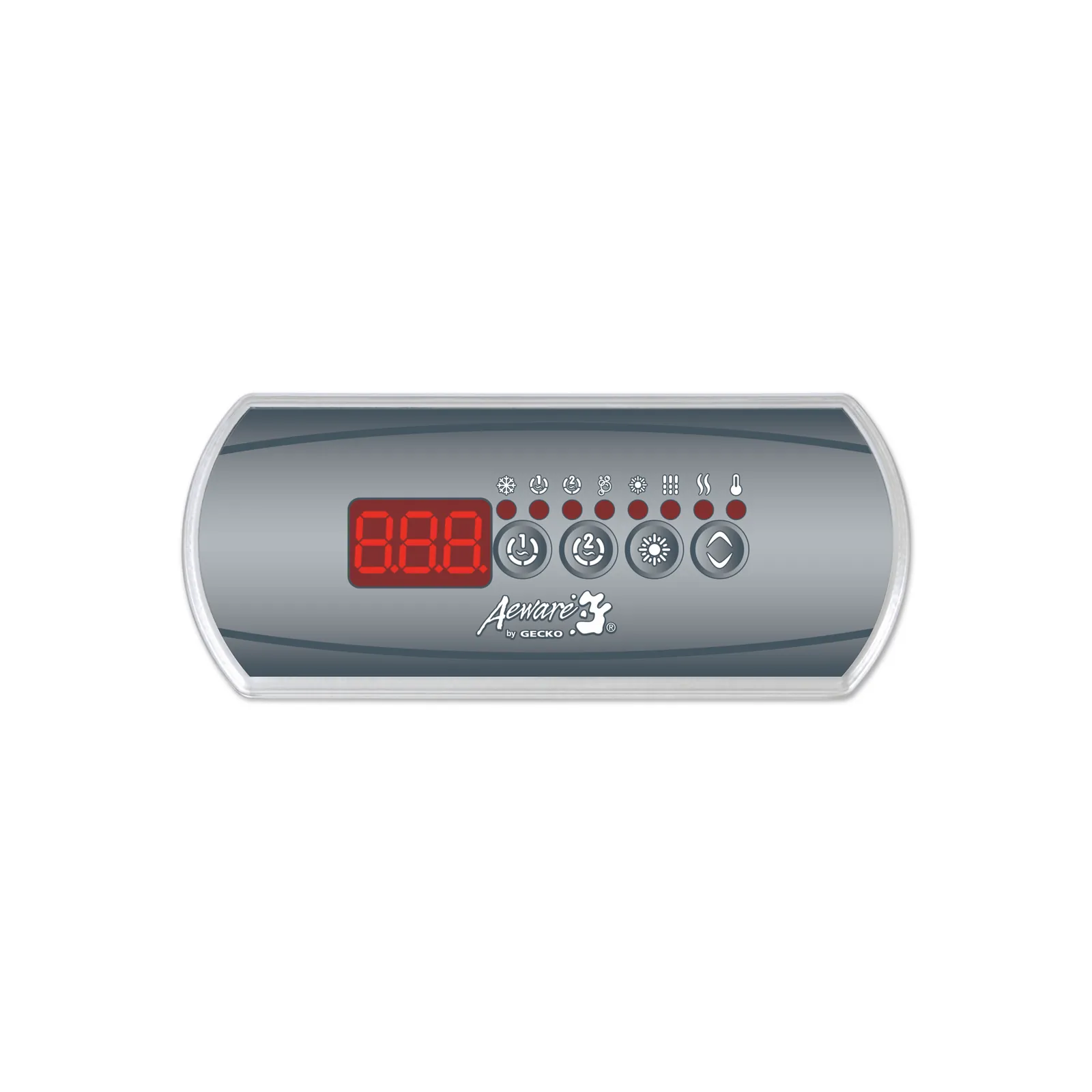
Most control panel issues stem from simple power delivery problems or environmental factors that affect the sensitive electronics. When your tub is exposed to high humidity or extreme temperature swings, moisture can sometimes collect behind the display overlay. This moisture interferes with the button contacts, leading to phantom button presses or a screen that refuses to register your touch.
Another common cause is a loose connection between the topside panel and the main control pack. Over time, the vibrations from the pump motor can cause the ribbon cable or data plug to wiggle loose. If the data cable isn’t seated firmly, the screen may stay dark or show garbled text, even if the hot tub pump is running normally.
Finally, software freezes are a reality for modern digital systems. Just like a computer, the control board can experience a “lock-up” if the sensors send conflicting data or if the system experiences a brownout.
If you notice the system is unresponsive, it’s rarely a sign that the entire unit is broken. Instead, it’s usually a signal that the system needs a reboot to clear its temporary memory. You can find the specific wiring and safety requirements for your electrical installation in the official Gecko Alliance technical documentation.
Perform a hard power reset
A hard reset is the first and most effective step for any unresponsive display. Locate the dedicated GFCI breaker for your hot tub in your home’s electrical panel and flip it to the “off” position. Wait at least 60 seconds before flipping it back on. This delay is essential because it allows the capacitors inside the control board to fully discharge, which clears any bad data stored in the memory.
This method works for most minor glitches. If the display lights up but shows an error code, wait another 5 minutes to see if the system clears the code on its own after the sensors re-calibrate. If the display remains completely dark after the reset, check your main service panel to ensure the breaker hasn’t tripped again.
This fix isn’t for panels that show signs of physical damage, such as cracks in the screen or melted plastic. If you see visible burning or smell ozone, don’t attempt to reset the power. Instead, keep the breaker off and contact a licensed electrician to inspect the control pack for internal shorts. Never attempt to open the main control housing yourself, as it contains high-voltage components that pose a risk of serious electric shock.
Check for external connection issues
If the reset doesn’t work, inspect the cable connections you can reach without opening the main enclosure. Many hot tubs have a small access hatch or a panel under the cabinet where the topside control cable plugs into the main board. Ensure the plug is pushed all the way into the socket. If you see any signs of green corrosion on the pins, it means moisture has leaked into the connection point.
You can gently clean minor surface oxidation with a dry, soft-bristled brush, but never use liquid cleaners or metal tools on the pins. If the pins look bent or are heavily corroded, the cable or the port itself is likely damaged beyond repair. This is a common issue in humid climates where salt or mineral build-up occurs. If the connection looks clean and tight but the unit still doesn’t work, the internal logic board may have suffered a component failure.
This is where you must stop and consult a professional. If you have the correct tools and training, you might swap the cable, but most homeowners should avoid this. If you’re uncertain about the wiring, have a technician verify the voltage levels at the control board. A professional can quickly determine if the fault lies in the panel, the data cable, or the main computer board.
Verify the water chemistry and temperature
Sometimes the screen works, but the system seems “stuck” on a specific temperature or cycle. This often happens because the water temperature sensors are misreading the actual heat of the water. If the sensor is coated in scale or mineral deposits, it will report inaccurate data to the control board, causing the system to stop heating or to enter a “protection” mode.
If you suspect the sensors are the problem, test your water chemistry to ensure your pH and alkalinity levels are within the recommended range. High calcium levels lead to rapid scale build-up on probes and heating elements. If your water is very “hard,” consider using a scale inhibitor to prevent further deposits.
If the control panel shows a flow error, it may not be a panel issue at all. Instead, it often points to a clogged filter or a struggling pump. Maintenance frequency depends on your specific usage, so always consult your owner’s manual for the correct service schedule.
Common mistakes to avoid
Using abrasive cleaners: Never spray window cleaner or harsh chemicals directly on the display. Liquid can seep into the bezel, causing permanent corrosion on the ribbon cables. Use a dry microfiber cloth; if grime persists, dampen the cloth with distilled water only.
Forcing buttons: If a button sticks, stop immediately. Pushing harder snaps the internal membrane switch, turning a simple cleaning job into an expensive repair. Gently wiggle the button or use a blast of compressed air to clear debris.
Ignoring error codes: Never treat an error code as a transient glitch. Codes starting with “E” often signal a sensor failure that could lead to overheating. If the code persists after a hard reboot, call a technician.
Overloading the breaker: Check your circuit load. If your appliance shares a line with a microwave or space heater, voltage drops will trigger phantom panel errors. If the unit resets when another appliance starts, move it to a dedicated circuit that meets the amperage requirements specified on the hot tub’s nameplate.
Prevent control panel failures
The best way to keep your system running is to manage the environment around the control housing. If you notice the panel feels loose, secure it immediately to prevent water from dripping behind the gasket. A single loose screw can compromise the seal, allowing condensation to corrode sensitive internal relays.
If your panel is located in direct sunlight, install a simple sunshade. Excessive heat causes the LCD screen to fade and can trigger false error codes. You should check the housing every month for signs of heat warping or discoloration.
| If you’re doing this | Do this instead | Why |
|---|---|---|
| Leaving the cover off | Close the cover after use | Reduces moisture and heat damage |
| Cleaning with wet cloths | Use a dry microfiber cloth | Prevents liquid from entering seams |
| Ignoring small leaks | Fix leaks near the panel | Stops water from shorting the circuit |
| Keeping filters dirty | Replace every 3 months | Prevents flow errors and pump strain |
Most failures occur because users ignore minor moisture buildup. If you see fogging inside the display, don’t wait for a total shutdown.
Frequently asked questions
How long does a control panel usually last?
A control panel typically lasts 7 to 10 years if the tub is kept in a dry area and the cover is used consistently. Harsh sunlight or heavy rain may cause the plastic overlay to degrade faster.
Is it safe to use the hot tub with an error code?
No, you shouldn’t use the hot tub if an error code is displayed. Many codes indicate heater or pump malfunctions that lead to unsafe water temperatures or poor sanitation. Always clear the code or have a professional verify safety before entering.
Why is my control panel screen flashing?
A flashing screen often indicates that the system is in priming mode or has detected a power interruption. Most systems flash while testing pump flow after a reset. If flashing persists, the system can’t detect water flow correctly.
Can I replace just the display overlay?
Yes, you can replace just the overlay if the buttons are worn but the screen works. This task requires peeling off old adhesive and aligning the new overlay perfectly. If the screen is blank, you must replace the entire topside control unit.
What happens if I ignore a “flow” error code?
If you ignore a flow error, the heater will disable itself to prevent overheating. This causes the water to drop in temperature and become stagnant. If the pump makes a grinding noise, turn the power off immediately to prevent motor damage.
How do I know if the control board is the problem?
The control board is likely the problem if power reaches the unit but the display remains dead or shows nonsensical symbols. If the panel works on another tub but fails on yours, the main board is likely faulty. Consult a technician to avoid unnecessary replacement costs.
Conclusion
If these quick checks don’t bring your display back to life, it’s best to contact a professional for a deeper inspection. Don’t try to open the internal components yourself, as you’ll want to keep your warranty intact. They’ll help you get back to relaxing in your warm water in no time.
Related guides