To fix a door that won’t open or close, effective garage door opener logic board troubleshooting starts with checking the power source and the wall-mounted control panel. If the unit doesn’t hum or show any lights, the issue is often a tripped circuit breaker rather than the logic board itself. A dead board usually shows no indicator lights on the opener housing even when the power is confirmed to be on. If you see lights but nothing happens, the sensors or internal receiver are the likely culprits.
Understanding why openers stop responding
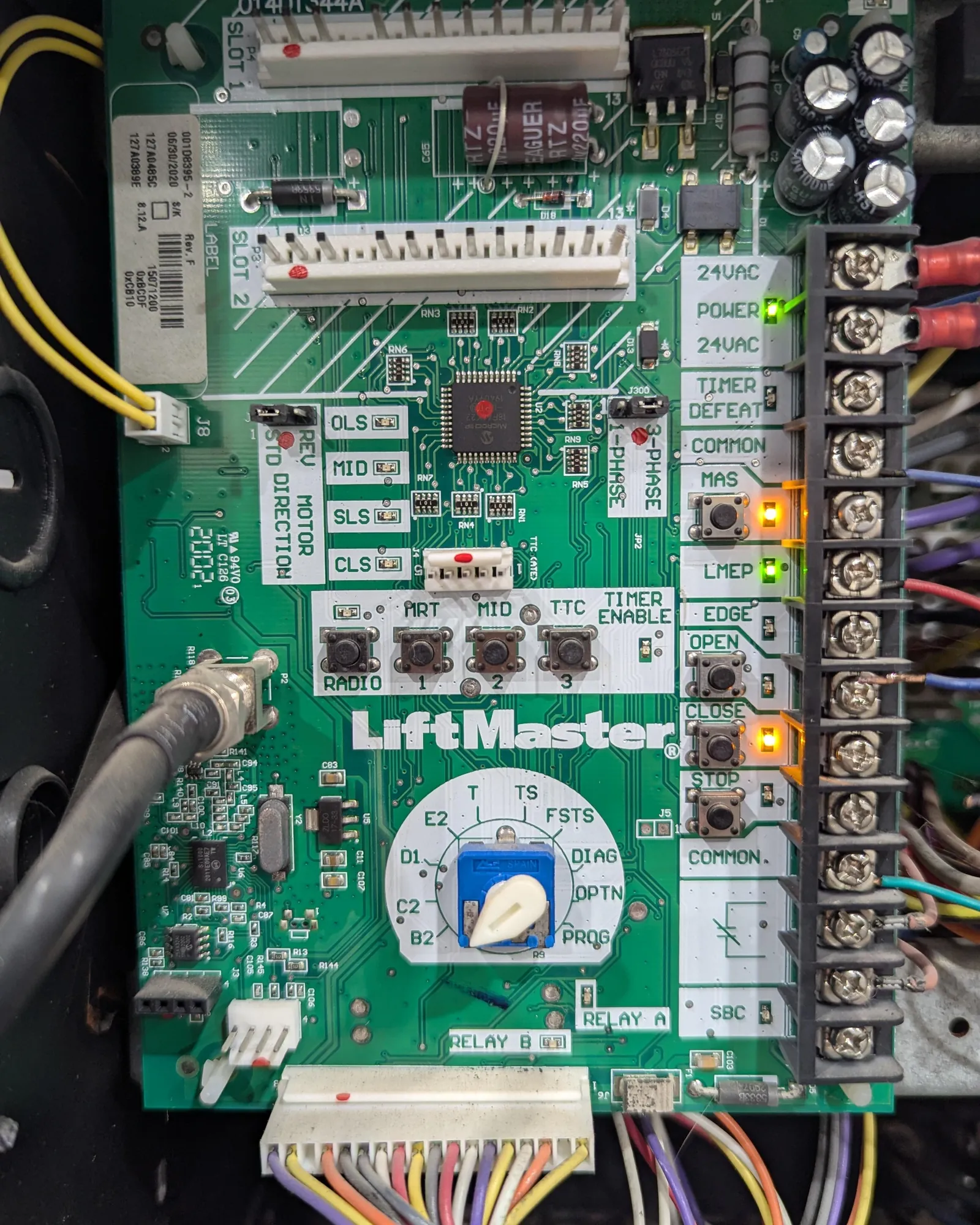
When your opener fails to move the door, it’s easy to assume the main computer is broken. In reality, modern units have several safety features that stop the motor to prevent damage or injury. The most common cause is a misalignment of the safety sensors located near the floor. If these infrared eyes are blocked or bumped, the logic board will intentionally refuse to close the door as a safety measure.
Another frequent cause is a faulty wall control panel. Many newer systems use a digital signal to communicate between the wall button and the motor unit. If this wire is loose, frayed, or the button itself has suffered from moisture, the logic board won’t receive the “open” or “close” command. You should inspect the thin bell wire running from the wall to the motor for any breaks or staples that might have pierced the insulation.
Finally, interference can disable your remotes. If the logic board is functioning but the remotes don’t work, check for new LED bulbs installed in the opener housing. Many non-shielded LED bulbs emit radio frequency interference that blocks the opener’s receiver. If your remote works only when you’re standing right under the unit, this interference is likely the reason.
Reset the power and wireless settings
If the opener is completely unresponsive, a simple power cycle often clears temporary software glitches. Unplug the opener from the ceiling outlet and wait at least 60 seconds before plugging it back in. This allows the capacitors on the logic board to discharge fully and forces the processor to reboot. If the unit begins to function again, it was likely just a minor error in the software state.
If the power cycle doesn’t work, check your remote connections. Sometimes the logic board loses the “handshake” with the remote controls after a power surge. You can try to re-program your remotes by pressing the “Learn” button on the motor unit and then the button on your remote. If the indicator light on the motor doesn’t flash or respond when you press the Learn button, the logic board has likely suffered a permanent failure.
This fix is for users who have confirmed that the outlet has power. If the outlet is dead, you need an electrician to check the home circuit. Never attempt to open the motor housing, as there are high-voltage components inside that can cause serious injury. If the board remains unresponsive after a power cycle and remote re-programming, it’s time to contact the manufacturer or a professional repair service.
Check sensors and wall controls
Misaligned safety sensors are the most common reason a door won’t close, even when the logic board is perfectly healthy. Look at the two sensors near the door tracks. One should have a solid light and the other should also have a solid light, indicating the beam is aligned. If either light is flickering or off, the sensors aren’t talking to each other. Gently nudge them until they face each other directly and the lights turn solid.
The wall control unit is the next point of failure. If you have a multi-function wall console, check if the “Lock” or “Vacation” mode is active. When this mode is on, the logic board will ignore all remote control signals to keep your home secure. You’ll see a blinking light on the wall console if this feature is enabled. Simply disable the lock mode, and your remotes should work instantly.
This process is ideal for homeowners who see lights on the motor but can’t get the door to move. If you have verified the sensors are aligned and the wall control isn’t locked, but the motor still refuses to engage, the logic board has likely reached the end of its life.
Because logic boards are specific to the model and year of the opener, you must find the exact part number on the label located on the motor housing before seeking a replacement.
Inspecting garage door opener logic boards for damage
Sometimes the issue isn’t the board itself, but the environment around it. Check the area around the motor for signs of pests or moisture, which can cause short circuits on the control board. If you see signs of water intrusion or nesting materials, don’t touch the board. You must hire a professional to clean or replace the unit to avoid a fire hazard.
You should also look for external devices that might be causing signal jamming. In some neighborhoods, high-frequency devices or even faulty security systems can overwhelm the receiver’s antenna. If you have recently installed a new wireless device in the garage, try turning it off to see if the door begins to respond. This is a common, often overlooked cause of intermittent remote control failure.
This troubleshooting step is for those who have already ruled out sensor and power issues. If you find physical damage to the board, such as burned components or dark spots, don’t attempt to repair it yourself. Replacing a logic board requires matching the radio frequency and the drive type of your specific motor. If you aren’t comfortable identifying these technical specifications, it’s safer to have a professional handle the repair.
Advice to avoid regarding opener repairs
Don’t spray lubricant on the logic board: People often think cleaning electronics with contact spray will fix a connection, but this causes permanent damage to sensitive circuits. The residue creates conductive bridges between pins, leading to short circuits that fry the microprocessor.
Don’t bypass the safety sensors: Never wire sensors together or tape them in a fixed position to force the door closed. This removes the only mechanism preventing the door from crushing people or pets. If your door reverses unexpectedly, the issue is almost always a misaligned beam or a broken wire, not the sensor itself.
Don’t attempt to solder the board: Attempting to repair a board with a soldering iron is rarely successful. The heat required often delaminates the copper traces from the board, turning a simple part replacement into a full unit replacement.
Don’t use generic replacement boards: Always buy the specific board made for your exact model. A board from a different series won’t communicate with your motor’s drive system. If you can’t find the exact part number printed on the existing board, stop the repair. Using an incompatible board can permanently burn out the motor’s windings.
Managing your garage door system
If you’re struggling with a door that won’t open, take a moment to look at your current habits and what you can do to keep the system running smoothly. The following table provides a quick guide for common scenarios.
| If you’re doing this | Do this instead | Why |
|---|---|---|
| Leaving remotes in the car | Take them inside your home | Prevents theft and potential code hacking |
| Using non-shielded LED bulbs | Switch to “garage-rated” LED bulbs | Prevents radio interference with the receiver |
| Ignoring a flickering sensor light | Re-align the sensor brackets | Ensures the safety reverse works correctly |
| Forcing the door by hand | Check for broken springs first | Prevents the motor from burning out |
| Using a universal remote | Program the official brand remote | Ensures better range and signal stability |
Frequently asked questions
Can I replace the logic board myself?
You can replace the logic board yourself if you follow the manufacturer’s manual and have the correct replacement part. The process involves removing the motor housing screws, unplugging the old board, and installing the new one. Note that performing this repair yourself may void your existing warranty.
How long does a logic board usually last?
Logic boards generally last for a long time, though their lifespan depends on environmental conditions and usage frequency. High humidity or extreme temperatures can cause corrosion on electrical components and shorten the board’s life. If you notice erratic behavior or the unit becomes unresponsive, the board may be failing.
Is it safe to operate the door with a failing board?
No, it isn’t safe to operate a garage door with a failing logic board because the safety reverse features may not function correctly. A faulty board can cause the door to ignore sensors or fail to stop when hitting an object. Disconnect the door and use the manual release until a professional confirms it’s safe.
Why does my garage door opener light stay on?
A light that stays on usually indicates a fault detected by the logic board or an incorrect light timer setting. Check your wall console to ensure the light button wasn’t pressed by mistake. If a power cycle doesn’t resolve the issue, the logic board’s relay may be stuck and require replacement.
What happens if I use the wrong logic board?
Using an incompatible logic board will prevent the motor from operating or cause the door to move in a dangerous, unpredictable manner. Because boards control travel limits and force settings, they must be perfectly matched to your specific motor drive. Always verify the model number on your current board before purchasing a replacement.
Conclusion
If you have tried these steps and the door remains unresponsive, it’s likely that the internal electronics have failed. Before buying a new board, compare the cost of the part to the cost of a new, modern opener. In many cases, if the unit is aging, upgrading to a new system with updated safety features and smartphone connectivity provides better value than repairing the old motor.
Related guides